What's New in Microsoft 365 Copilot: August 2026
← what changed this month, in plain English
On this page
Most of what follows shipped in June or July. Only sections 1, 2, 3, 8, 9, 14 and 29 actually landed in August, and each entry keeps the date Microsoft gave it. Section 55 is the odd one out — announced in July, then pulled on 4 August.
2026 monthly recaps: January · February · March · April · May · June · July · August (you are here)
Screenshot note: images below come from my demo tenant or official Microsoft product imagery. Your tenant may look different because features roll out at different times and the interface changes often.
If you only have 2 minutes
Four things explain most of this month:
- Excel had the biggest month. A theme design skill that formats a whole sheet in one pass, a brand kit skill that applies your organisation’s approved colours and fonts, grounding in Power BI reports that respects row-level security, and support for cloud-saved workbooks with AutoSave switched off.
- Copilot started reaching out — on paper. Microsoft says the mobile app now sends push notifications like Your Day at a Glance, the first time the Copilot mobile app tells you when it is worth opening rather than waiting to be asked. The roadmap still says September, so see section 28 before you plan around it.
- Documents got their admin work done for them. Word can build and maintain a table of contents, headers, footers and footnotes. PowerPoint can write, reply to and resolve comments, and will soon assign them as tasks.
- The admin layer got sharper edges. An Agent 365 Dashboard, a heatmap of which sites your agents are reaching into, and three Cost Management changes — one of which needs you to recreate your existing alerts. Domain exclusion for web grounding was also announced, then rolled back on 4 August — so that one is a heads-up, not a task.
Also worth a look: Claude Fable 5 (Preview) in Cowork for long-running work and a Meeting recaps app in Teams.
Admin Checklist - August 2026
Start with these three. They are the items where doing nothing has a cost:
- Recreate spending alerts on existing Cost Management policies. The alerts improved, and Microsoft’s guidance is to recreate alerts on existing policies. Microsoft does not spell out what happens to one you leave alone, so if a notification matters to you, recreate it rather than assume.
- Look at the Purview DLP control for external email. In Public Preview, it stops Copilot using emails from external senders as grounding data. External email is the one input to your tenant that someone outside it writes — and Microsoft’s own reason for the control is prompt injection. Section 59 has the detail.
- Open the Agent Access Insights heatmap. It gets you closer to the question everyone actually asks about agents — which sites are they reaching into, and how often?
Then, when you have time:
- Check whether Claude Fable 5 should be on. It is in Preview and off by default in Cowork, so it will not appear for users unless you enable it — and enabling it means prompts and responses for that model are retained by the model provider.
- Open the Agent 365 Dashboard. You will find it in Copilot Analytics in the Viva Insights web app, not the Microsoft 365 admin center. Agents accumulate quietly; this is where you notice.
- Un-plan domain exclusion. If July’s announcement made it into a rollout plan or a governance document, take it out — Microsoft rolled the feature back on 4 August 2026.
More admin-facing changes are grouped together from section 47 onwards.
Microsoft 365 apps and everyday work
1. Excel gets a theme design skill
For: Copilot in Excel · Rolling out August 2026
Excel picked up a theme design skill. You call it with @theme-design and ask Copilot to design or polish a sheet. It applies a coordinated colour palette, styles the charts and structures the layout so the important numbers stand out.
The point is that it does the whole look in one pass, rather than you formatting cell by cell. Raw data goes in, a readable report comes out.
Why this matters: Most spreadsheets that get shared are ugly not because people don't care, but because formatting is slow and boring. Handing that to Copilot means the analysis gets read instead of skipped.
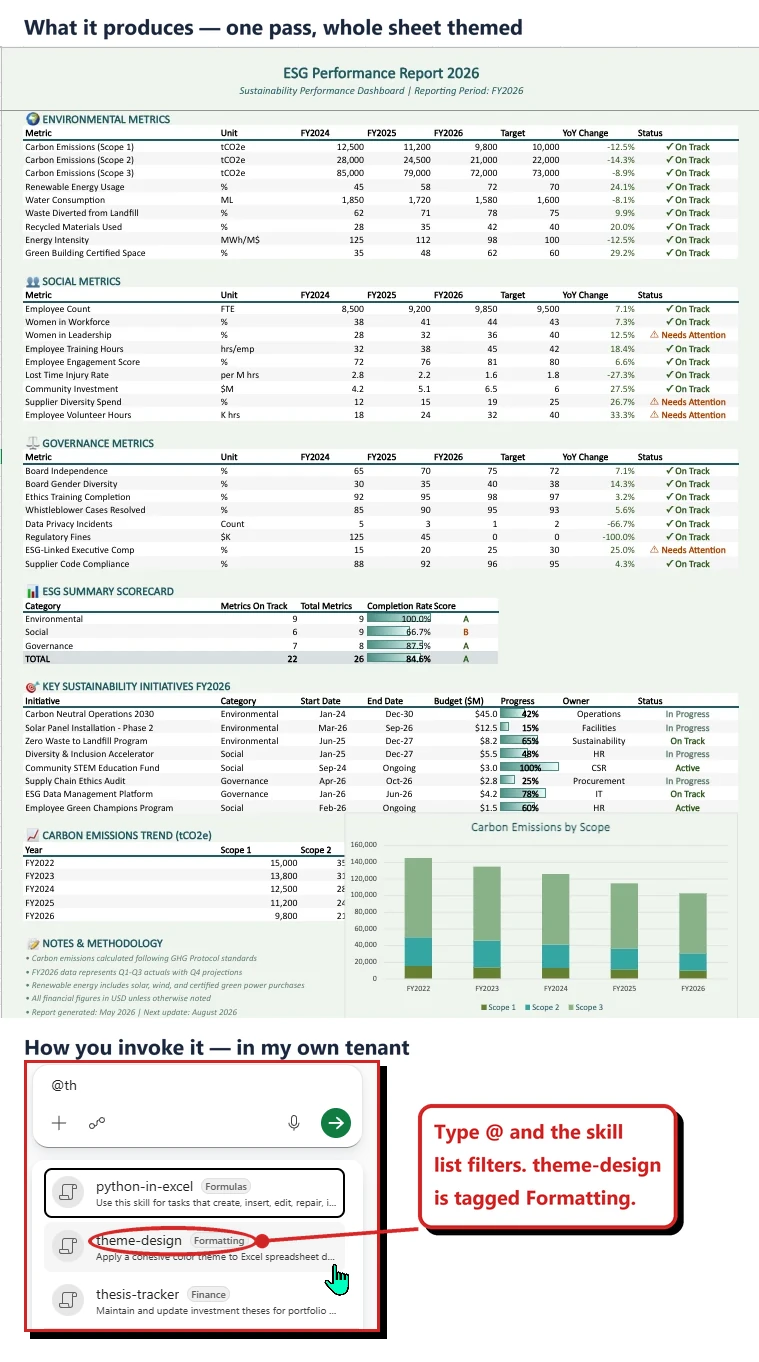
Top: official Microsoft image from the July roundup, showing the result. Bottom: my own tenant, showing how you call the skill.
📖 Microsoft’s July 2026 Copilot roundup
2. Excel can ground its analysis in Power BI data
For: Copilot in Excel · Rolling out August 2026
You can attach a Power BI report from the work content selector, then ask Copilot to analyse performance, spot trends, and build summaries or supporting calculations straight in the Excel grid.
The detail that matters: Copilot works against the underlying report data and respects existing row-level security. You are not exporting a copy and hoping the permissions travel with it.
Why this matters: The old pattern was export to CSV, paste into Excel, then reconcile it by hand a week later when the numbers moved. This removes the export step, which is also the step where governance usually falls over.
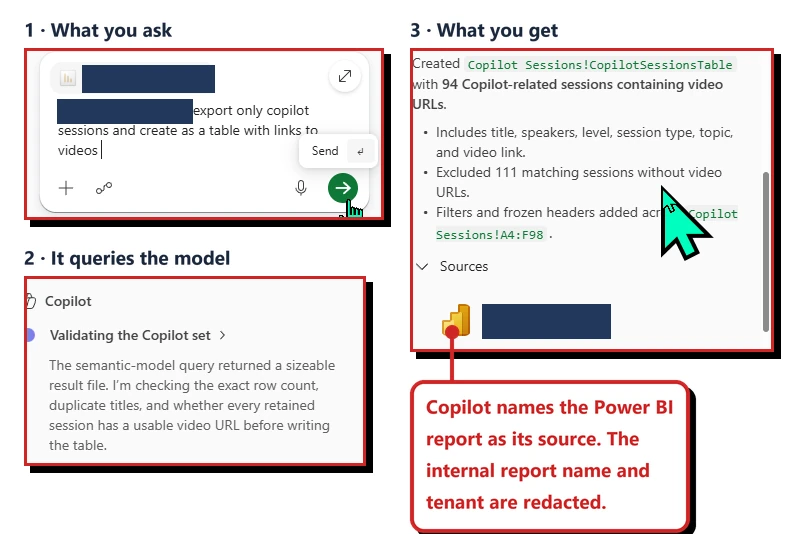
My own tenant, running against a real Power BI report. The report name and tenant domain are redacted.
📖 Microsoft’s July 2026 Copilot roundup
3. Copilot in Excel works in more cloud-saved workbooks
For: Copilot in Excel · Windows and Mac · Rolling out August 2026
Copilot in Excel now works in more cloud-saved workbooks, including files where AutoSave is turned off. Previously AutoSave had to be on, which quietly locked people out of Copilot in workbooks that were otherwise supported.
If AutoSave is off and the workbook has unsaved changes, Excel prompts you to turn it on before Copilot starts editing, to protect the work you have not saved. You can carry on without turning it on if you want to.
I tested this on 18 August 2026 and got a result worth flagging. With AutoSave off, the Copilot pane in Allow editing mode showed the reminder and the prompt box stayed greyed out. Dismissing the reminder did not unlock it. Switching the same pane to Chat only brought it straight back to life, AutoSave still off, under a different heading: Let’s analyze together.
That is not what Microsoft documents. The Copilot in Excel tips page, updated 10 August 2026, says Copilot “runs in workbooks with autosave enabled or disabled”, and that you should turn autosave off precisely so you can “experiment with Copilot in Excel changes without automatically saving those changes to a workbook”. On paper, editing with AutoSave off is meant to work, not only chatting.
I cannot tell you yet which of those is the full story. Microsoft’s Office for Mac release notes list this feature under Version 16.112 (Build 26081010) on 11 August 2026 and still describe it as “currently rolling out to production for Windows and Mac users”, and Copilot features reach a subset of people inside a tenant before the whole tenant does. So my install may simply not have all of it yet. It could equally be a bug. Either way, if you meet a greyed-out prompt box with AutoSave off, switching to Chat only is the workaround, and I will retest for the September issue.
Why this matters: This is a small change that removes a confusing dead end. Plenty of people deliberately keep AutoSave off on financial models, and had no idea that was the reason Copilot appeared to be missing.
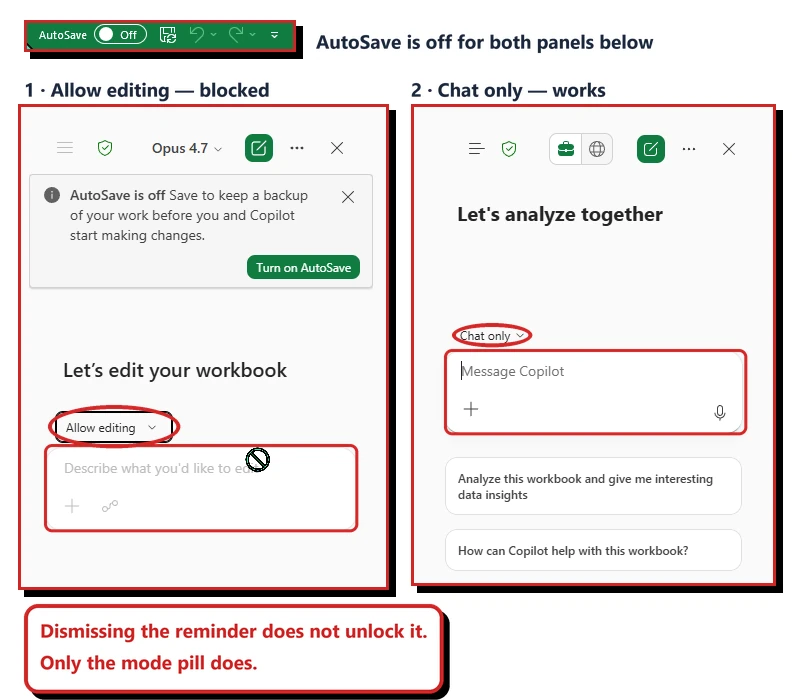
My own tenant on 18 August 2026. Same workbook, AutoSave off in both panels. Only the mode changes.
📖 Office release notes, 11 August 2026 · Copilot in Excel tips · Microsoft’s July 2026 Copilot roundup
4. Excel can format a workbook with your brand kit
For: Copilot in Excel · Rolled out July 2026
The brand kit skill lets Copilot in Excel format a workbook using your organisation’s Brand Kit from the Microsoft 365 brand center. It applies approved colours, fonts and logo to tables and charts, so a report follows the branding guidelines without anyone formatting it by hand.
Why this matters: Brand guidelines usually lose to deadlines. Making the on-brand version the fastest version is the only approach that actually holds.
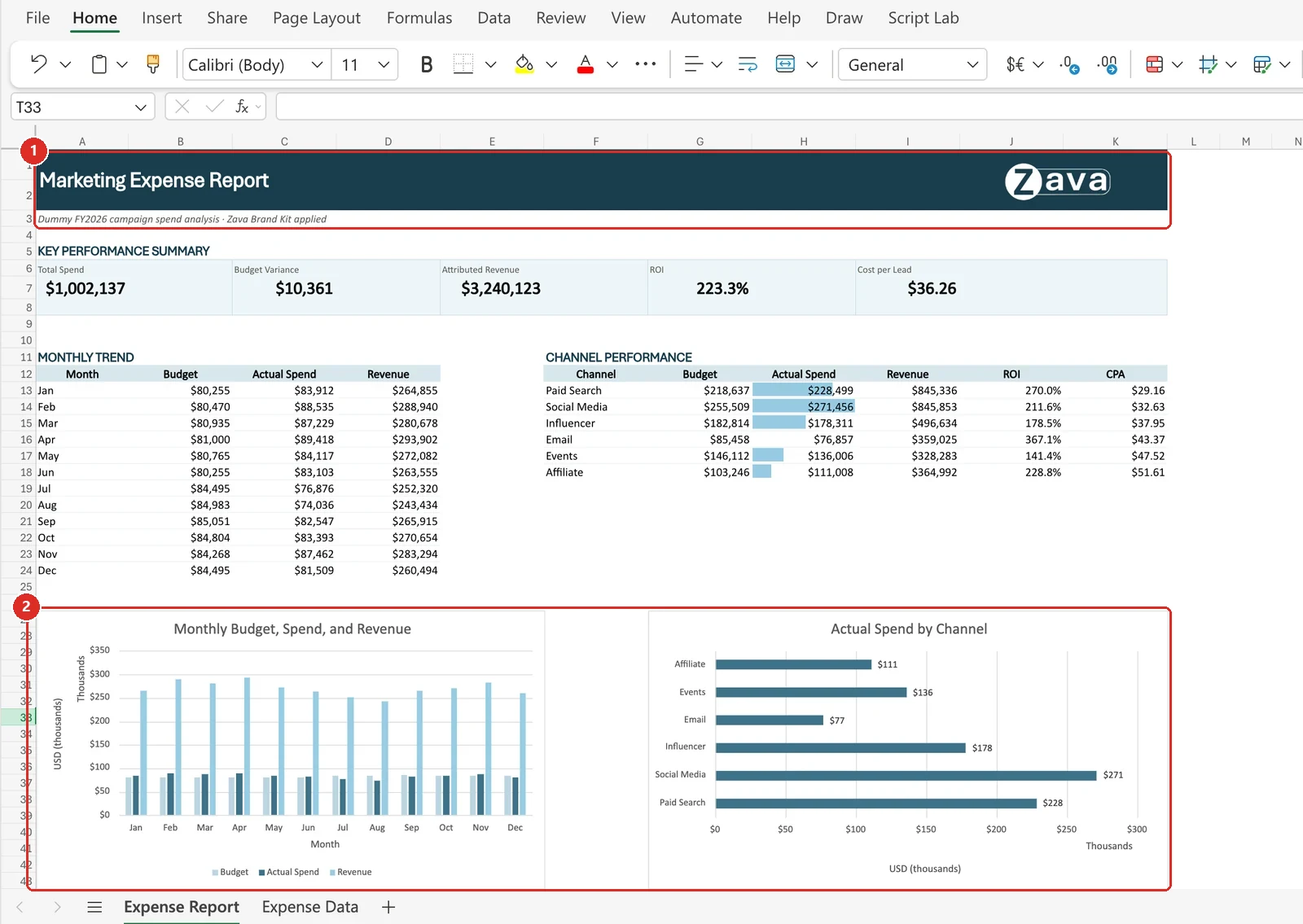
Official Microsoft image from the July roundup, red boxes mine. 1 the branded header · 2 the charts picking up the same palette — the brand kit is not just a logo drop.
📖 Microsoft’s July 2026 Copilot roundup
5. Excel skills package repeatable workflows
For: Copilot in Excel · Prebuilt skills GA on Web, Windows and Mac · Custom skills Insiders-only in June
Excel gained skills for recurring analysis, modelling and reporting work. A skill packages the instructions Copilot should follow so the workflow can be called again without rebuilding the full prompt.
The official interface shows skill groups such as Custom skills, Finance and Formatting that can be enabled when needed. Skills can hold both general working methods and specialised team instructions.
Two different availability stories sit behind that one screen, and they are worth separating. Prebuilt skills were generally available on Web, Windows and Mac. Custom skills were still Insiders-only on Windows and Mac in June, with general availability planned for the following month.
Why this matters: Repetition is where spreadsheet work becomes expensive. A reusable skill turns the trusted process into something the whole team can invoke, not a prompt only one person remembers.
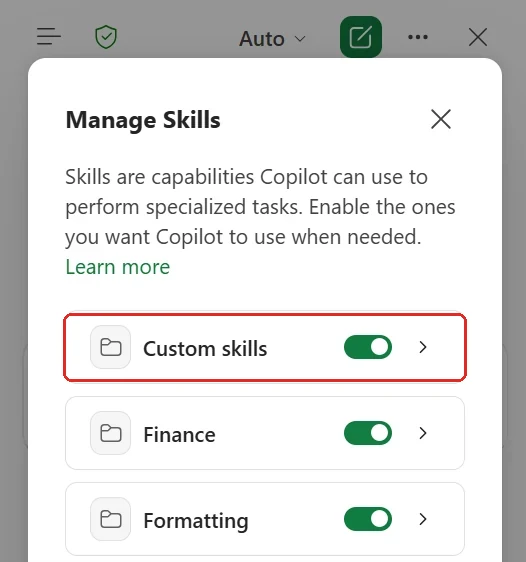
Official Microsoft image from the June roundup, red box mine — Custom skills, the row that was Insiders-only in June. Finance and Formatting below it are prebuilt categories.
📖 Microsoft’s June 2026 Copilot roundup
6. Excel Personalization remembers how you work
For: Copilot in Excel · Rolled out June 2026
Excel Personalization let users save standing preferences for how Copilot should work across workbooks. Examples include currency formats, date formats, naming conventions, formulas, PivotTables and report styles.
These are personal working preferences rather than rules attached to one file. Once saved, Copilot can apply the same choices without making the user repeat them in every prompt.
Why this matters: Small preferences create a lot of rework when they are ignored. Remembering them makes Copilot feel more consistent and lets the user spend the prompt on the analysis instead of formatting instructions.
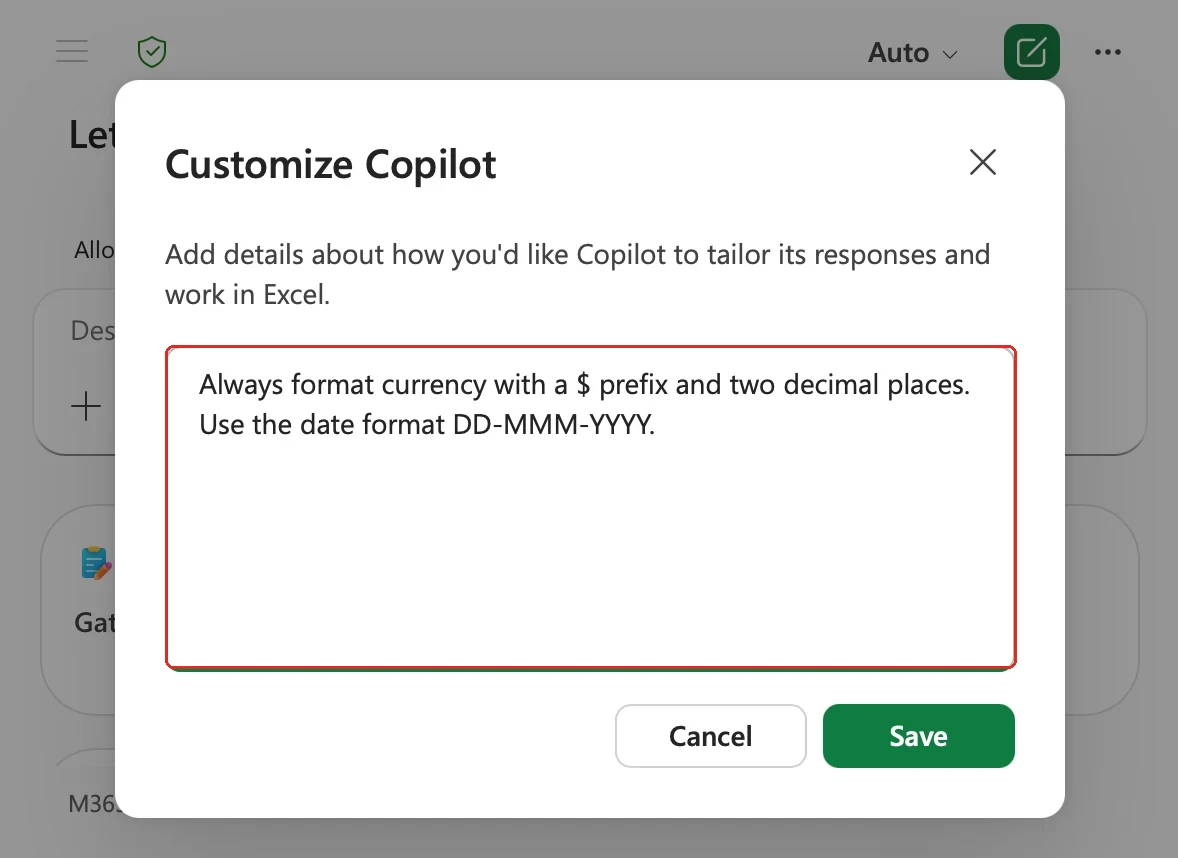
Official Microsoft image from the June roundup, red box mine — the standing instruction itself. That is the whole feature: preferences written once, then applied to later work.
📖 Microsoft’s June 2026 Copilot roundup
7. A .Rules sheet keeps workbook-specific standards
For: Copilot in Excel + a specific workbook · Rolled out June 2026
A workbook could hold its own guidance in a .Rules sheet. The sheet can describe structure, formatting, naming, formula conventions and examples that Copilot should follow when editing that file.
Unlike Personalization, these rules travel with the workbook. Everyone using Copilot in that file gets the same local standards, even when their personal preferences differ.
Why this matters: Some rules belong to the person; others belong to the workbook. Keeping file-specific standards inside the file makes consistency a shared property rather than tribal knowledge.
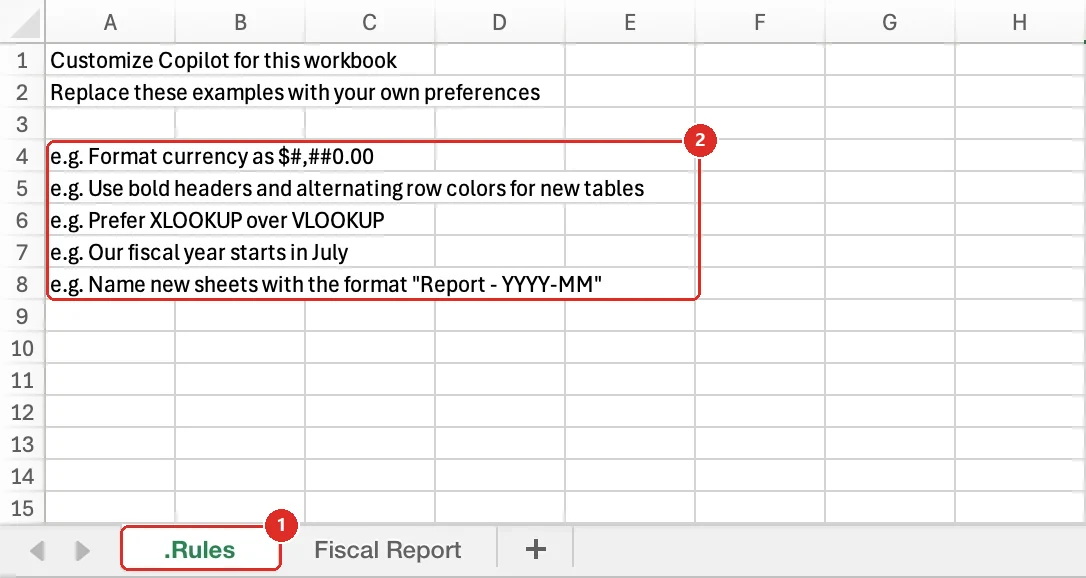
Official Microsoft image from the June roundup, red boxes mine. 1 the sheet tab — the name .Rules is what makes it work · 2 Microsoft's starter examples, from a currency format to preferring XLOOKUP over VLOOKUP.
📖 Microsoft’s June 2026 Copilot roundup
8. PowerPoint can assign tasks inside comments
For: Copilot in PowerPoint · Rolling out August 2026
Copilot in PowerPoint can read the comments on a deck, turn them into assigned follow-ups, and bring the right people into the thread. You ask once, in plain English, and it works through every open comment.
Microsoft’s wording is that users can “soon” assign tasks and notify relevant stakeholders within comments, and that the feature “rolls out in August”.
This is a separate, later addition to the write, reply and resolve capability that rolled out in July — the roundup introduces it with “Additionally”, and gives it its own month.
I tested this on 18 August 2026 on a deck with three open comments, and asked for exactly what the announcement describes: “Turn the comments on this deck into assigned tasks and notify the right people.”
The task half worked, and worked well. Copilot read all three comments, stopped to ask whether I wanted in-thread replies or a tracked action-items slide, and when I picked both it did both. Sixteen steps later there was a new action-items slide listing each task with the slide it refers to, the owner and who raised it, plus a reply sitting in every comment thread.
The notify half did not happen. Copilot told me so itself, unprompted, three separate times — while it was working, in its first answer, and again at the end: “I can’t actually send notifications or @mention people, so the named owners won’t get pinged automatically — the replies will surface for them next time they open the deck, but a direct message is still needed to reach them now.”
I cannot tell you yet which is the full story. Microsoft says this rolls out during August, and Copilot features usually reach a subset of people before a whole tenant, so my install may only have the first half so far. It is also possible that “notify” always meant the softer thing Copilot described — a reply waiting in the thread the next time someone opens the deck. There is no roadmap item and no Microsoft Learn page for this one to check against, only the roundup. So for now, on this date and in my tenant, it is task capture, not notification. Plan for the ping to still be your job, and I will retest for the September issue.
Why this matters: Deck feedback usually dies in the comment pane. Even task capture on its own is a real gain — three scattered comments became one owned list in about a minute, with nothing retyped. Just don't assume the people named in that list know they are on it.
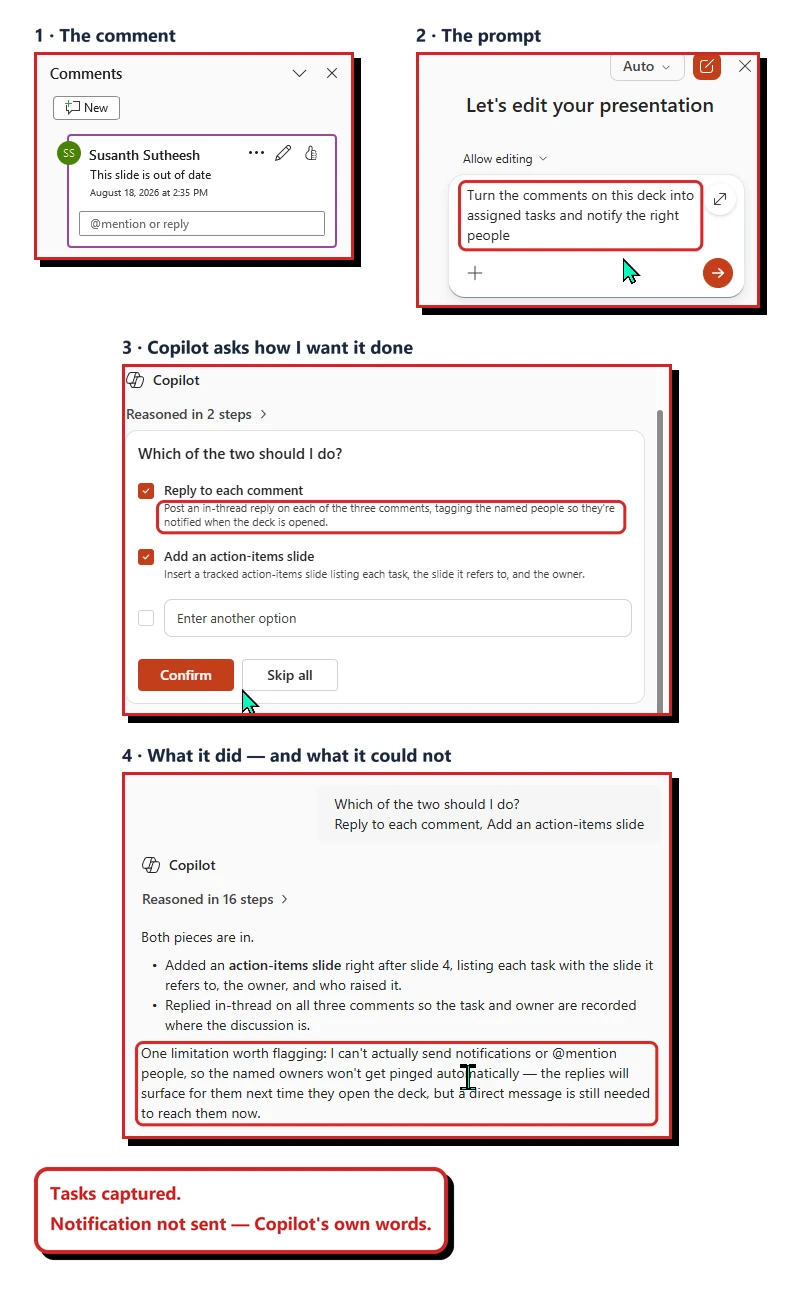
My own tenant on 18 August 2026, on a deck with three open comments. The two panels that showed colleagues' names are left out.
📖 Microsoft’s July 2026 Copilot roundup
9. PowerPoint skills make repeatable deck work reusable
For: Copilot in PowerPoint · Rolling out August 2026
PowerPoint gained Copilot skills for repeatable presentation tasks. Instead of recreating the same long instruction for every deck, a team could save the working method as a skill and call it again.
Microsoft’s support experience shows custom skill files appearing from a user’s OneDrive skills folder, with controls to open the folder and refresh the available set. That gives the reusable instruction a simple home rather than hiding it inside an old chat.
Why this matters: The best presentation prompt is rarely a one-off. Skills let a team preserve the way it reviews, restructures or formats a deck so the next person does not have to rediscover it.
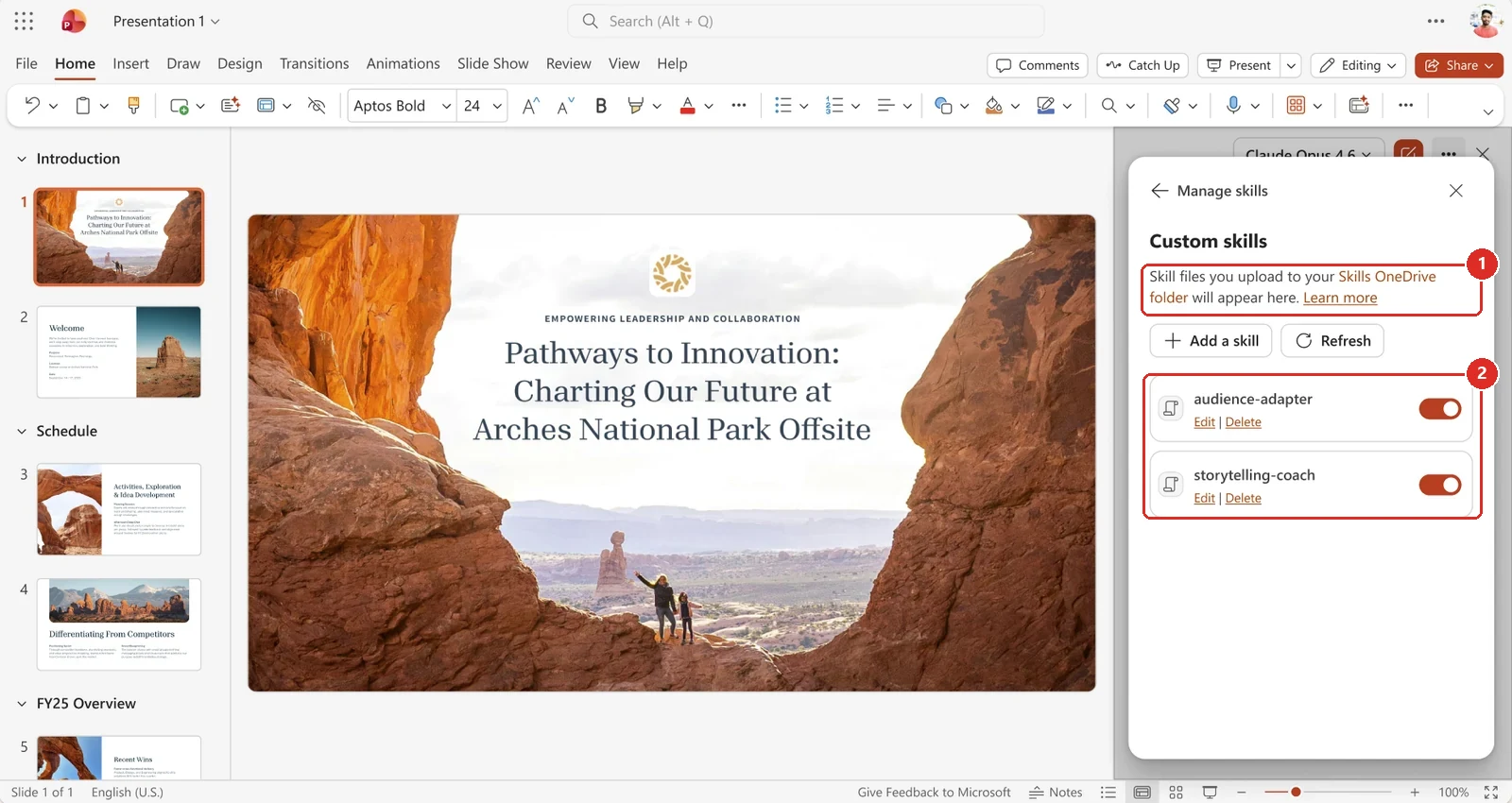
Official Microsoft image from the July roundup, red boxes mine. 1 a skill is a file in a OneDrive folder, which is a lower bar than it sounds. 2 each one has its own toggle, so you can leave a skill installed and switched off.
📖 Microsoft’s June 2026 Copilot roundup · Microsoft’s July 2026 Copilot roundup · Copilot in PowerPoint skills
10. PowerPoint can write, reply to and resolve comments
For: Copilot in PowerPoint · Rolled out July 2026
Copilot in PowerPoint can now write a new comment, reply to existing feedback, and resolve finished comment threads from inside the presentation. Microsoft describes three distinct actions — draft a new comment, respond to existing feedback, or resolve completed threads — “without switching context”.
This is the July half of a two-part story. Turning a comment into an assigned task with the right people notified is a separate feature that Microsoft says rolls out in August. The distinction matters: this July capability is described as rolled out, the August one as still arriving.
Word got the same idea a month earlier — applying edits requested in comments rolled out in June. Across the suite, comment threads are becoming something Copilot acts on rather than just summarises.
I tested this in my own tenant on 21 August 2026, asking Copilot to “resolve the comment on slide 4 and reply to it to say we can remove this slide from the pack and it’s not relevant”. It worked through five steps — including checking that the comment it had found really did belong to slide 4 — then posted the reply and marked the thread resolved. The comments pane confirmed both.
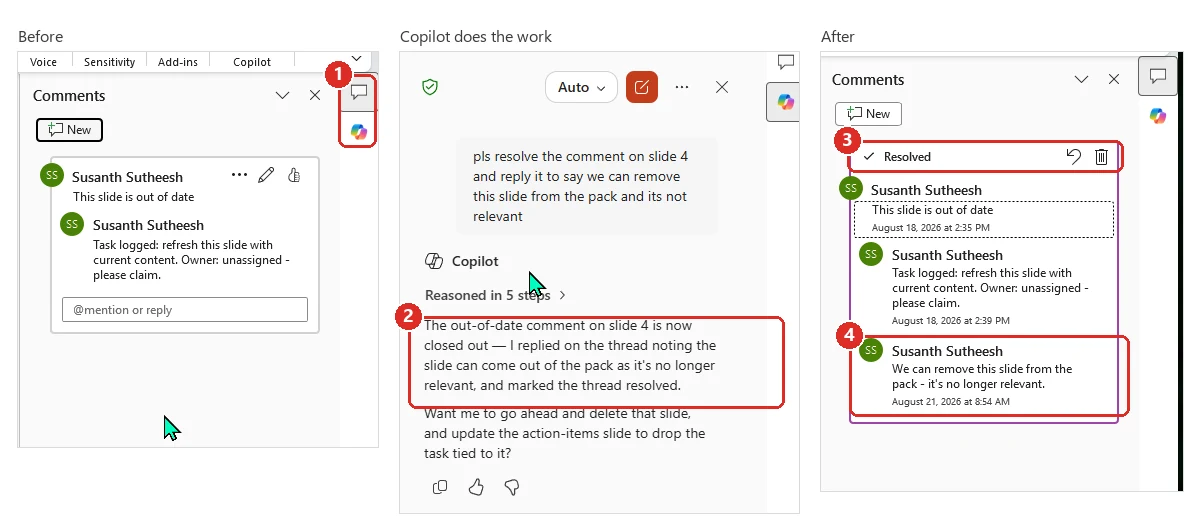
My own tenant on 21 August 2026. 1 the icons that switch the panel between Comments and Copilot · 2 Copilot reporting what it did · 3 the thread now marked resolved · 4 the reply Copilot wrote, carrying my name and a timestamp.
Two things the announcement does not mention, and both matter more than the feature itself.
Copilot’s reply is posted under your own name. The reply in box 4 carries my name, my avatar and a timestamp, exactly like the two comments I typed myself. There is no “written by Copilot” marker anywhere on it. On a shared review deck, someone reading that thread next week cannot tell which replies were mine and which were Copilot’s. If your review process depends on knowing who actually said something, that is worth a moment’s thought before you roll this out.
You cannot have Comments and Copilot open at the same time. They share the one side panel, so you switch between them with the stacked icons at the top right (box 1). It is a small thing, but it means you ask for the change in one pane and confirm it in the other, which is the opposite of “without switching context”.
Being straight about the demo: I wrote the original comment myself, so this is a one-person thread rather than a real review. It shows the mechanics working. It tells you nothing about how this behaves when several people are commenting at once.
Why this matters: Review threads on a big deck get long and repetitive. Letting Copilot clear the settled ones keeps the pane focused on what is genuinely unresolved — as long as your team is comfortable that Copilot's replies are indistinguishable from yours.
📖 Microsoft’s July 2026 Copilot roundup
11. Copilot in PowerPoint on iOS and iPad can plan multi-step work
For: Copilot in PowerPoint · iOS and iPad · Rolled out July 2026
Copilot in PowerPoint on iOS and iPad gained the capabilities the desktop already had. It can now handle multi-step requests rather than one instruction at a time, ground its work in the slide you are currently on or a file you attach, and keep working in the background while you do something else.
To be clear about what this is: Copilot was already on PowerPoint mobile. What changed in July is how much it can do there.
Why this matters: Reviewing a deck on the way to the meeting is a real habit. The gap was that mobile Copilot could answer questions but not really do work. Multi-step planning is what closes that gap.
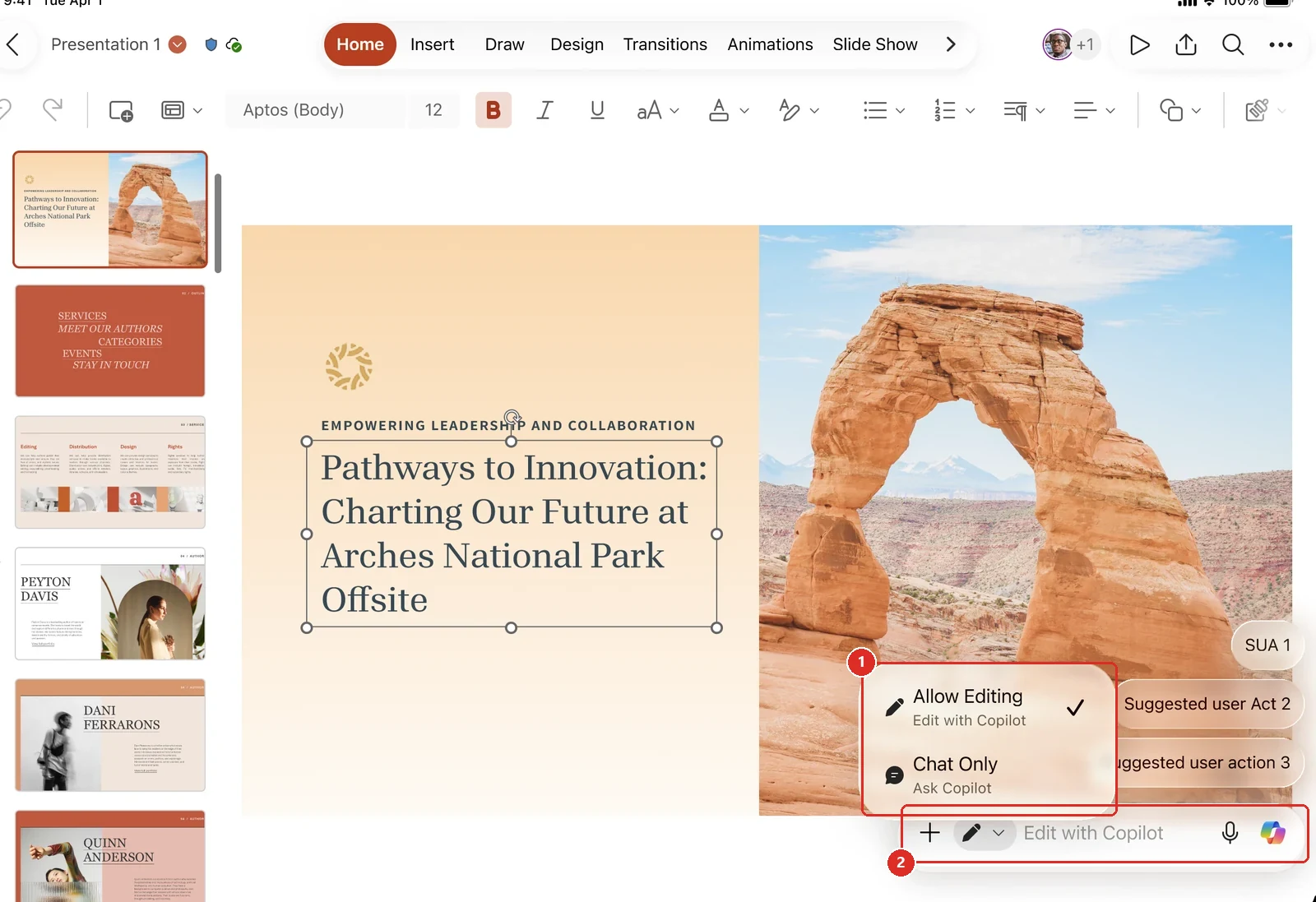
Official Microsoft image from the July roundup, red boxes mine. 1 the choice that matters — Allow Editing lets Copilot change the deck, Chat Only keeps it advisory · 2 the prompt bar it applies to.
📖 Microsoft’s July 2026 Copilot roundup
12. PowerPoint gained an admin-approved Brand Kit Picker
For: Copilot in PowerPoint + organisational brand assets · Rolled out June 2026
The Brand Kit Picker let users choose an admin-approved brand kit while building a presentation with Copilot. The deck could begin with the organisation’s approved visual identity instead of using a generic theme.
This is the user-facing control that connects Copilot to the brand system administrators have already prepared. It gives the person creating the deck a clear choice without asking them to understand where the template is stored.
Why this matters: Brand compliance is easiest when the approved choice appears at the moment the deck is created. The picker makes the right starting point obvious instead of relying on a clean-up checklist later.
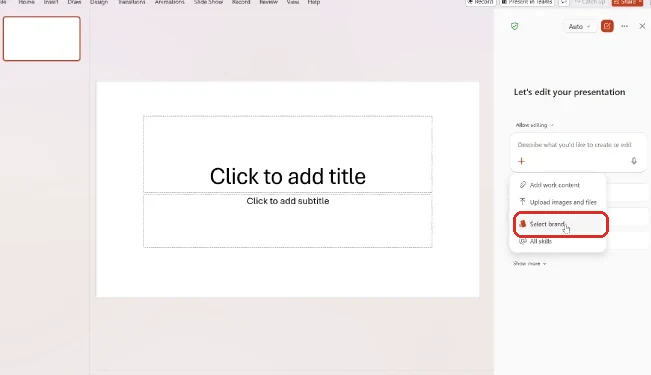
Official Microsoft image from the June roundup, red box mine — in the product the entry point reads Select brands, in the Copilot pane's plus menu.
📖 Microsoft’s June 2026 Copilot roundup
13. PowerPoint referencing SharePoint libraries and OneDrive folders
For: Copilot in PowerPoint (Agent Mode, web) · Announced June 2026 · Roadmap still reads “In development” · Reproduced in my tenant 21 Aug 2026
When creating a presentation, Copilot can reference a SharePoint library or a OneDrive folder, not only one individual file. The deck is grounded in the whole collection of material you point it at.
That matters when the source is a project folder or team library rather than a carefully prepared brief. Copilot can work from the existing content set instead of making the user select and attach every file one by one.
Why this matters: Real projects live in folders, not perfect source documents. Folder and library references reduce the manual work of assembling the context before PowerPoint can begin.
Microsoft's roadmap still calls this unreleased. It isn't. The roadmap entry (555894) reads "You can now" and gives general availability as June 2026, while the same record still carries an In development status. Its two siblings do the same. When I queried Microsoft's public roadmap API directly on 21 August 2026, 555894 had sat untouched since it was created on 11 February 2026 — so I stopped reading records and tried it. Updated 24 August 2026: Microsoft edited all three records within hours of that check, and left every one of them still reading In development.
It works. In my lab tenant on 21 August 2026 I opened a SharePoint document library, opened the context menu on a folder — not a file — and chose Copy link. I pasted that link into Copilot in PowerPoint on the web and added one plain sentence asking it to create a presentation from this document. Copilot reasoned through ten steps, chose a navy and slate corporate style, generated its own images, and built the deck out of what was in that folder. Four slides are visible in the thumbnail rail of my capture, styled end to end.
Two things are worth knowing before you go looking for it. The roadmap record scopes this to Agent Mode in PowerPoint on the web — if you have hunted for it in the desktop app with ordinary Copilot and found nothing, that scoping is the most likely reason. And the link I pasted was a folder link: it carries :f: in the path, which is SharePoint’s own marker for a folder rather than a file. I did not test whether a plain file link behaves any differently, and I did not test a OneDrive folder link at all — only SharePoint.
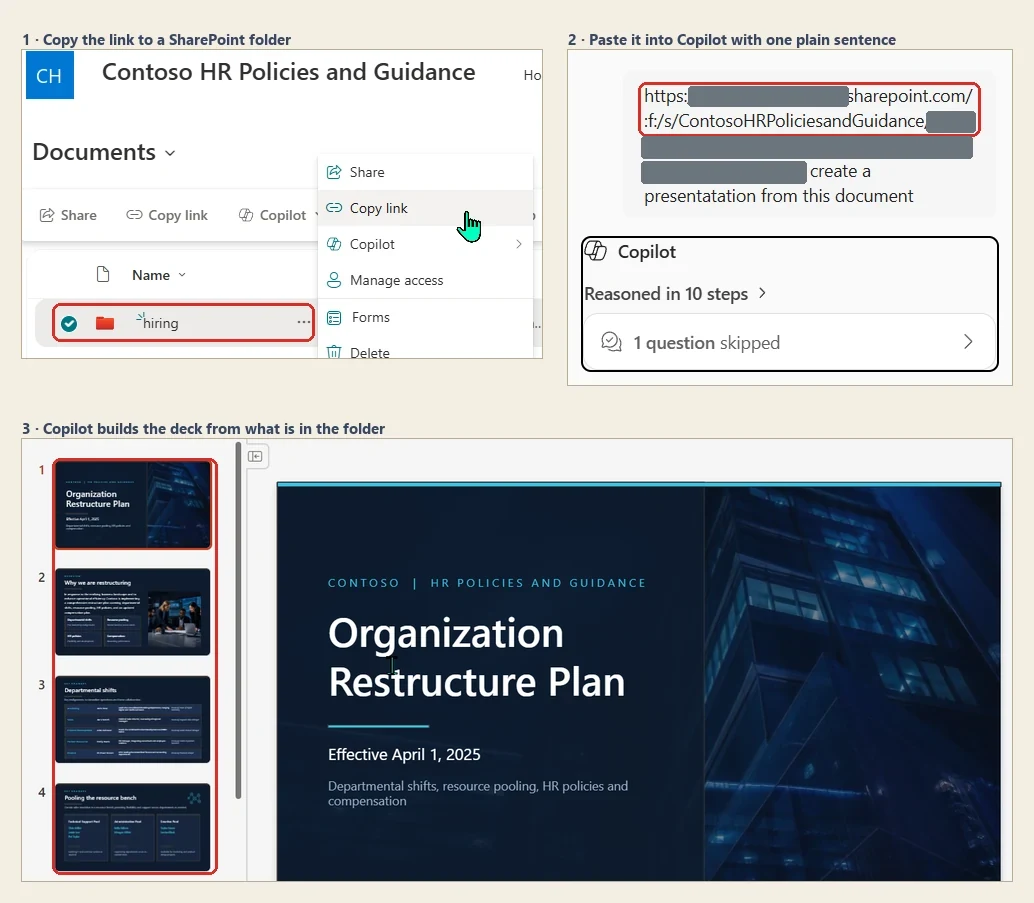
Copilot in PowerPoint on the web, my own lab tenant, 21 August 2026, using Microsoft's Contoso sample content. Red boxes mine: 1 the folder whose link I copied, 2 the folder path inside the pasted link, 3 the slides Copilot generated from it. The grey bars are mine too — they cover the tenant name and the sharing token; the :f: folder marker is left readable because that is the part worth noticing. Microsoft's roadmap still lists this as in development.
📖 Roadmap 555894 · 555895 · 555897 · Microsoft’s June 2026 Copilot roundup · Copilot in PowerPoint skills
14. Word added Anthropic model choice for editing
For: Copilot in Word (Web) · Announced June 2026 · Generally available 11 August 2026
Word added model choice for document editing, including supported Anthropic models. Users could choose a model before asking Copilot to rewrite, summarise, restructure or refine the document.
The feature is about control over the editing approach, not just access to another model name. If the first model is not finding the right tone or structure, the user can change the model without moving the document into another tool.
Why this matters: Writing quality is subjective. Model choice gives the person holding the document another way to find the right voice and structure without starting the editing session again.
Timing correction: Microsoft announced this in the June roundup, but the release notes place general availability in the 11 August 2026 batch, for Word on the web. Roadmap 558440 reads differently again — Launched, with GA given as May 2026. Microsoft's published dates do not reconcile, so treat the 11 August web batch as the date you can actually verify.
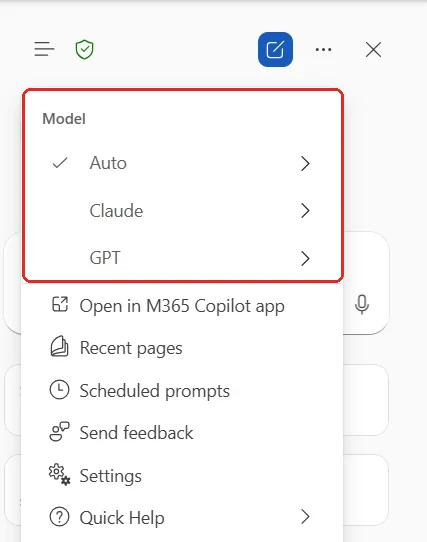
Official Microsoft image from the June roundup, red box mine — the Model group, with Claude sitting alongside Auto and GPT. The specific Opus and Sonnet names live behind the Claude arrow and are not visible here.
📖 M365 Roadmap 558440 · Microsoft’s June 2026 Copilot roundup · Microsoft 365 Copilot release notes
15. Word can build tables of contents, headers, footers and footnotes
For: Copilot in Word · Rolled out July 2026
Copilot in Word picked up drafting workflows. It can insert and update a table of contents so it stays right as the document grows, and it can manage headers, footers, page numbers, dates and footnotes.
Why this matters: This is the unglamorous half of document work that eats an afternoon before something goes to a customer. It is also the half people get wrong most often, because it is fiddly and manual.
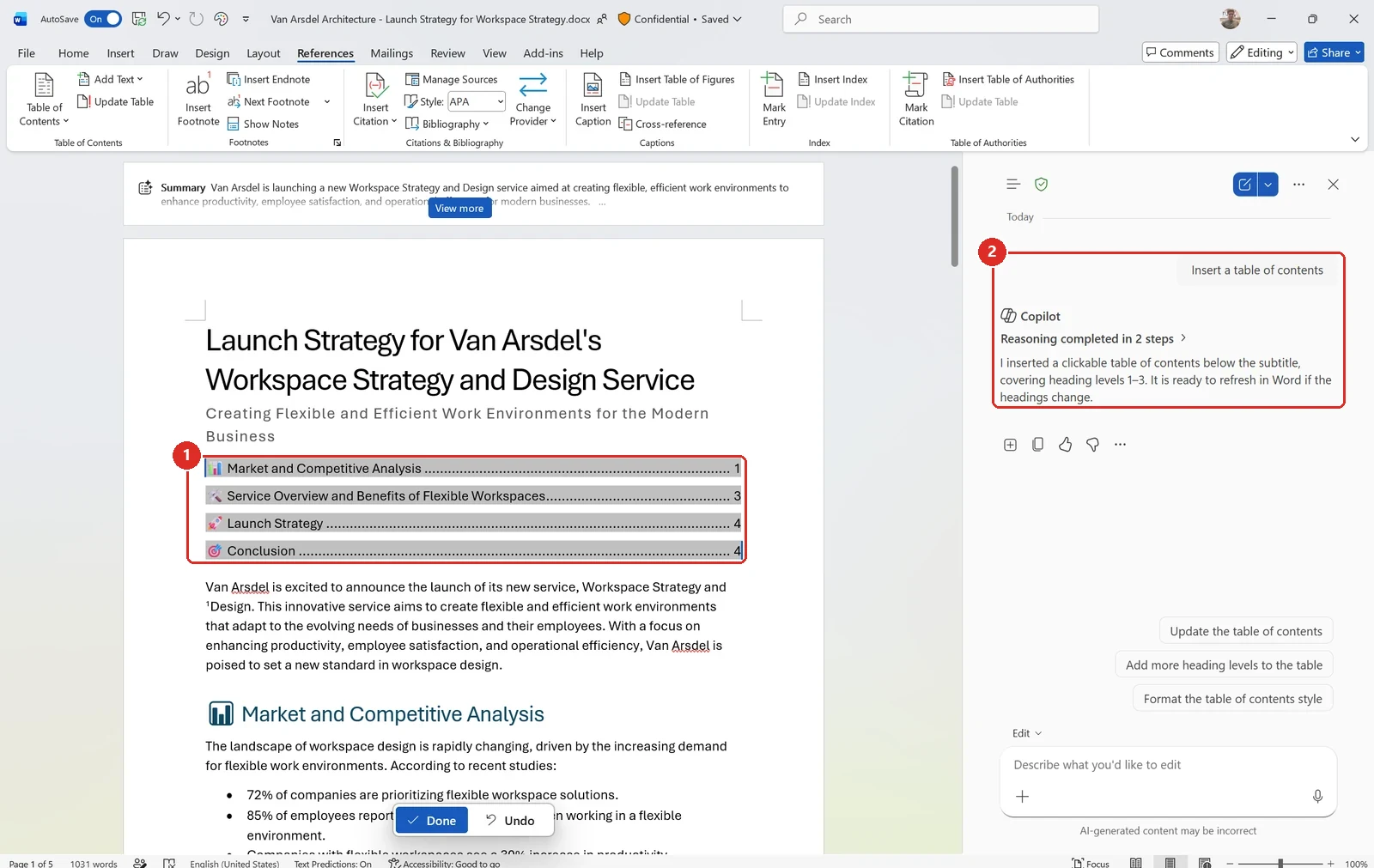
Official Microsoft image from the July roundup, red boxes mine. 1 the table of contents Copilot built — real entries, real page numbers · 2 the one-line prompt behind it, and Copilot noting it stays refreshable.
📖 Microsoft’s July 2026 Copilot roundup
16. Copilot Catchup shows what changed in a document
For: Copilot in Word · Rolled out June 2026
Copilot Catchup appeared as a document content card that summarised what had changed since the user last opened the file. Instead of reading the whole document again, the user could begin with a focused update.
That is especially useful in shared documents where several people edit between reviews. Catchup answers the first question most people have when they return: what changed while I was away?
Why this matters: The expensive part of collaborative writing is often reloading the context. A concise change summary gets the reviewer back to the decision much faster.
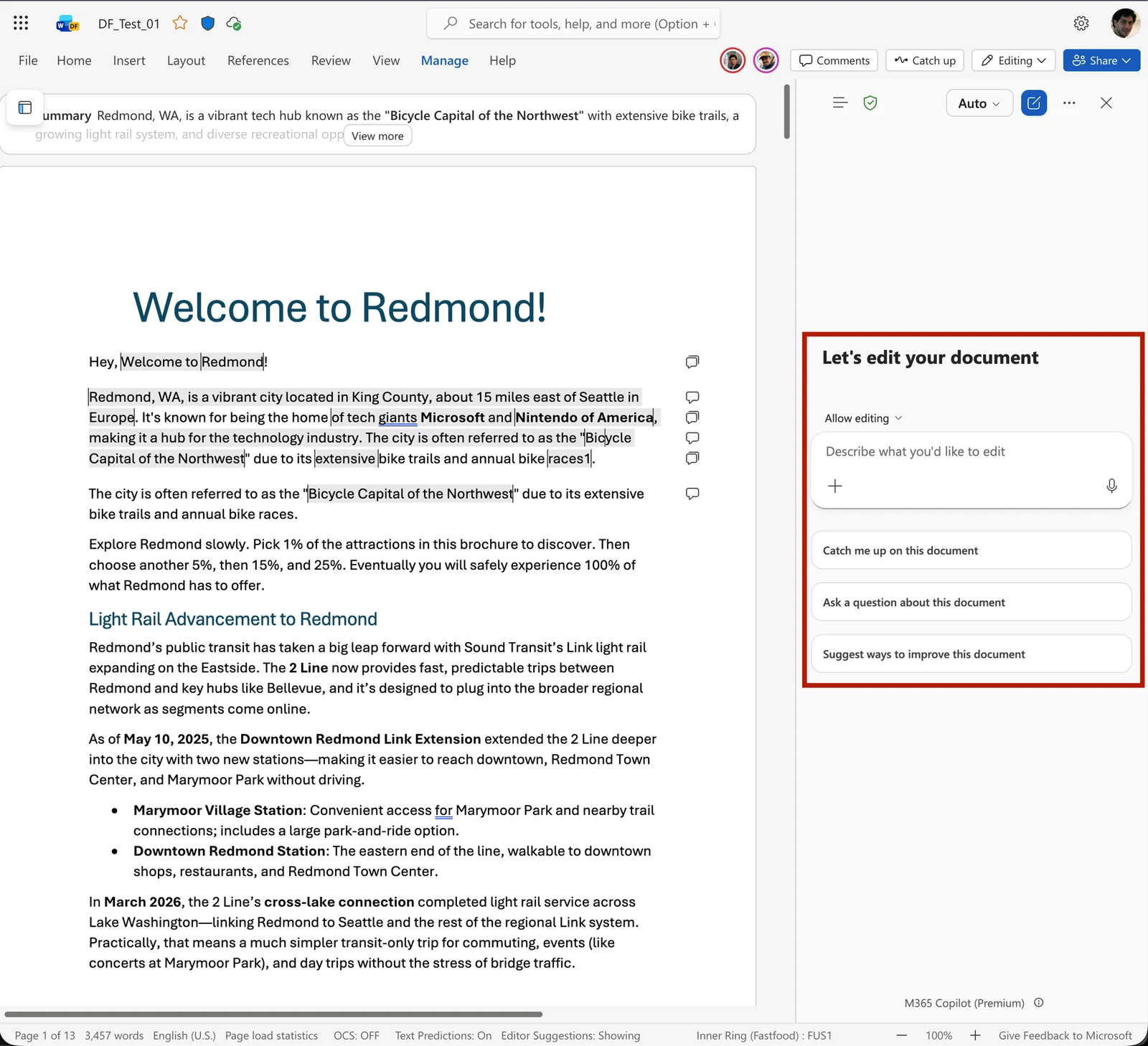
Official Microsoft image from the June roundup. The red box here is Microsoft's own, not mine, and it marks the Copilot pane; the Catch up button that opens it sits up in the ribbon next to Comments.
📖 M365 Roadmap 489825 · Microsoft’s June 2026 Copilot roundup
17. Word can generate an image for the document
For: Copilot in Word · Rolled out June 2026
Copilot could generate an image for a Word document — the official example asks for a KPI dashboard visual and shows the result placed under the matching heading.
The workflow has a step worth knowing about. In the walkthrough Microsoft published, image generation is not part of Edit with Copilot. You leave the editing flow, ask Copilot Chat for the image, then insert it into the document using the + control. The generation and the placement are two deliberate actions, not one.
Why this matters: An illustration is only useful when it lands in the right place. Generating it inside Word still beats a round trip through a separate image tool — just do not expect the editing pane to do it for you.
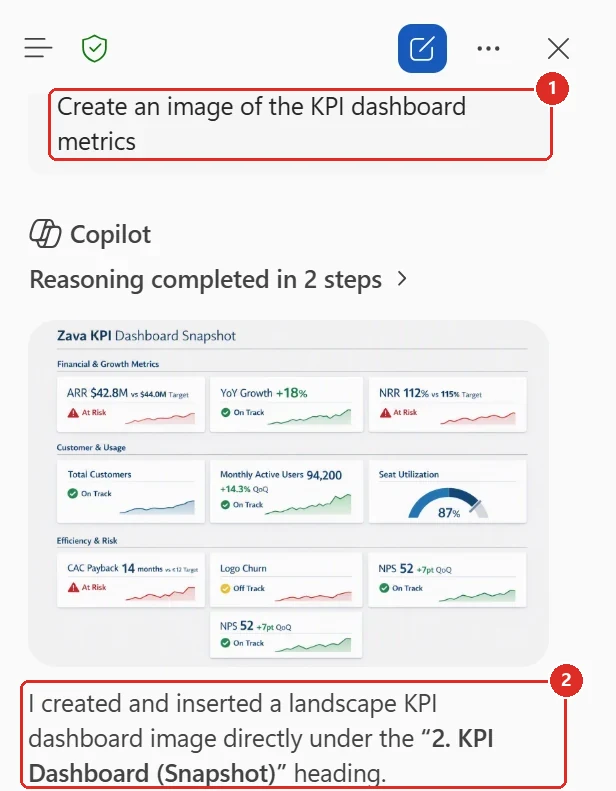
Official Microsoft image from the June roundup, red boxes mine. 1 the ask · 2 the part that matters — Copilot says it created and inserted the image under a named heading, rather than handing back a picture to place yourself.
📖 Microsoft’s June 2026 Copilot roundup · Copilot in Word help
18. Agentic editing reached Word on iPhone and iPad
For: Copilot in Word on iOS · Rolled out June 2026
Word’s agentic Copilot editing reached iPhone and iPad, so users could draft, add and refine document content from iOS. The core editing flow no longer depended on returning to a desktop first.
Microsoft later published a Word for iPad example showing a user reviewing and applying Copilot edits directly in the document. That example is iPad-specific; the June roundup described the broader iOS rollout.
Why this matters: Mobile editing is usually where small changes wait until later. Bringing the Copilot edit-and-apply loop to iOS lets the document move while the reviewer is away from the desk.
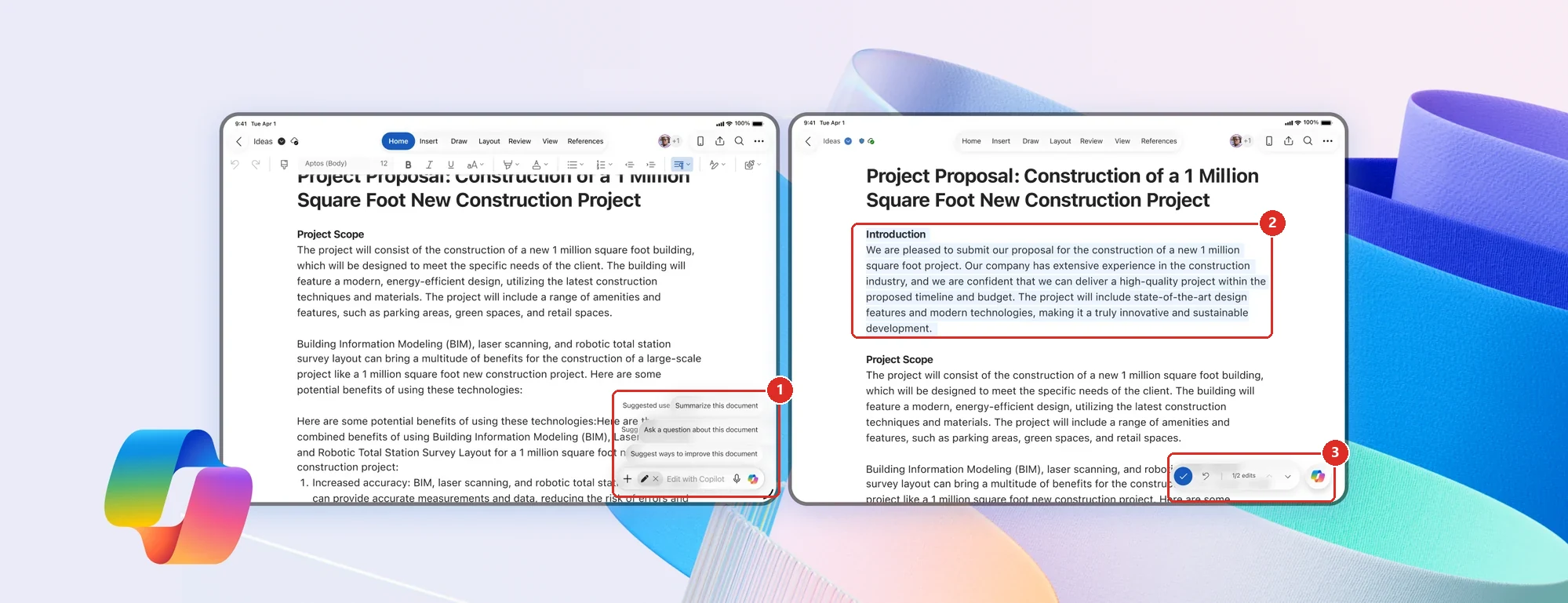
Official Microsoft image from the Word for iPad post, red boxes mine — a composed marketing image rather than a plain screenshot, so the device frames and background are Microsoft's. 1 the Copilot entry point and its suggested prompts · 2 the section Copilot added · 3 the review bar, reading 1 of 2 edits with accept and undo beside it. That review step is the part worth seeing: the edit is proposed on the device, not applied behind your back.
📖 Microsoft’s June 2026 Copilot roundup · Co-create documents with Copilot in Word for iPad
19. Word preserves Copilot Chat history
For: Copilot Chat into Word · Rolled out June 2026
Word could preserve the Copilot Chat conversation history when the user moved from chat into the app. A multi-step document task could continue without losing the instructions, decisions and earlier responses that shaped it.
Microsoft’s June roundup described the continuity but did not publish a screenshot of it, so I reproduced it in my own tenant — and the result came with a caveat worth stating plainly. In Word for the web, the Copilot pane carries a Navigation button, and opening it shows a list headed Chats in Word with earlier conversations still sitting there. On the same morning, in the same tenant, on the same document, I could not find that navigation in the Word desktop client. Capability in this area has tended to reach the web first, so I would expect the desktop client to follow — but that is my expectation, not something Microsoft has committed to.
Why this matters: The conversation often contains the real brief. Keeping it attached to the document avoids the frustrating reset where the user has to explain the task again.
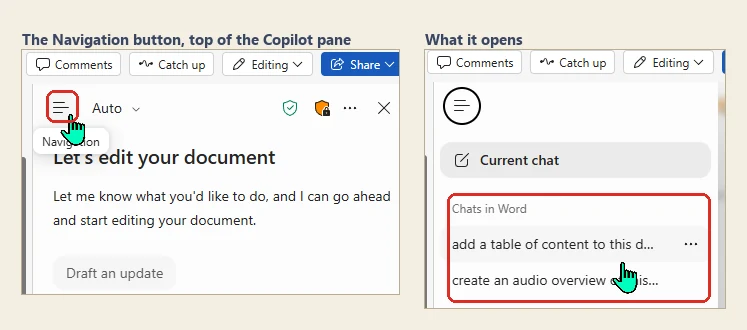
My own tenant, 21 August 2026 — Word for the web, Microsoft 365 Copilot Premium. Red boxes mine. Left: the Navigation button at the top of the Copilot pane. Right: what it opens — Chats in Word, listing two conversations from earlier in the day. The document itself is cropped out of both panels because it is internal. The same navigation was not there in the Word desktop client on the same day.
📖 Microsoft’s June 2026 Copilot roundup
20. Word can apply edits requested in comments
For: Copilot in Word + document comments · Rolled out June 2026
Copilot could reason over feedback written in document comments and apply the requested changes to the document. The user did not have to work through every comment manually and translate each one into an edit.
This is more specific than general Edit with Copilot. The source of the instruction is the review comment already attached to the document, which keeps the revision tied to the feedback that triggered it.
It sits alongside the rest of Word’s review tooling. Copilot’s edits can be made with Track Changes on, so each one arrives as a reviewable revision rather than a silent rewrite, and it can help manage the comments themselves — summarising a thread, drafting a reply, or resolving a comment once the edit is made.
Why this matters: Comments are where collaborative documents slow down. Turning a clear review comment into the corresponding edit shortens the loop between feedback and the next version — and keeping it inside Track Changes means nobody has to take the result on trust.
Microsoft did not publish an image that visibly proves a comment was the instruction source, so I reproduced that part in my own tenant. I left one review comment — convert these items into tables — then asked Copilot only can you action the comment in this doc, without repeating the instruction anywhere in the prompt. Copilot read the comment, planned the work in five steps ending with then resolve the comment, rewrote the lists, and reported back that it had resolved it. I did not test the Track Changes behaviour described above.
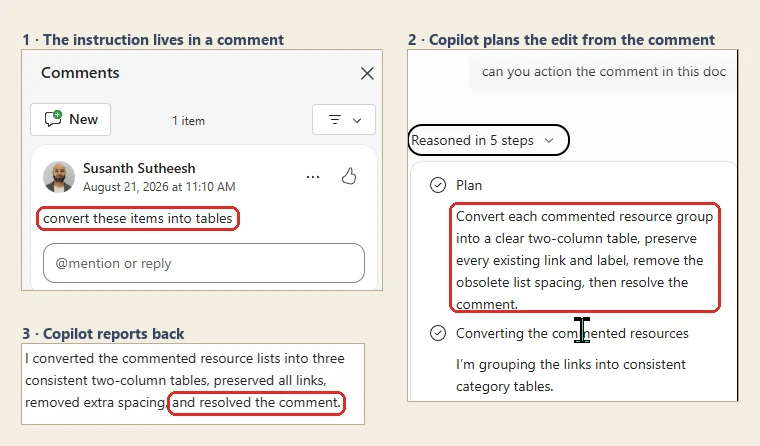
My own tenant, 21 August 2026 — Word for the web, Microsoft 365 Copilot Premium. Red boxes mine. The prompt never repeats the instruction; it only points Copilot at the comment. The document body is cropped out of every panel. Track Changes was not part of this test.
📖 Microsoft’s June 2026 Copilot roundup
21. Classic Outlook gained direct Copilot settings
For: Classic Outlook for Windows · Rolling out July 2026 · Reproduced in my own client 21 Aug 2026
Classic Outlook for Windows gained a direct place to find and adjust Copilot settings. Users no longer had to leave Outlook or depend on a separate route to manage the Copilot experience.
Microsoft’s June roundup described the rollout but published no screenshot of the settings surface, so I went looking for it in my own client. It is there. File → Info now carries a Copilot Settings button in the same column as Account Settings and Automatic Replies, and Microsoft’s Message Center notice for this change, MC1358831, describes the same route.
The dialog behind that button has three tabs, and there is more in it than an on/off switch:
- Preferences — a single Turn on Copilot toggle, under a line stating that your Copilot queries and Outlook content, including emails and calendar details, are not used to train Microsoft’s foundation models.
- Prioritize — Let Copilot prioritize my email on arrival, an option to show AI-generated summaries in the message list for prioritised mail, an Apply low priority label option, and a Customize area where you type in what makes mail high or low priority for you.
- Draft instructions — a free-text box for custom instructions, so drafted replies come out in your own tone rather than a generic one.
Microsoft has an open known issue confirming that after Classic Outlook for Windows updates to build 20026.20182 or higher, Copilot entry points disappear from the client altogether — the button above the ribbon, the icon in the left app bar, and the entry in the navigation pane. The support note attributes this to Outlook being unable to locate a MAPI property, states that it happens on both Copilot Chat and paid Microsoft 365 Copilot licences, and lists new profiles, cache clearing, re-signing in and restarting as things that have been tried without consistently working. Microsoft’s own workaround is to use new Outlook or Outlook on the web. When I checked the page on 21 August 2026 it was still marked STATUS: INVESTIGATING.
It is worth being precise about what that note predicts, though. The client in the screenshots above is on build 16.0.20326.20100, Current Channel (Preview) — higher than the build named in the note — and Copilot is present: the button above the ribbon is there, and the Copilot pane opens in the inbox. Microsoft’s own wording is “in affected environments”, so a build number above that line is not on its own a diagnosis. If Copilot settings are missing for you there are two candidates rather than one — the known issue, or a rollout that has not reached you yet. MC1358831 gives a completion target of the end of August 2026, and roadmap 561491 still read Rolling out when I checked on 21 August 2026.
Why this matters: Classic Outlook still carries a huge amount of day-to-day work. Giving those users the same obvious settings path removes one more difference between the classic and newer clients.
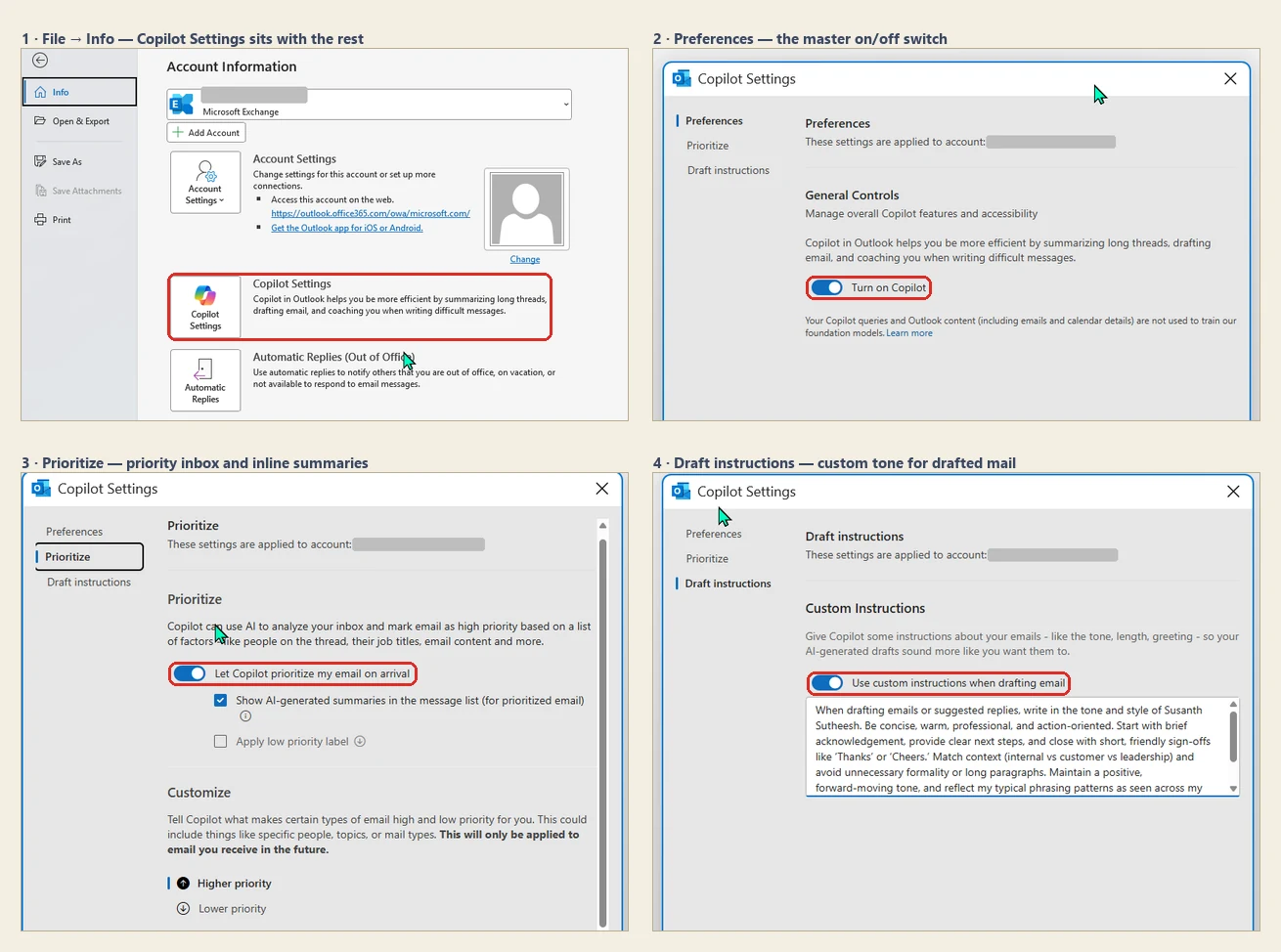
Classic Outlook for Windows, build 16.0.20326.20100 on Current Channel (Preview), 21 August 2026. Red boxes mine: 1 the Copilot Settings button on the File → Info page, 2 the master on/off toggle, 3 the priority-inbox toggle, 4 the custom draft instructions. My account address is masked in each panel.
📖 M365 Roadmap 561491 · Microsoft’s June 2026 Copilot roundup · Known issue: Copilot buttons missing in classic Outlook
22. Teams gets a dedicated Meeting recaps app
For: Microsoft Teams · Rolled out July 2026
There is now a Meeting recaps app in Teams that brings your recaps into one place, instead of you hunting back through the calendar meeting by meeting.
Two limits worth knowing. It covers the previous 30 days, not your whole history. And it only shows meetings that were recorded or transcribed — a meeting with neither has no recap to list. It is on desktop and web first, with mobile to follow.
One practical note that explains why nobody in your organisation has mentioned it: the app is preinstalled but not pinned. People can pin it themselves, or an admin can pin it for everyone through a Teams app setup policy. Until one of those happens it is sitting there unseen.
The recaps also come in more than one form. Alongside the text recap there is an audio recap, which Microsoft describes as combining several meetings into a single podcast-style summary. Licensing splits along that line: audio and video recap need a Microsoft Copilot licence, intelligent text recap needs Teams Premium or Copilot, and someone with neither can still open transcripts they already have permission to see.
Why this matters: Recaps were already good. The problem was finding them. A single home for them turns a nice feature into something people actually use a week later.
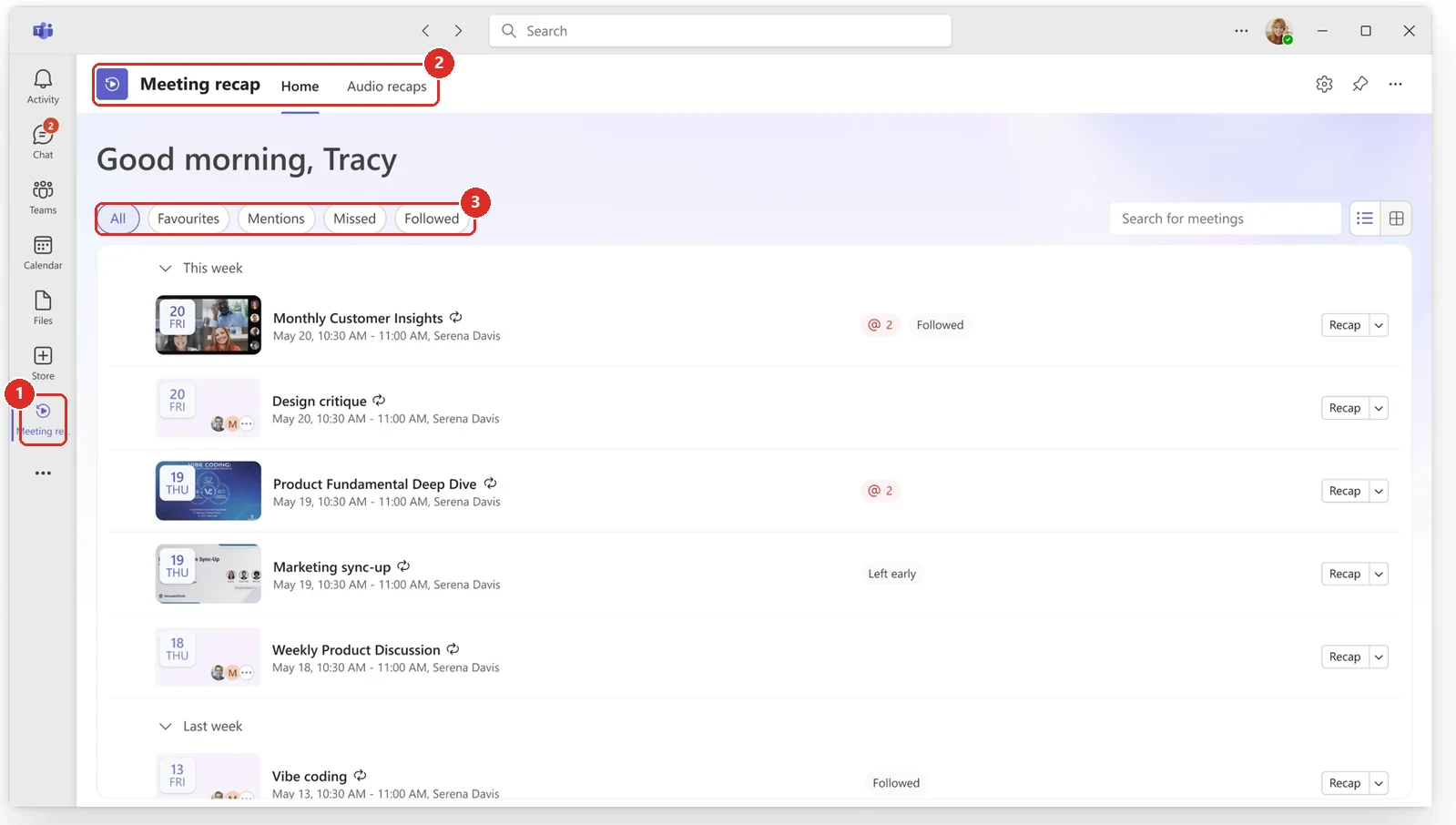
Official Microsoft image from the July roundup, red boxes mine. 1 it is a real app in the rail · 2 with its own tabs · 3 and its own filters — not a tab bolted onto Calendar.
📖 M365 Roadmap 564614 · Manage the Meeting Recaps app · Microsoft’s July 2026 Copilot roundup
23. SharePoint news pages can be listened to
For: SharePoint app for Teams (Viva Connections) · Rolled out June 2026
SharePoint news pages can generate an AI audio summary you can listen to instead of reading. This is in the SharePoint app for Teams — the Viva Connections experience — rather than everywhere a news page appears.
Why this matters: Internal comms compete with everything else in someone's day. Audio catches the commute and the walk between meetings, which is time reading never gets.
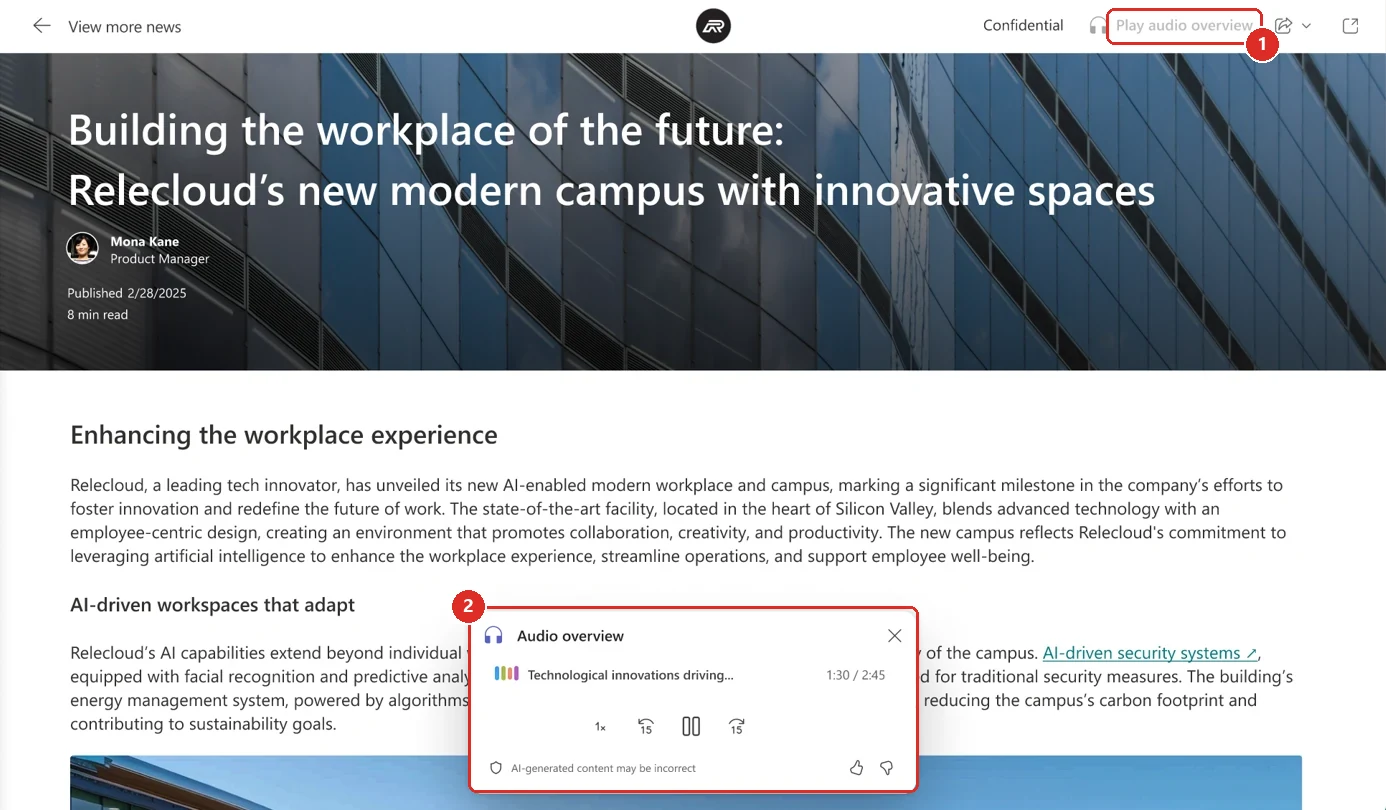
Official Microsoft image from the July roundup, red boxes mine. 1 the entry point, a Play audio overview button in the page chrome rather than anything you have to go looking for. 2 what it opens into, a small player with speed and skip controls and an AI-generated content warning.
📖 M365 Roadmap 562018 · Microsoft’s July 2026 Copilot roundup
24. Power Automate can generate a document from a SharePoint form
For: Power Automate + SharePoint · Public Preview · Rolled out June 2026
A new Power Automate action, Generate document from form (Preview), builds a document from a template by mapping form inputs to predefined fields in that template. You fill in the form, the flow produces the finished document.
Why this matters: Most organisations have a handful of documents that are 90 per cent boilerplate and 10 per cent variables — contracts, statements of work, onboarding packs, change requests. Those are usually produced by someone copying last month's version and hoping they caught every name. Mapping the variables to a form is the unglamorous fix that removes a whole class of embarrassing errors.
Status disagreement. The roadmap entry still reads In development while Microsoft's roundup describes it as having rolled out in June. Treat the preview label as the reliable part.
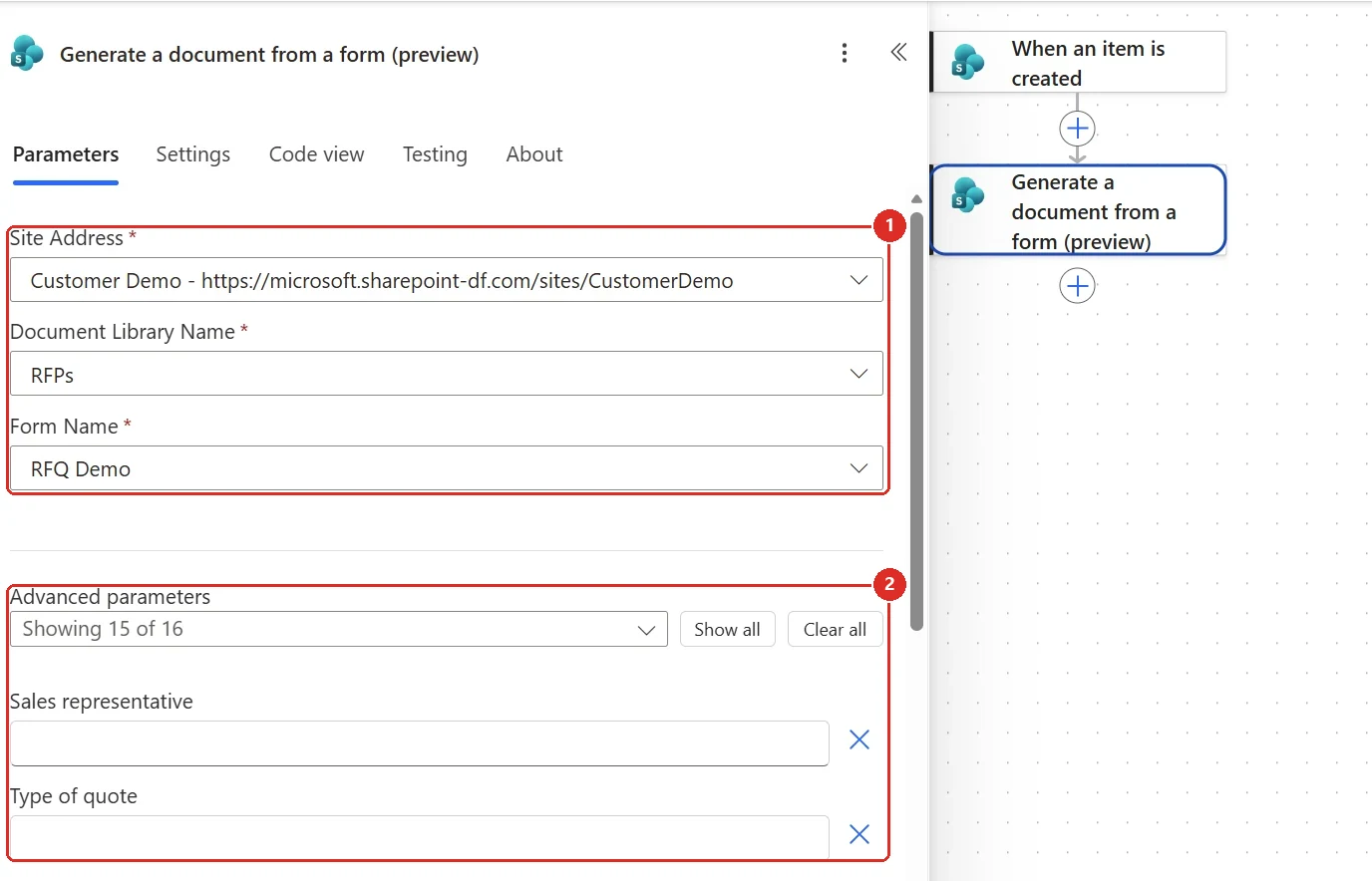
Official Microsoft image from the July roundup, red boxes mine. 1 the three things the action actually needs: a site, a library and a form. 2 the part that does the work, your form fields turned into parameters you can map.
📖 M365 Roadmap 561026 · Microsoft’s July 2026 Copilot roundup
Copilot Chat, Notebooks, Search and agents
25. Add the Word, Excel and PowerPoint agents straight into a chat
For: Microsoft 365 Copilot Chat · Rolled out July 2026
You can now pull the Word, Excel and PowerPoint agents directly into a Copilot Chat prompt. Open Copilot, @mention the agent, and it joins the chat.
That means you can create a document, a spreadsheet or a deck without leaving the Copilot app.
One thing Microsoft’s note does not say is whether a Copilot licence is needed to use the agents this way. The Word agent’s own roadmap entry 543420 says that agent is available to Microsoft 365 users with or without a Copilot licence — but that is a statement about the agent itself, not about this chat integration, so I would not promise either way until you see it in your own tenant.
Why this matters: It collapses the "where do I start?" problem. You no longer have to decide whether a piece of work is a Word job or an Excel job before you begin — you just describe it and bring the right agent in.
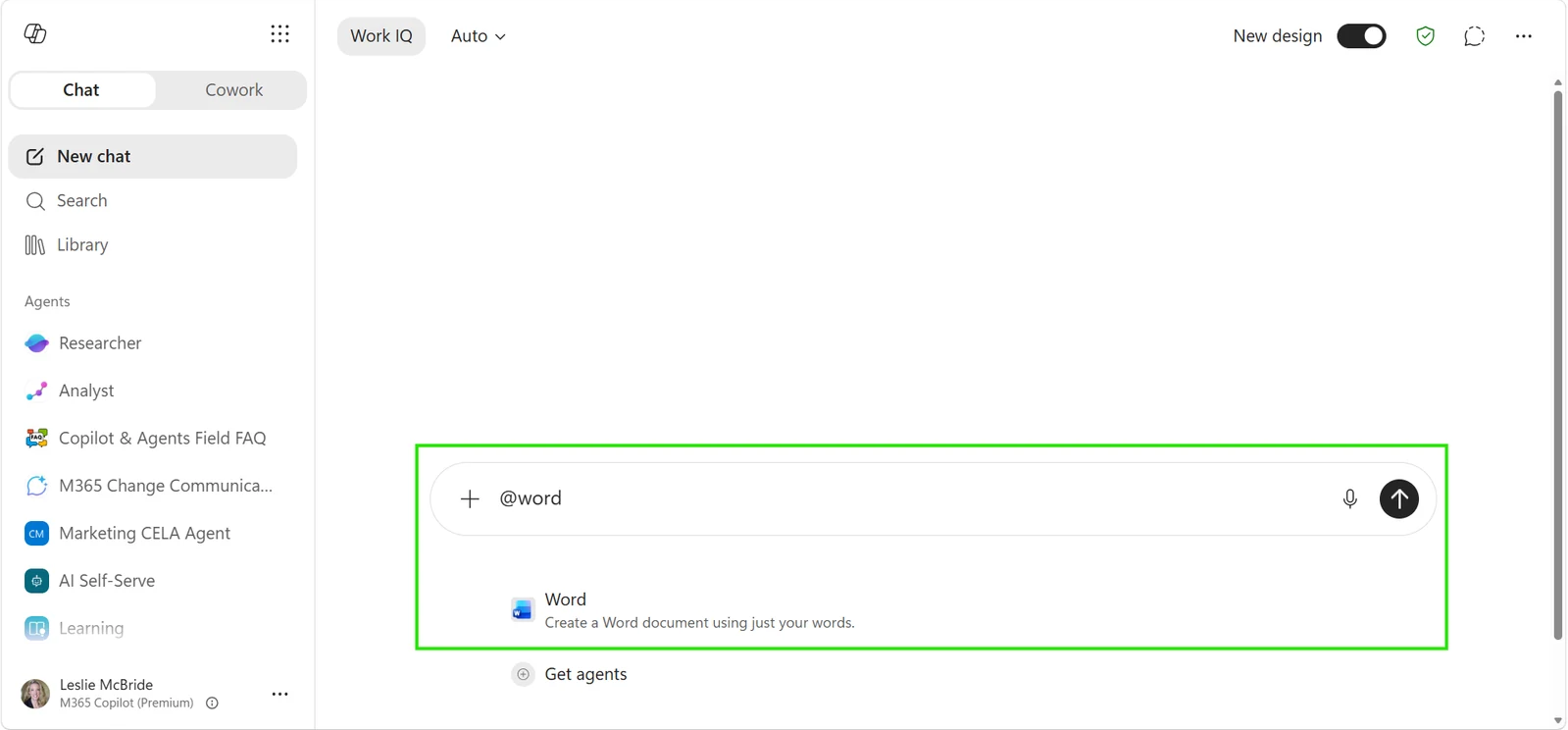
Official Microsoft image from the July roundup.
📖 Roadmap 543420 · 543422 · 543421 · Microsoft’s July 2026 Copilot roundup
26. Copilot Chat can ground answers in Power BI
For: Microsoft 365 Copilot Chat + Power BI through Work IQ · Frontier · Rolled out June 2026
Microsoft’s June roundup said Copilot could reason over Power BI enterprise data and return grounded answers from Power BI reports and semantic models. Eligible Frontier users with Microsoft 365 Copilot Premium and permission/licensed access to the relevant Power BI reports and semantic models could ask a natural-language question without first building a query or exporting the data.
This keeps the answer inside Copilot while the underlying BI model remains governed. The semantic model still supplies the business definitions; Copilot gives the user a simpler way to ask the question.
Why this matters: A well-built semantic model already contains the organisation's agreed version of revenue, margin, customer and product. Bringing that governed meaning into Copilot is much safer than asking people to reason from a pasted spreadsheet.
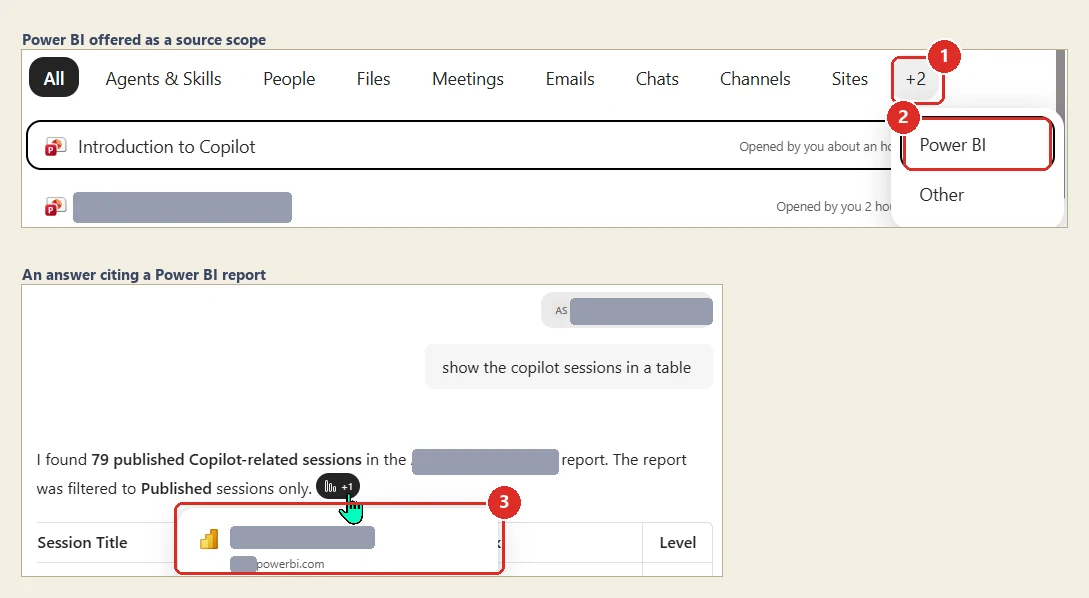
My own tenant, 21 August 2026 — Frontier, Work IQ on, Microsoft 365 Copilot Premium. Red boxes mine. 1 the scope row hides its last two entries behind +2; 2 opening it shows Power BI is one of them. 3 hovering the citation on the answer resolves it to a Power BI report on …powerbi.com. The report I queried is internal, so its name is masked in all three places it appeared, the tenant subdomain is masked, and the results table — which listed named colleagues — is cropped away entirely.
📖 M365 Roadmap 567891 · Microsoft’s June 2026 Copilot roundup · Microsoft Fabric IQ in Microsoft 365 Copilot
27. Regenerate lets you retry or switch model
For: Microsoft 365 Copilot Chat · Rolled out June 2026
The latest Copilot response gained a Regenerate path with simple actions such as Try Again and Switch Model. Users could explore another answer without copying the prompt into a new chat or rebuilding the context from scratch.
The model switch is especially useful when the first response is structurally fine but the task needs a different kind of reasoning. The conversation stays in place while the user changes the engine behind the next attempt.
Why this matters: The first answer is not always the best answer. A one-click retry keeps the useful context and makes iteration feel like part of the workflow instead of a failure.
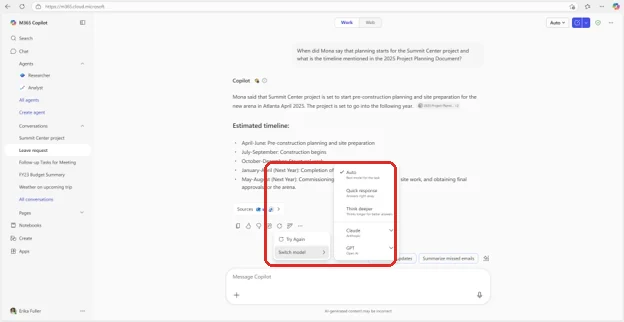
Official Microsoft image from the June roundup, red box mine — the Try Again and Switch model options, and the model list they open: Auto, Quick response, Think deeper, Claude and GPT.
📖 Microsoft’s June 2026 Copilot roundup
28. The Copilot mobile app sends push notifications
For: Microsoft 365 Copilot mobile app · iOS and Android · Microsoft 365 Copilot licence required · Rolled out July 2026 · Timing disputed, see below
Microsoft’s July roundup says the Copilot mobile app can now send push notifications so you can catch up without opening Outlook, Teams and everything else in turn. You get prompts like Your Day at a Glance and Items waiting for you.
Open the notification and the app is already showing the answer to that prompt, rather than an empty chat box.
The roadmap entry adds one detail the roundup leaves out: the feature taps into your Copilot Memory. That is worth knowing, because it means the picks are shaped by what Copilot has already learned about your work, not by a generic rule applied to everyone.
Why this matters: This is the first time the Copilot mobile app reaches out rather than waiting to be opened. Copilot could already act unprompted — scheduled prompts run to a timetable, and Cowork sends approval and completion notifications — but this puts that on the device you actually carry.
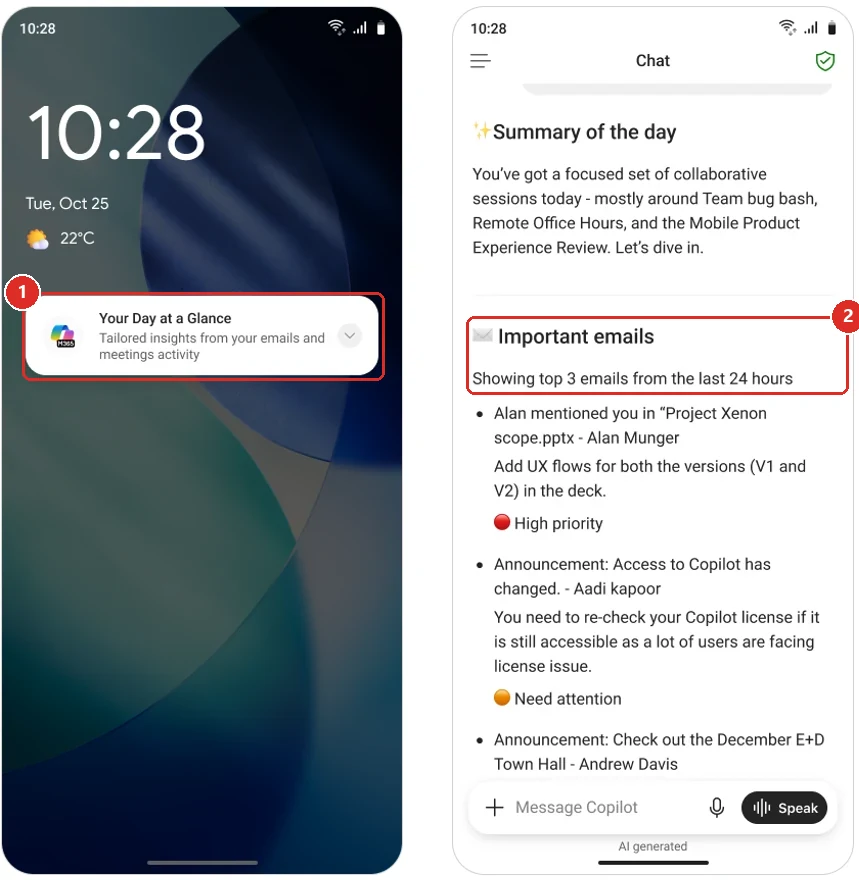
Official Microsoft image from the July roundup, red boxes mine. 1 the notification on the lock screen · 2 what it opens into — a ranked digest, not just a nudge.
Timing disputed — check before you promise this to anyone. Microsoft's July roundup states plainly that this feature "rolled out in July". The matching roadmap entry disagrees: 560339 still reads In development with general availability given as September 2026, and it was last updated on 10 August 2026 - after the roundup was published. My own rule for this issue is that the later Microsoft source wins, and the later source here is the roadmap. So treat September as the date to plan around, and treat any earlier sighting in your tenant as a bonus rather than the norm.
📖 M365 Roadmap 560339 · Microsoft’s July 2026 Copilot roundup
29. Copilot Notebooks accept Markdown, TXT and RTF files
For: Copilot Notebooks · TXT and RTF rolled out July 2026 · Markdown rolling out August 2026
Notebooks can now take Markdown (.md), TXT (.txt) and RTF (.rtf) files as references, alongside the file types they already supported. That covers software documentation, video transcripts and rich-text notes.
Worth reading the timing carefully, because Microsoft split it: TXT and RTF rolled out in July, and Markdown support rolls out in August.
Why this matters: Markdown is where a lot of technical truth actually lives — READMEs, runbooks, exported notes. Until now that content had to be converted before Copilot could reason over it.
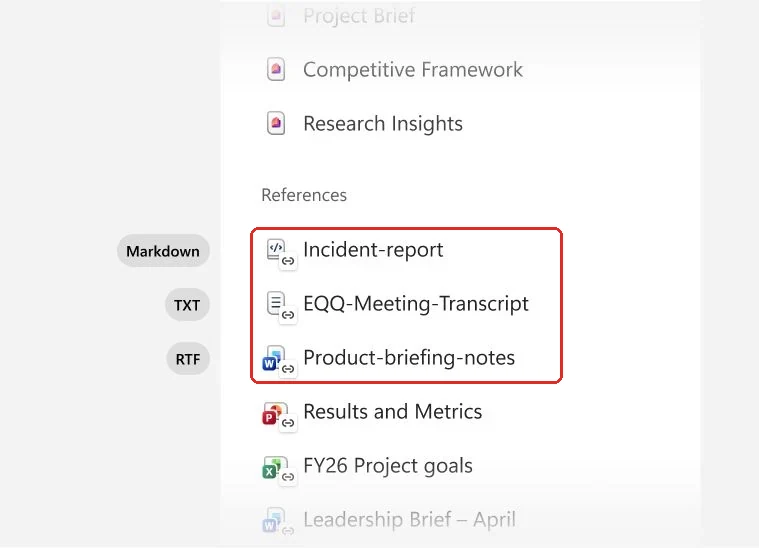
Official Microsoft image from the July roundup, red box mine — the three new formats sitting in the References list alongside the Office files that were always allowed.
📖 Microsoft’s July 2026 Copilot roundup
30. Copilot Notebooks expanded to Chat users
For: Copilot Notebooks + Copilot Chat users · Rolled out June 2026
Copilot Notebooks expanded beyond people with a paid Microsoft 365 Copilot licence to Copilot Chat users. More people could gather project references in one place and work from the same notebook context.
The June article called out tools such as mind maps and study guides alongside the shared reference workspace. This is access expansion rather than a new Notebook concept: the important change is who can use it.
Why this matters: Shared context only works when the wider team can reach it. Expanding Notebooks to Chat users makes the project workspace useful beyond the smaller licensed group.
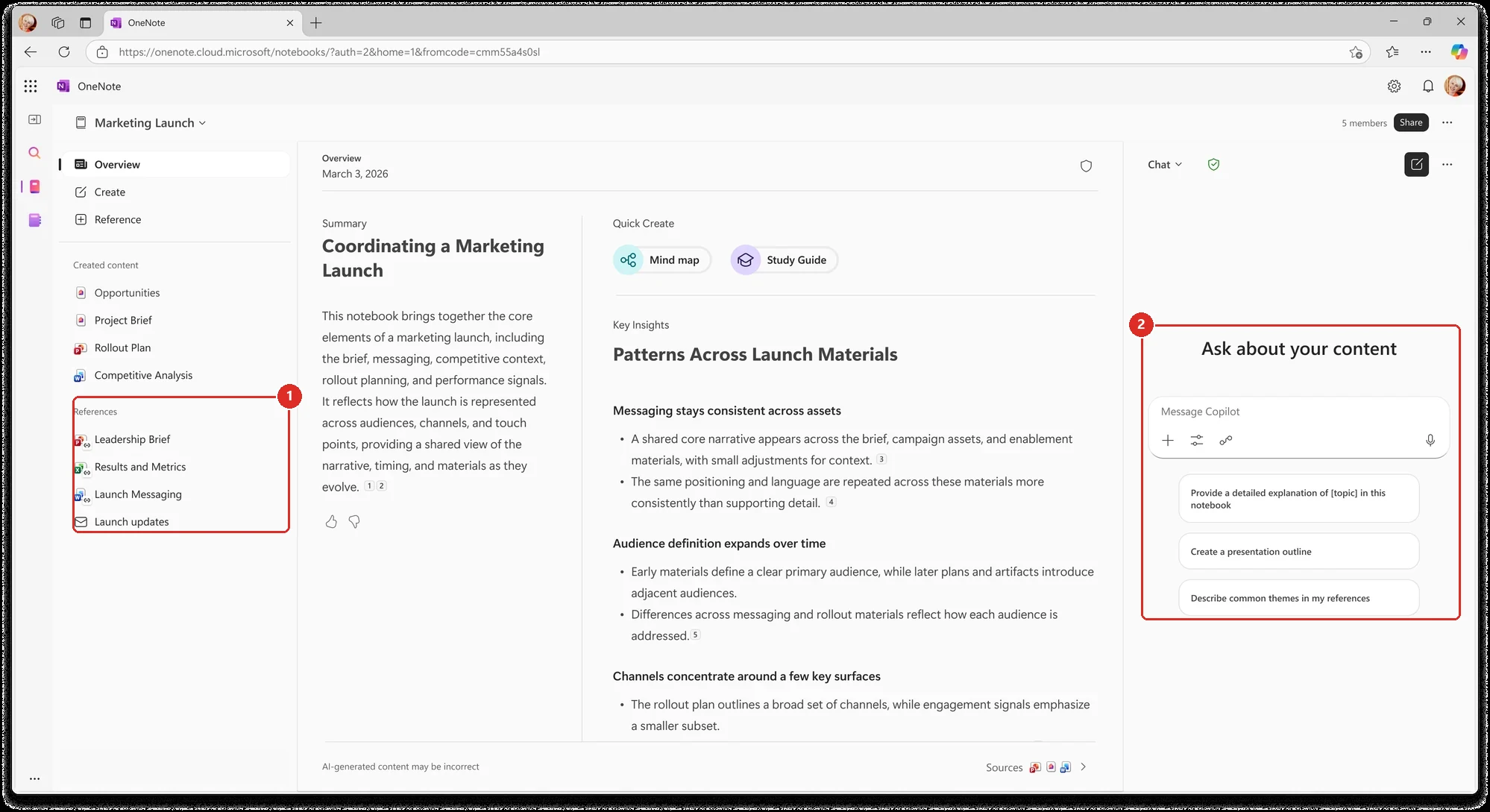
Official Microsoft image from the June roundup, red boxes mine. 1 the notebook's References, the material its answers are grounded in · 2 the Ask about your content pane a Chat user works in.
📖 Microsoft’s June 2026 Copilot roundup
31. Outlook emails can be added to a Copilot Notebook
For: Copilot Notebooks · Rolled out July 2026
You can add Outlook emails as references inside a Copilot Notebook, alongside the files, pages and links you already collect there. The notebook then grounds its answers in those conversations — the decisions, the caveats, the constraint somebody mentioned once and never wrote down anywhere else.
Why this matters: A lot of the reasoning behind a piece of work never reaches the document. It stays in the thread. Pulling the thread into the same notebook as the deliverable means Copilot is reading the argument, not just the conclusion.
This moved up from my horizon list. I had this as a watch item because I could not confirm it had shipped. Its roadmap entry now reads Launched, so it gets a proper section.
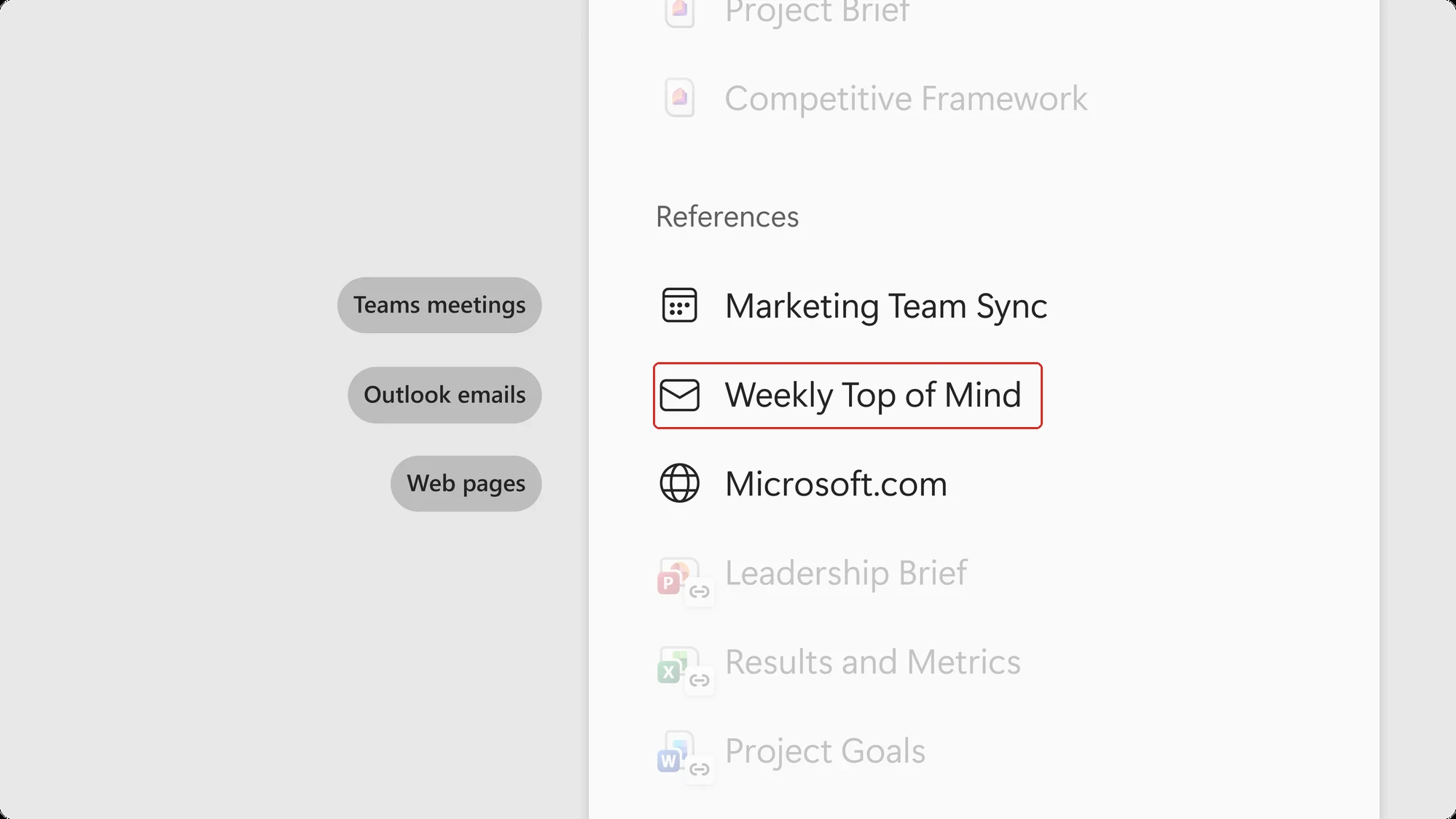
Official Microsoft image from the June roundup — a composed illustration rather than a plain screenshot, so the grey pill labels are Microsoft's. The red box is mine, and it marks the Outlook email, Weekly Top of Mind, sitting in the notebook's References beside a Teams meeting and a web page.
📖 M365 Roadmap 564910 · Microsoft’s June 2026 Copilot roundup
32. Copilot Search answers got shorter, with a clearer way to continue
For: Copilot Search · Rolled out July 2026
Copilot answers inside the Copilot Search module now give more concise responses, and they show more prominently that you can carry the conversation on in Copilot Chat in the sidebar.
In my own tenant on 21 August 2026, both halves hold up. The route to Chat is a two-step path, though, which Microsoft’s one-line description does not convey.
Asking Copilot Search what was new in Copilot during July returned a single short paragraph with citations, visibly cut off with a fade and a Continue reading button, rather than the long answer this used to produce.
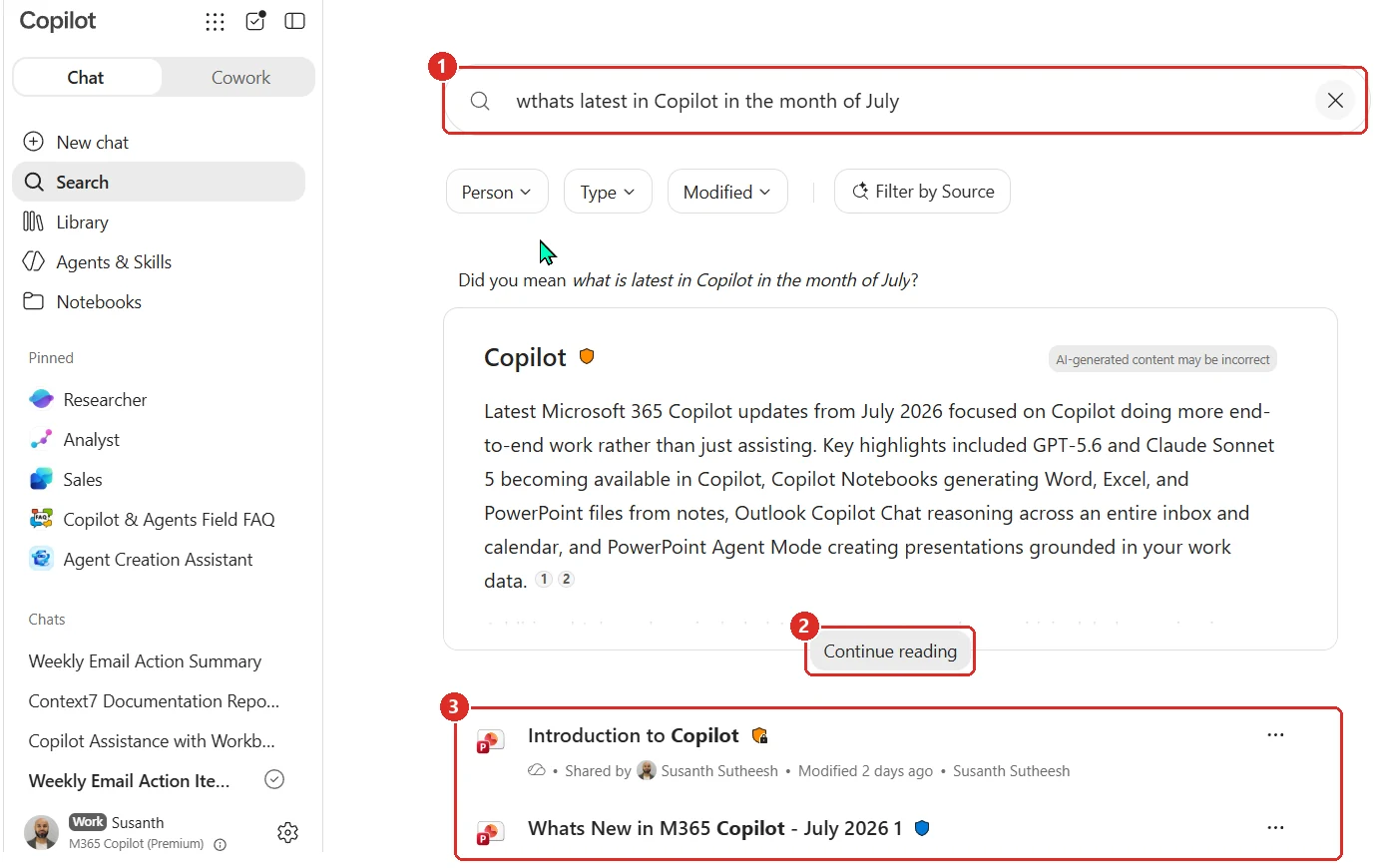
My own tenant on 21 August 2026. 1 the query · 2 the answer stops short and offers Continue reading · 3 the file results still sit underneath the answer. File preview text redacted.
Continue reading expands the answer in place. It does not take you to Chat. The handoff is a second control that only appears once the answer is fully expanded: an Ask Copilot button sitting under the finished text. That is the one that opens Copilot Chat in the right rail, with the original question already carried across, so you can keep going without retyping it.
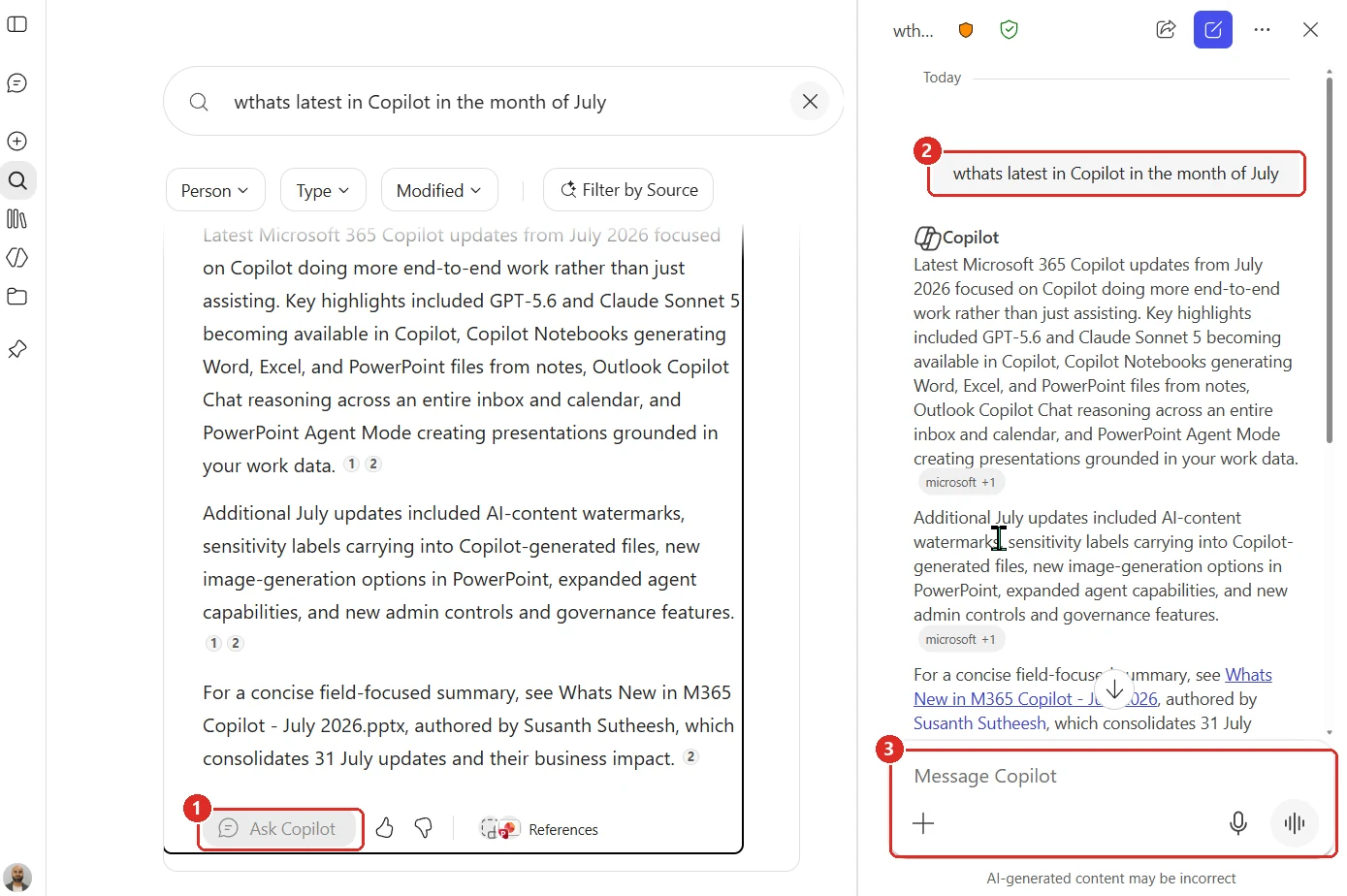
My own tenant on 21 August 2026. 1 Ask Copilot appears only after the answer is expanded · 2 the question is carried into Chat for you · 3 the composer is there to keep the thread going. The source-filter column between the two panes has been removed.
Why this matters: Search answers were often too long to skim and too short to be the final word, so people bounced. Making them tighter and putting an obvious "keep going" path next to them fixes both ends of that. Worth knowing the path is two clicks, not one, if you are writing adoption guidance.
📖 M365 Roadmap 562354 · Microsoft’s July 2026 Copilot roundup
33. Add and manage your own sources, and point a prompt at one
For: Microsoft 365 Copilot · Rolled out July 2026
Copilot now lets you manage your own sources directly, and scope a specific prompt to a single connector. So you can tell Copilot to answer only from, say, your ticketing system rather than everything it can reach.
One clarification, because the wording invites the wrong reading: users are not deploying arbitrary connectors. An admin enables the connector for the tenant; the user then authenticates to it and chooses when to point a prompt at it.
Why this matters: Most bad Copilot answers are not the model being wrong — they are the model reading the wrong thing. Being able to say "only look here" is the simplest quality control there is.
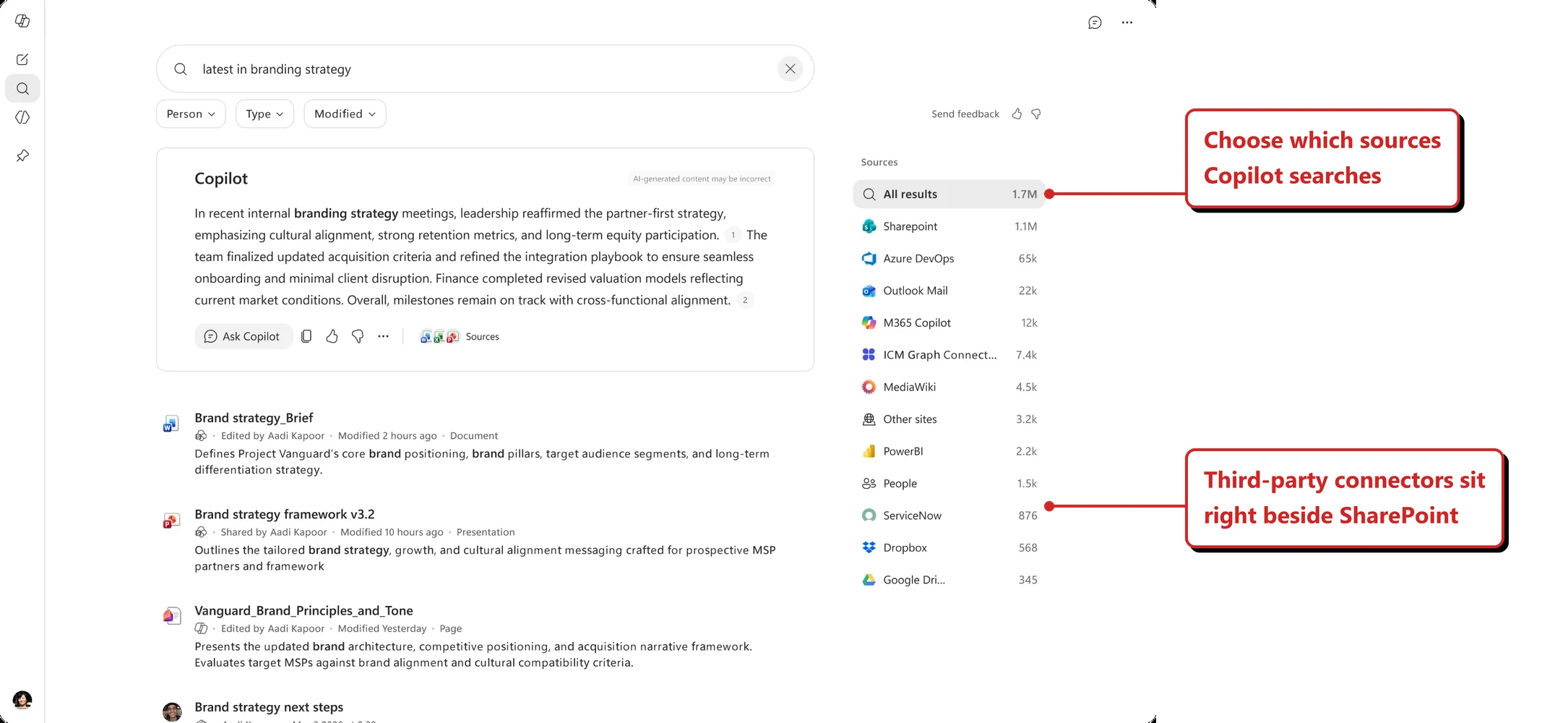
Official Microsoft image from the July roundup, with my annotation added.
📖 M365 Roadmap 496596 · Microsoft’s July 2026 Copilot roundup
34. Copilot connectors reach DoD tenants
For: Microsoft 365 Copilot · DoD cloud · Rolled out June 2026
Copilot connectors — including Atlassian Jira and Confluence — became available for DoD tenants. They were already available in GCC and GCC High, so this closes the last gap across the US government clouds.
Microsoft is explicit about where the data ends up, which is the part that matters in this cloud: content is indexed into Microsoft Graph and stays inside the tenant boundary, with existing permissions, compliance policies and security controls still governing access.
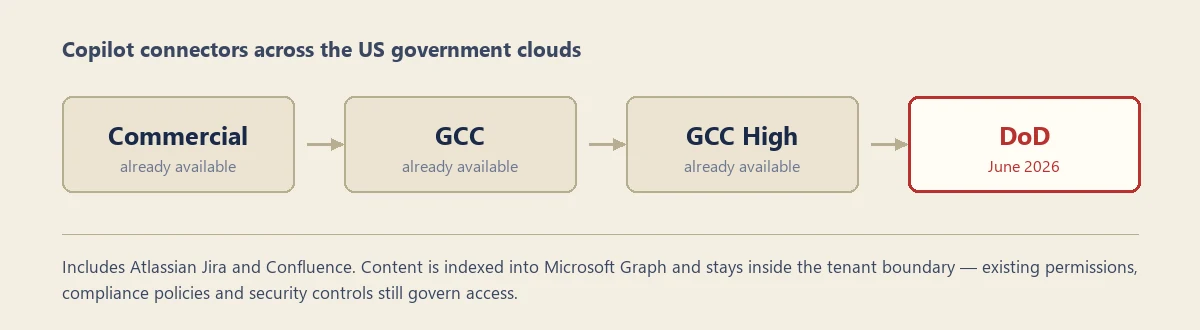
My own diagram, drawn from Microsoft's July 2026 roundup — not a screenshot. I have no DoD tenant to capture this in. The red box marks the cloud that changed.
Why this matters: Sovereign and government clouds usually trail commercial by a long way. Each connector that crosses over closes a real gap for teams who have been watching features they cannot use.
📖 M365 Roadmap 512428 · Microsoft’s July 2026 Copilot roundup
35. More Copilot connectors, aimed at specific industries
For: Microsoft 365 Copilot · Copilot connectors · Rolled out July 2026
Microsoft expanded the Copilot connectors catalogue with a set of clearly industry-shaped sources. Grouped by the industries Microsoft itself named: financial services (Daloopa, FactSet, Fitch Solutions, Morningstar, PitchBook, S&P Global), professional services (Dice, Forrester, HG Insights), industrial and manufacturing (Infor Nexus, Sight Machine), healthcare and life sciences (Article Galaxy, Nyquist AI), and retail and consumer goods (Passby Pulse, Polar Analytics).
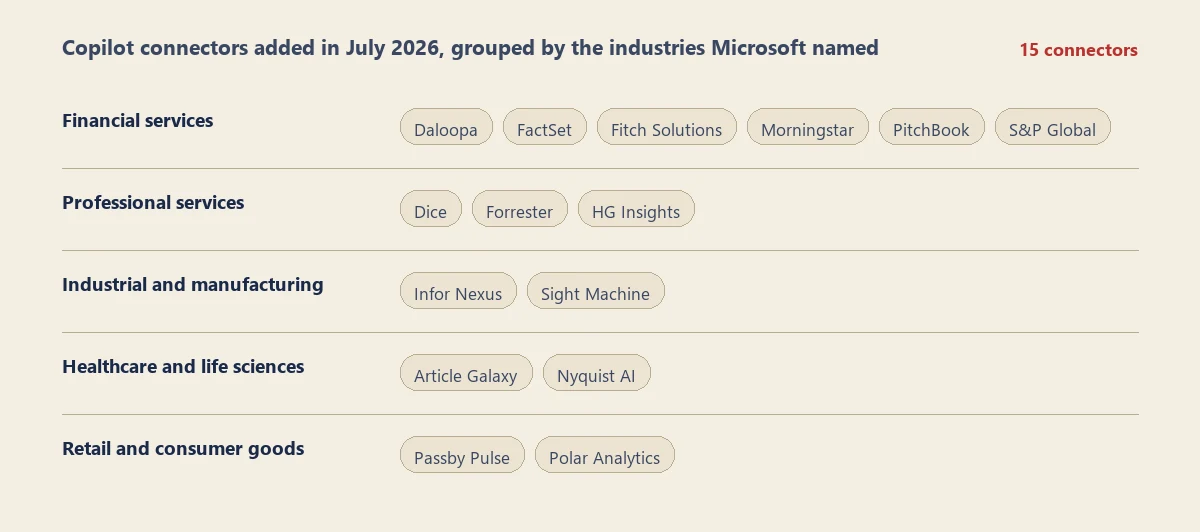
My own chart of the July additions — not a screenshot. My tenant is not licensed for any of these, so there is nothing for me to capture.
These are connectors, not plugins — they bring an external body of knowledge into Copilot’s grounding, so answers can cite it the same way they cite a SharePoint document.
Why this matters: Generic Copilot is only ever as good as the tenant it can see. A research analyst asking about a company does not want an answer synthesised from internal email — they want the source their industry already pays for. This is Microsoft filling in the sources that make Copilot useful in a specific job rather than in general.
📖 Copilot connectors overview · Microsoft’s July 2026 Copilot roundup
36. Researcher lets users choose models and modes
For: Researcher agent in Microsoft 365 Copilot · Rolled out June 2026
For eligible users, Researcher added model and mode choices directly in the Copilot conversation. Microsoft’s support experience shows Auto/Critique, Model Council, GPT and Claude paths; Claude requires admin-enabled Anthropic access, and the new Auto and Model Council features require Frontier.
Auto uses GPT responses refined by Claude; Model Council combines GPT and Claude deep reasoning; the GPT and Claude choices let the user select one provider’s deep-reasoning path directly.
Why this matters: Research tasks vary. Sometimes the user wants automatic orchestration; sometimes they want one model or a multi-model critique. Putting the choice inside Researcher keeps that decision close to the task.
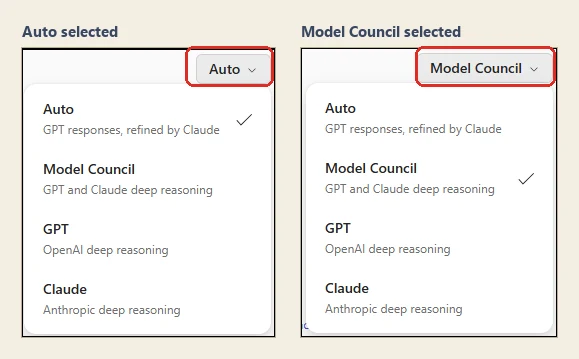
Official Microsoft support images, placed side by side by me, red boxes mine — the picker pill follows the choice. Both panels list the same four paths and what each one does: Auto is GPT refined by Claude, Model Council is GPT and Claude deep reasoning, and GPT and Claude are each that provider's deep reasoning on its own. Auto and Model Council need Frontier; Claude needs admin-enabled Anthropic access.
📖 Microsoft’s June 2026 Copilot roundup · Use model choice in the Researcher agent
37. Planner Agent adds task cards and plan management
For: Planner Agent in Microsoft 365 Copilot · Rolled out June 2026
Planner Agent could return interactive task cards and help people prioritise work across Planner plans. From natural language, users could create or update tasks and ask the agent to build a structured plan with goals and buckets.
The official example shows a draft campaign plan with dated tasks and a Save plan action. The conversation is not only describing the plan; it is preparing Planner work the user can review and save.
Why this matters: A plan becomes useful when the work is structured, dated and ready to assign. Planner Agent shortens the distance between discussing the project and having a real plan to manage.
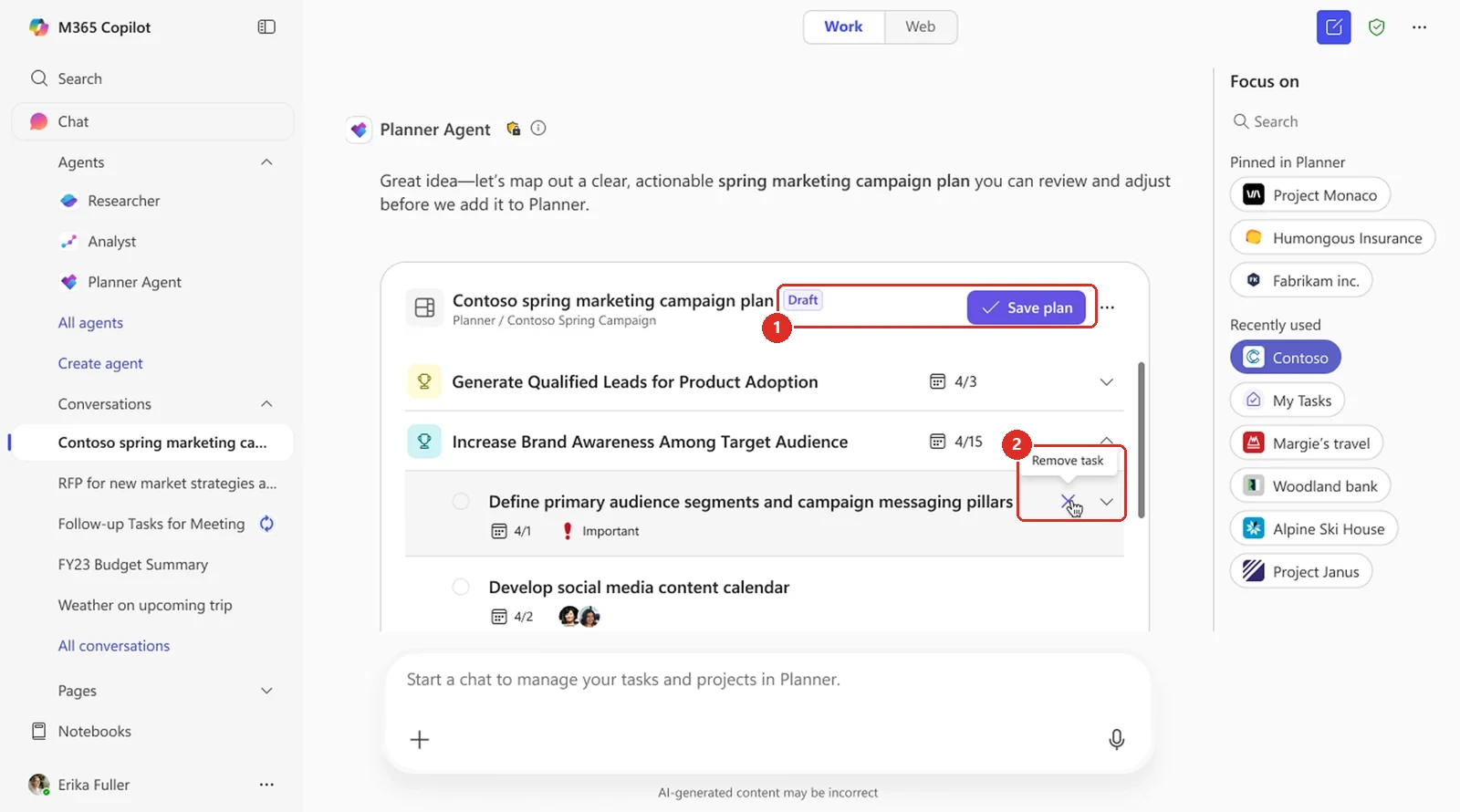
Official Microsoft image from the June roundup, red boxes mine. 1 nothing reaches Planner until you press Save plan, so the draft is yours to argue with first. 2 and you can strike tasks out inline before it commits.
📖 M365 Roadmap 516576 · Microsoft’s June 2026 Copilot roundup
Copilot Cowork
38. Claude Fable 5 (Preview) arrives in Cowork
For: Copilot Cowork · Preview · Off by default · Rolled out June 2026 · Timing disputed, see below
Anthropic’s Claude Fable 5 is available in Copilot Cowork, in Preview, as an option for longer, more complex work. Anthropic positions it for ambitious, long-running projects — sustained reasoning, deeper context handling, and the ability to plan, execute and check its own work across multi-stage tasks.
Two details that are easy to miss. It is off by default — an admin has to turn it on in the Microsoft 365 admin centre under Copilot settings, so it will not simply appear for your users. And Fable 5 requires data retention: Microsoft’s own change log says your prompts and responses for that model are retained by the model provider. Cowork shows a banner while the model is selected, so the person using it can see that is happening.
Why this matters: The interesting part is not another name in the model list. It is that Cowork is being pointed at work that runs for hours rather than seconds, where the model has to keep its footing without someone supervising every step. The opt-in is not a formality — it is a decision about where your prompts go.
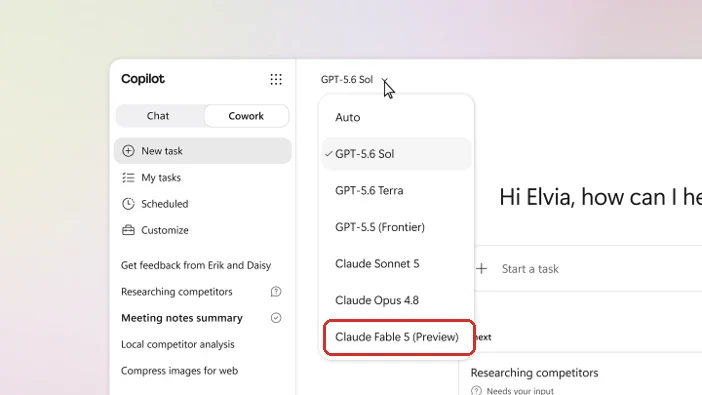
Official Microsoft image from the July roundup, red box mine — the new entry at the bottom of a list that already had six models in it.
📎 Two of our resources go deeper: the Copilot Cowork complete guide → for how it works, and our Cowork cost calculator → to estimate what a long-running task might cost.
Which month? Microsoft's own sources disagree. The Cowork change log places Fable 5 under June 2026, while the July roundup lists it as a July rollout. I have gone with June because that is the product team's own change log, but I cannot tell you the two agree.
📖 Microsoft’s July 2026 Copilot roundup · Cowork change log · Cowork model data retention
39. Cowork tasks can be triggered by an event, not just a schedule
For: Copilot Cowork · Frontier first, possibly broader now — see below · Rolled out July 2026
Cowork tasks used to run when you asked, or on a schedule. Now they can run when something happens. You describe the trigger in plain language — a message from a particular sender, an @mention, a keyword or topic, or a named event — and Cowork watches for it across Teams chats and channels, Outlook email and meetings.
The example in Microsoft’s own image is the giveaway: you write the task, and Cowork comes back with a “Set up trigger?” card rather than making you build the automation yourself.
Why this matters: A scheduled task runs whether or not there is anything to do. An event-triggered one runs because there is. That is the difference between an agent that adds noise to your day and one that only speaks when something actually happened.
Frontier first — but the two Microsoft sources have drifted apart. The July roundup says this rolled out in July to Frontier, the early-access programme, rather than to every tenant. The Cowork change log is less restrictive: updated on 5 August, it lists event-driven tasks under July with no Frontier note — and it does still tag the local-browser feature as Frontier further down the same page, so the omission looks deliberate rather than sloppy. By the same rule I used for the mobile notifications above, the later Microsoft source wins, which points to this having widened. I would still plan for Frontier and treat a wider rollout as a bonus, rather than promise it to a tenant that cannot see it yet.
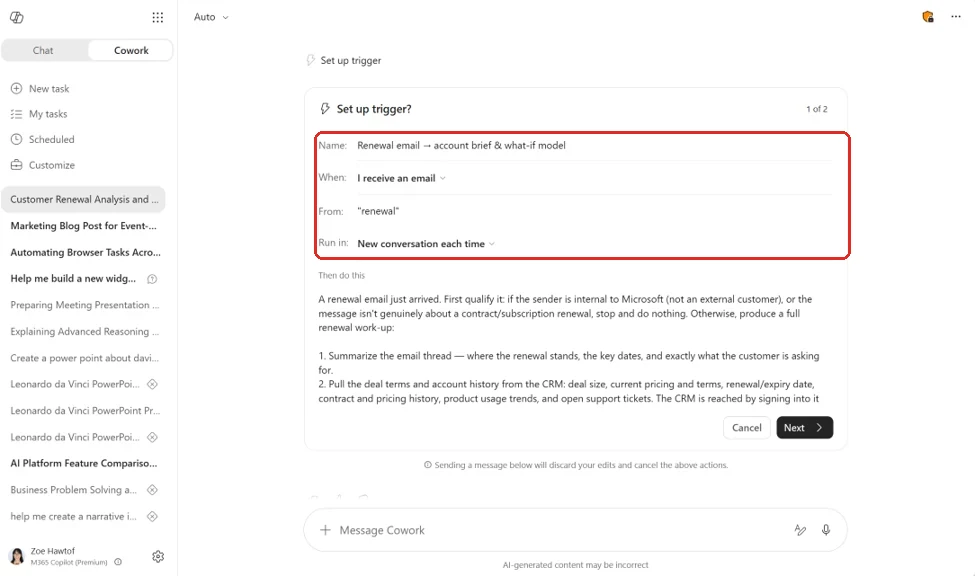
Official Microsoft image from the July roundup, red box mine — the whole trigger definition. The When row is the change: an arriving email, not a time of day.
📖 Microsoft’s July 2026 Copilot roundup · Cowork change log
40. Cowork can choose the model for the job
For: Copilot Cowork · Rolled out June 2026
Cowork gained automatic model choice. It could use OpenAI GPT 5.5 for deeper research and citation-heavy work, or supported Anthropic models for visual tasks such as PowerPoint and graphics.
The useful part is not another model picker. Cowork can decide which model fits the task without asking the user to understand every model first. The user still defines the outcome; Cowork chooses the engine behind the work.
Why this matters: Model choice becomes much more useful when it is invisible. People can ask for the work they need instead of learning which model is best at research, visuals or multi-step reasoning.
Since then: Auto is now Cowork's default rather than a "Frontier" option, and Microsoft's documentation applies the Frontier label to GPT 5.5, not to Auto. The screenshot below shows the June-era model list — the current list is longer.
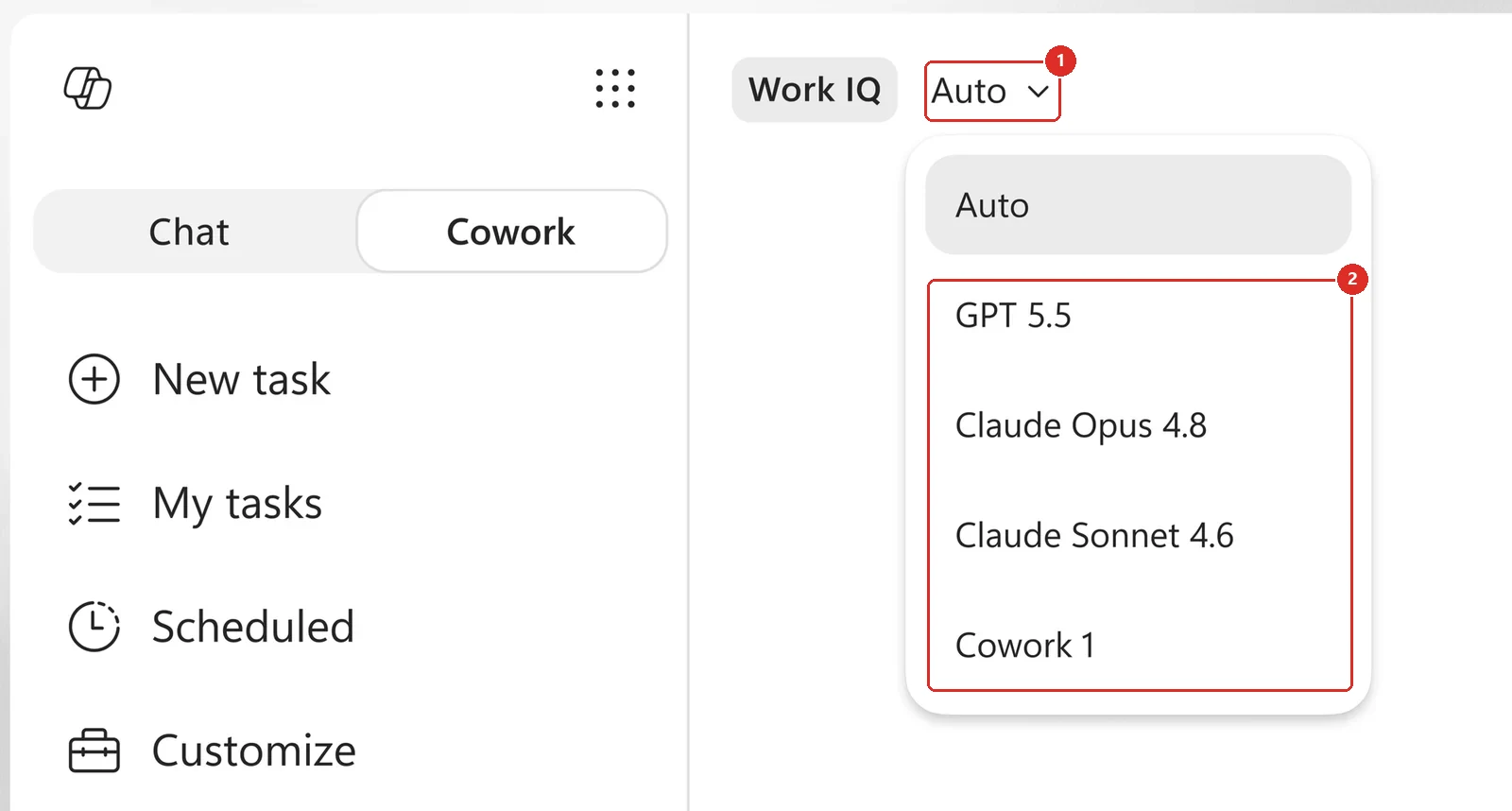
Official Microsoft image from the June roundup, red boxes mine. 1 the control, sitting next to the Work IQ chip rather than buried in settings. 2 what is in the list, two Anthropic models and a Cowork-specific one alongside GPT.
📖 Microsoft’s June 2026 Copilot roundup
41. Cowork’s plugin catalogue expanded
For: Copilot Cowork · Rolled out June 2026
Cowork’s plugin catalogue expanded into more of the systems people already use. Microsoft’s roundup named enosix arnold for Copilot Cowork, Harvey, LSEG, Miro, monday.com, Moody’s Credit MCP, Morningstar, S&P Global Energy and AI Meeting Notes TeamsMaestro, with Databricks available through sideloading.
Fabric IQ and named Dynamics 365 plugins — Customer Service, ERP and Sales — were also supported. That means a Cowork task can draw on more business context without asking the user to manually gather and paste everything into the prompt.
Why this matters: Cowork is only as useful as the systems it can reach. Every plugin on that list is a place your work already lives, and a question you no longer have to answer by copying and pasting.
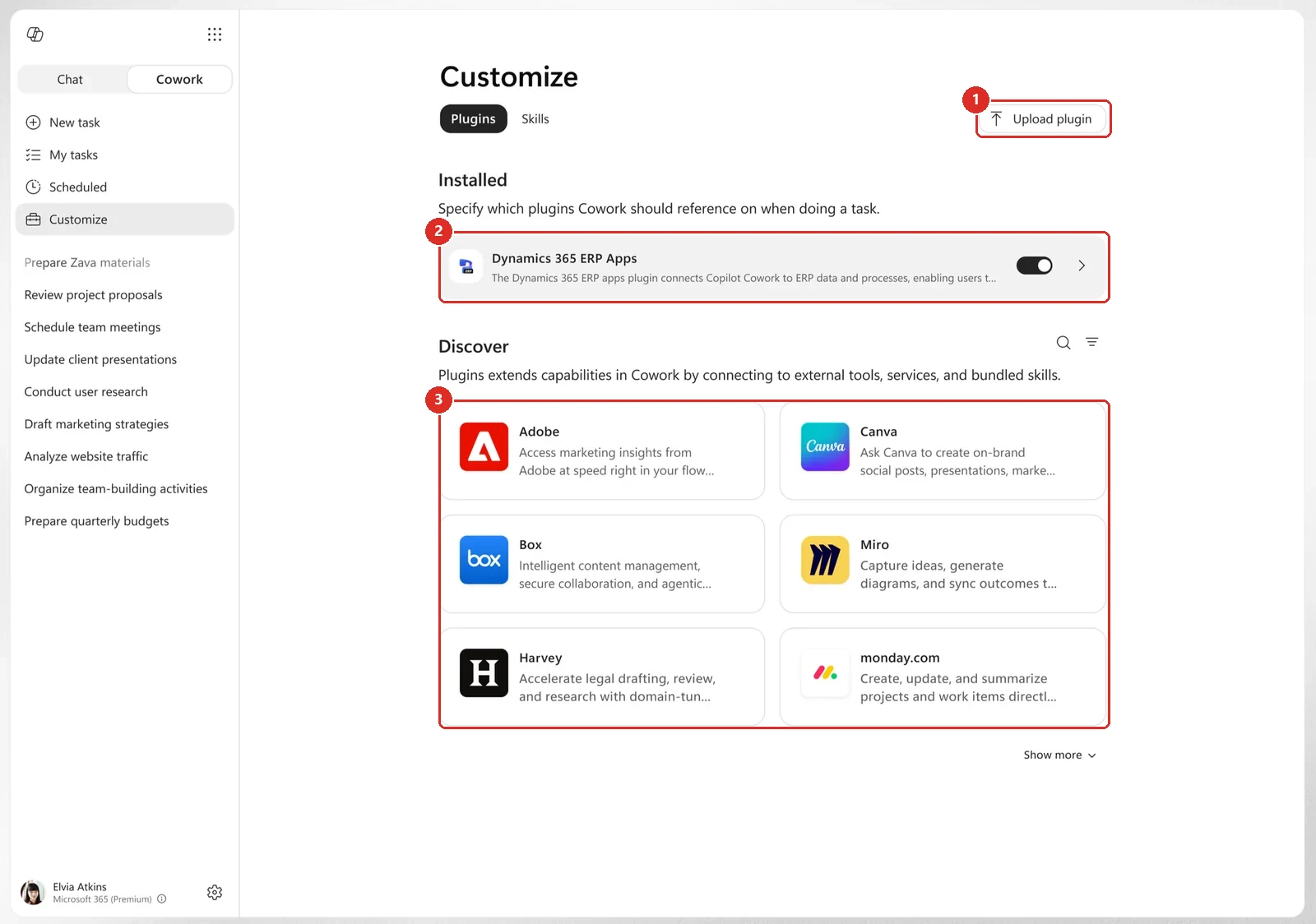
Official Microsoft image from the June roundup, red boxes mine. 1 you can upload your own. 2 installed plugins have a toggle, so this is a per-plugin on/off rather than all-or-nothing. 3 the catalogue, and the names in it are the interesting part.
📖 Microsoft’s June 2026 Copilot roundup
42. Cowork’s Customize tab gained skill authoring
For: Copilot Cowork · Customize · Timing disputed, see below
The same Customize surface has a second tab. Skills is where the reusable instructions live, and it gained authoring controls: Create new for writing a skill in place, and Upload skill for bringing in a .md, .zip or .skill file. Each skill has an owner and can be shared, so a working method can move from one person’s habit into something the whole team can call.
Timing note: Microsoft's own sources disagree on this one. The July roundup presents skill authoring as a July addition, while the current Cowork support documentation places the guided skill builder and skill uploads in June. I have flagged the conflict rather than quietly pick a date.
Why this matters: Plugins widen what Cowork can reach. Skills are what make a good process repeatable — the difference between one person who knows the trick and a team that can just call it.
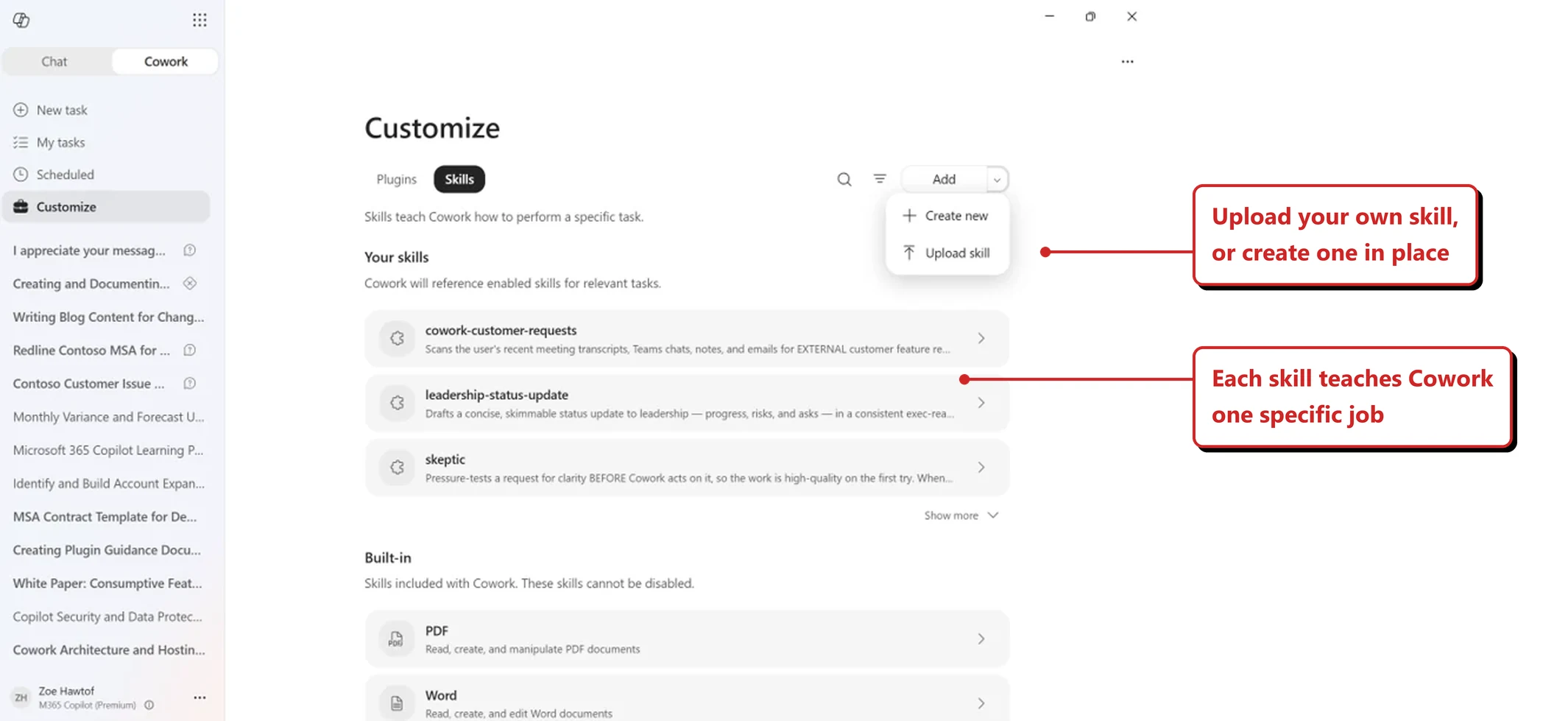
The Skills tab on the same Customize surface, with my annotations.
📖 Microsoft’s June 2026 Copilot roundup · Microsoft’s July 2026 Copilot roundup
43. Cowork can create and edit visuals
For: Copilot Cowork · Rolled out June 2026
Cowork could create and edit deck graphics, document illustrations and email imagery inside the task itself. Microsoft’s June article described the experience as powered by OpenAI’s ChatGPT Images 2.0.
That keeps the visual step inside the same flow as the research, writing and file creation. Instead of stopping to find another tool, the user can ask Cowork to create the image the deliverable needs.
Why this matters: A finished deliverable usually needs more than text. Letting Cowork make the supporting visual closes one more gap between a good draft and something ready to send.
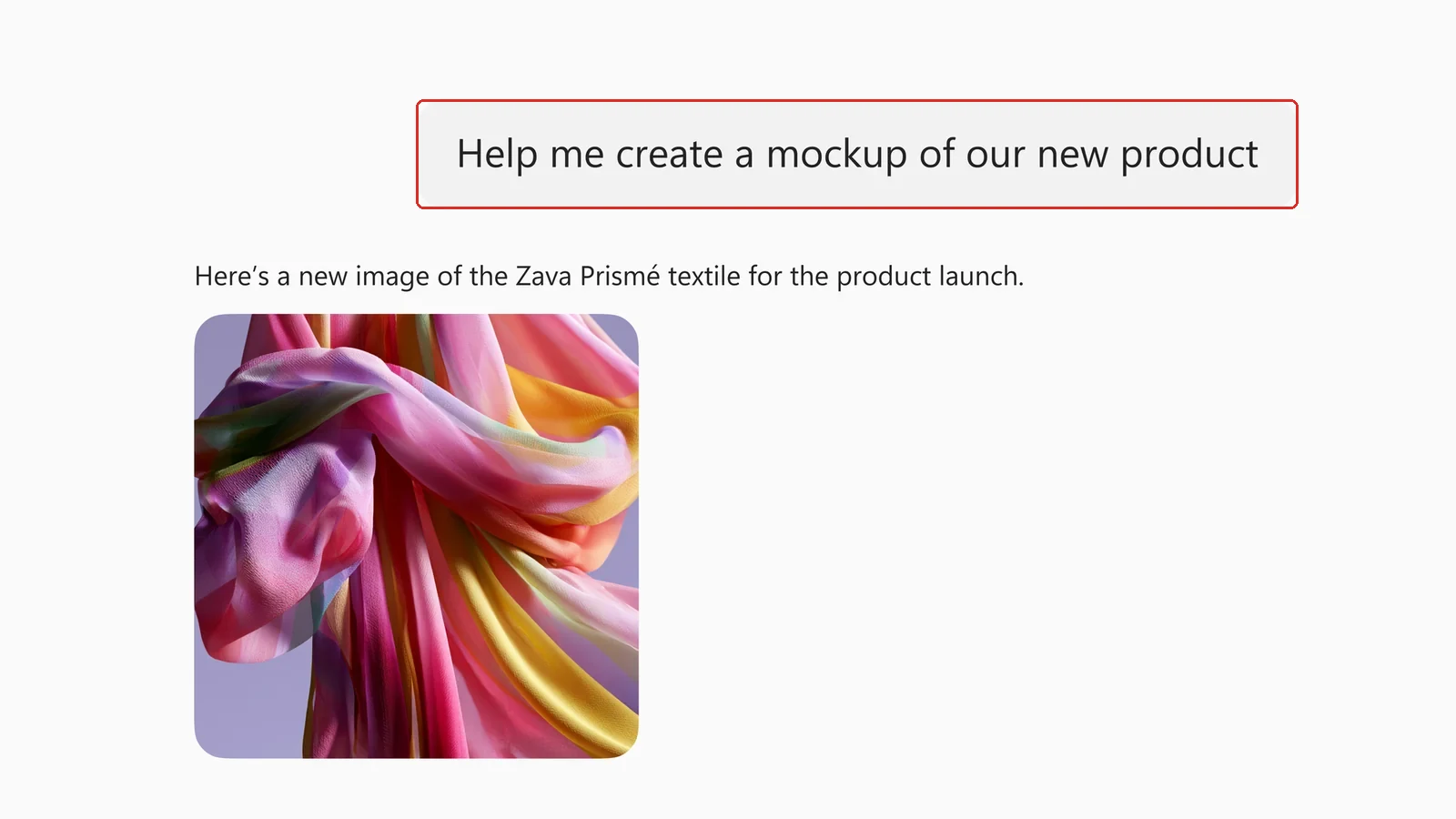
Official Microsoft image from the June roundup, red box mine. Nine words in, one image out, with no brand, format or style guidance anywhere in the prompt. Worth holding that thought until the next item.
📖 Microsoft’s June 2026 Copilot roundup
44. Cowork can use your organisational PowerPoint templates
For: Copilot Cowork + organisational asset library · Rolled out June 2026
Cowork could use branded PowerPoint templates from an organisation’s asset library. Generated presentations could begin with the approved colours, fonts, logos and layouts instead of needing a manual brand-clean-up pass afterward.
This is separate from image generation. One capability creates the visual content; the other makes sure the final deck looks like it belongs to the organisation that asked for it.
Why this matters: A deck is not finished if someone still has to rebuild it in the company template. Starting inside the approved brand system saves time and makes the output easier to trust.
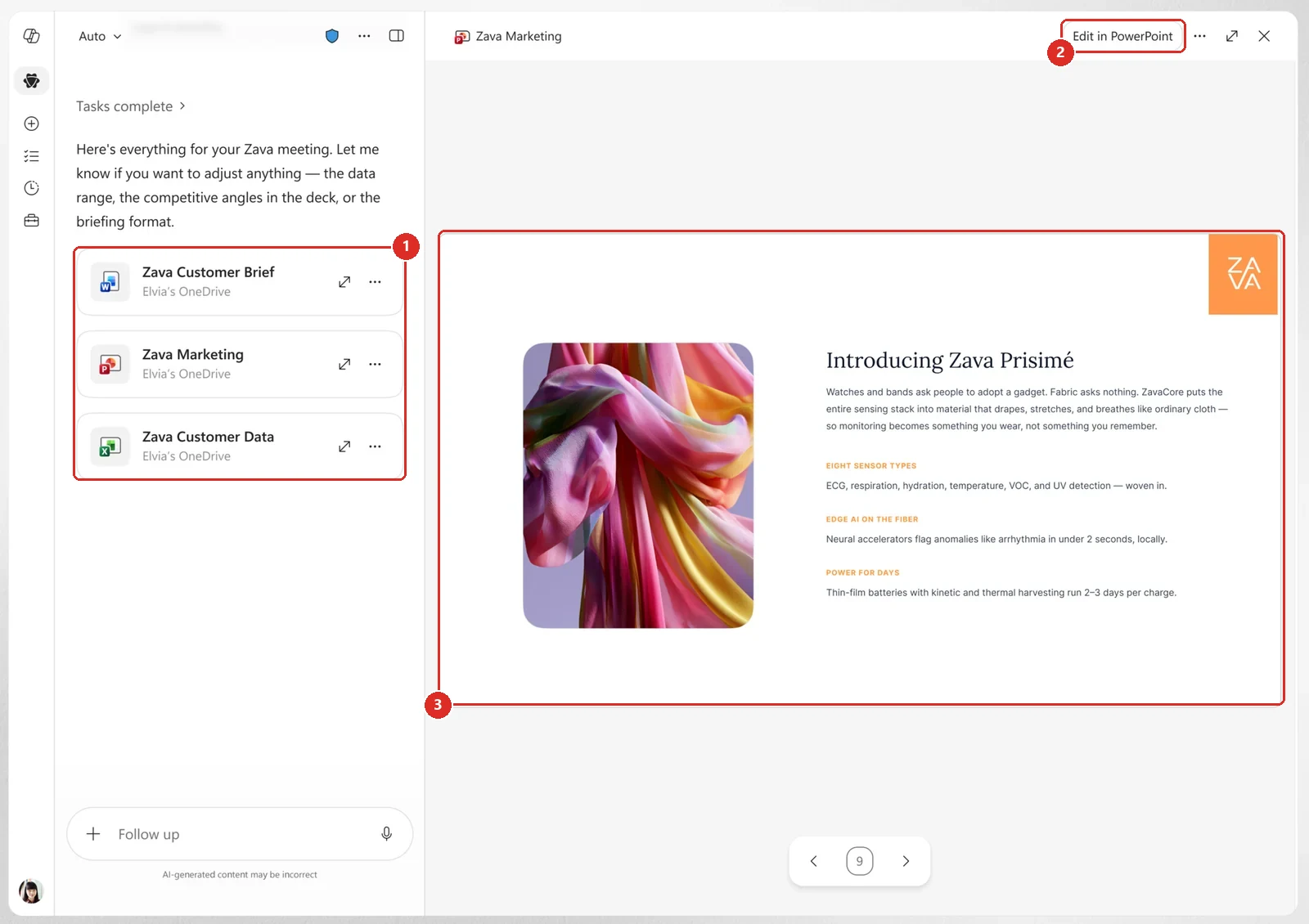
Official Microsoft image from the June roundup, red boxes mine. 1 one task, three files, in three different apps. 2 the way out, straight into PowerPoint. 3 the slide itself, carrying a logo block and brand-coloured labels rather than the generic look of the previous image.
📖 Microsoft’s June 2026 Copilot roundup
45. Cowork can work through the Edge browser
For: Copilot Cowork · Frontier · Rolled out June 2026
Cowork gained the ability to use Microsoft Edge across business systems, websites and intranet sites. That lets a task continue into browser-based tools instead of stopping when the next step sits outside Microsoft 365.
The official image also shows an approval boundary: when the browser needs a sign-in, Cowork pauses and asks the user to continue. Browser access does not mean invisible access to every system.
One update since June. Microsoft’s July roundup dropped the Frontier qualifier, but Microsoft’s current Cowork change log still lists this as Local browser use (Frontier) and states it is in Frontier and requires Edge to be installed. Plan on Frontier availability unless that product documentation changes.
Why this matters: A lot of real work ends in a browser-only system. Reaching that last mile is what turns "prepare the expense report" into "the receipts are ready in the expense tool."
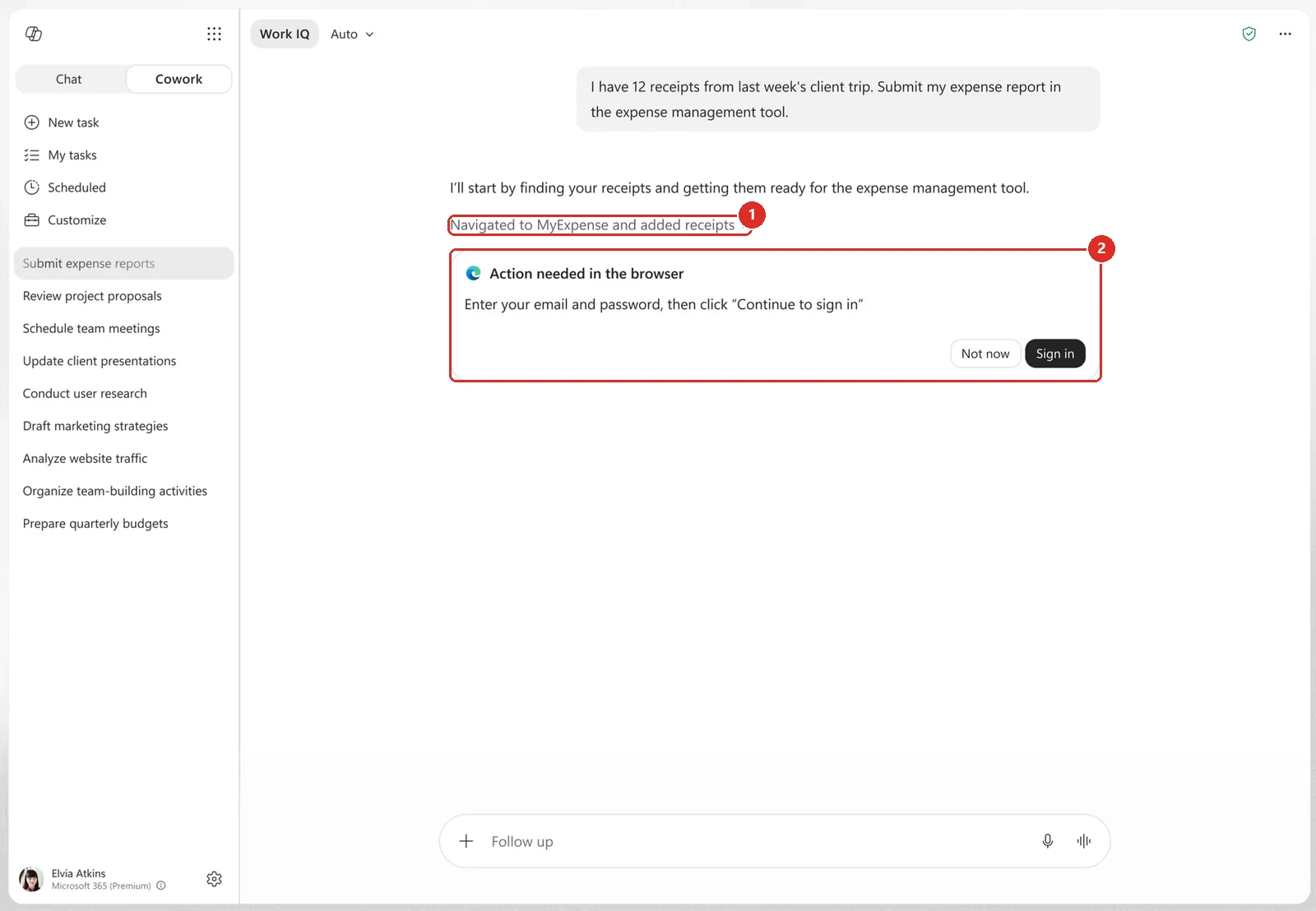
Official Microsoft image from the June roundup, red boxes mine. 1 it did drive the browser on its own. 2 and then handed straight back at the sign-in wall, which is the honest shape of most browser automation right now.
📖 Microsoft’s June 2026 Copilot roundup
46. Cowork sends approval and completion notifications
For: Copilot Cowork on iOS and Android · Rolled out June 2026
Cowork could send push notifications when a long-running task needed approval, needed more input, or had completed. The user no longer had to keep the task open and watch it work.
The notification becomes the hand-off point. Cowork can continue in the background, then bring the person back only when a decision or result is ready.
Why this matters: Long-running work is only useful if people can safely look away. Notifications let Cowork fit around the workday instead of asking the user to babysit the agent.
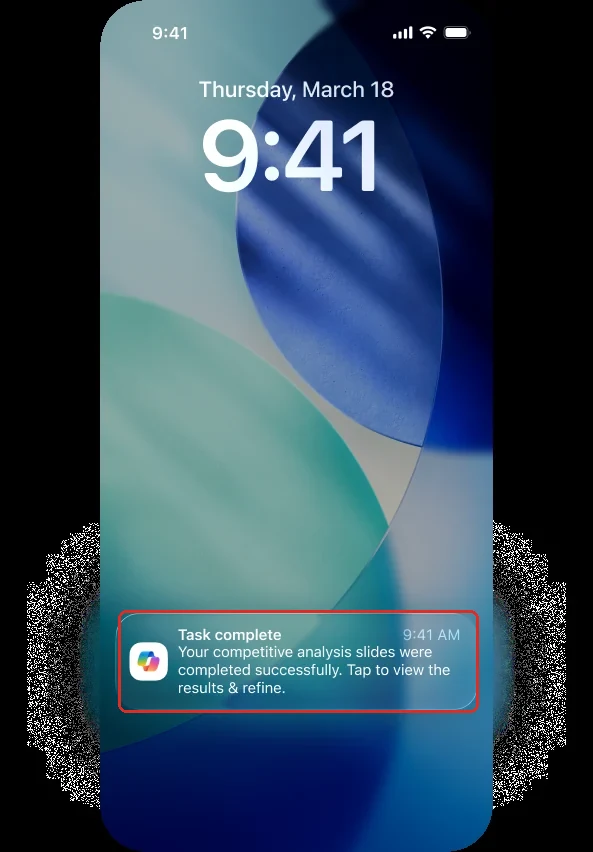
Official Microsoft image from the June roundup, red box mine. The point of a long-running task is that you stop watching it, so the finish has to find you.
📖 Microsoft’s June 2026 Copilot roundup
Admin, analytics and governance
47. Cost Management: better alerts, clearer policy logic, kinder overages
For: Microsoft 365 admin center · Cost Management · Rolled out July 2026
Three changes landed in Cost Management, and one of them needs an admin to actually do something.
- Improved spending alerts. Alerts got better — and Microsoft’s guidance is that admins should recreate alerts on existing spending policies where they rely on those notifications. Microsoft does not spell out what happens to an alert you leave alone, so if a notification matters to you, recreate it rather than assume.
- Clearer policy logic. If a user falls under more than one spending policy, they stay on the one with the highest per-user limit, and they are not moved to a different policy when they hit that limit.
- Kinder overage handling. A user who reaches their limit part-way through a task can finish that task. Microsoft’s stated intent is that the overage is not charged, and that it does not appear as consumed credits in the Cost Management dashboards. Read the fine print on that one: Learn describes the nonbilling as being at Microsoft’s sole discretion, and the not-shown-as-consumed promise is scoped to those dashboards.
The policy logic point is the one that trips people up: a spending policy sets a limit, it does not allocate or reserve a pool of credits for those users.
Why this matters: Cost controls only work if they are predictable. Knowing exactly which policy applies, and that a limit will not kill a job mid-run, is what lets an admin set a limit and stop worrying about it.
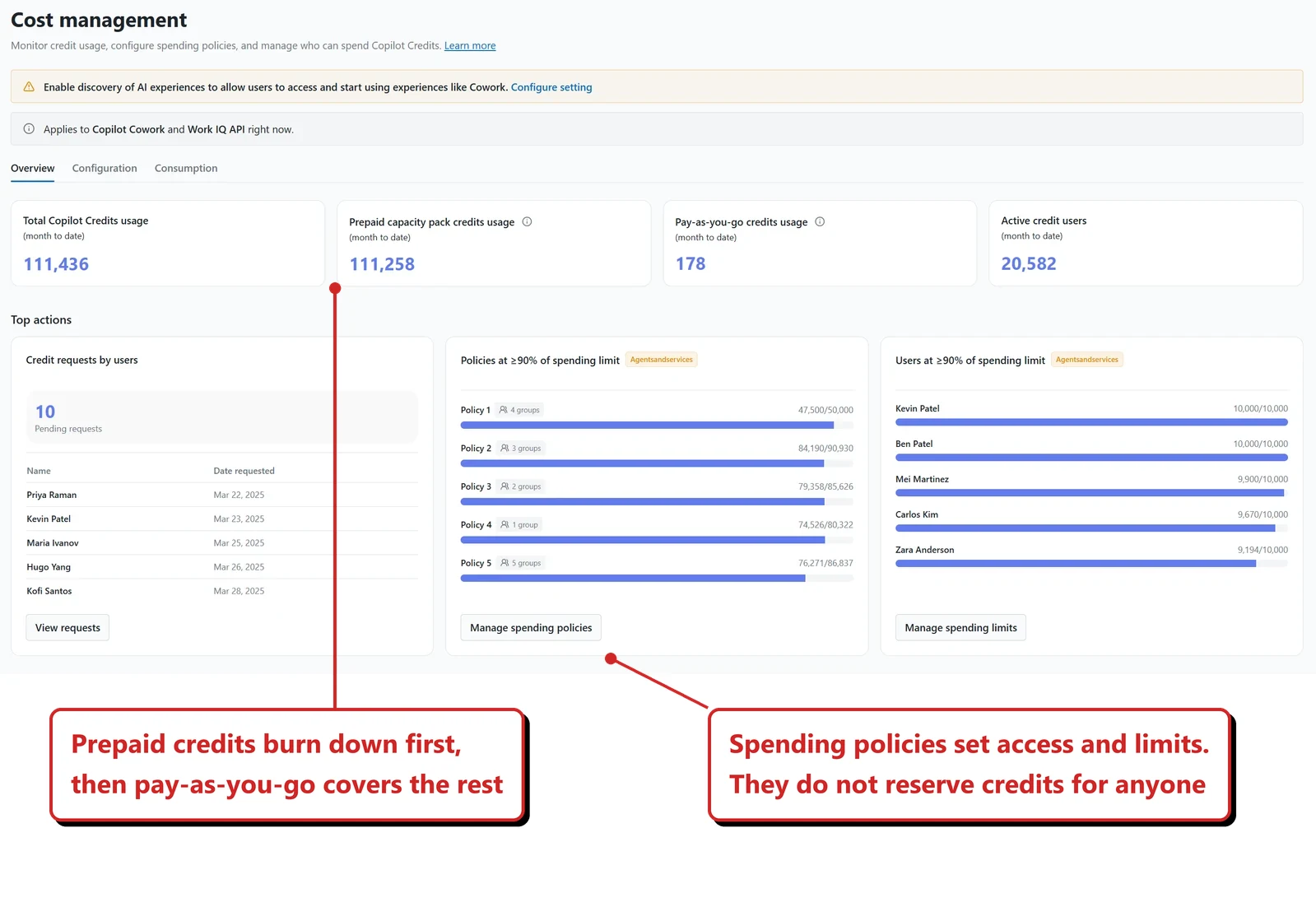
Official Microsoft image from the July roundup, with my annotation added.
📎 We go deeper on the numbers in our Copilot cost management guide → and Copilot credits explained →.
📖 Microsoft’s July 2026 Copilot roundup · Usage-based billing and cost management for Copilot Credits
48. The Cost Management Dashboard covers the full spend workflow
For: Microsoft 365 admin center + usage-based Copilot experiences · Rolled out June 2026
I had covered Cowork’s usage billing and spending limits, but not the complete Cost Management Dashboard workflow. Administrators could create group spending policies and limits, monitor Copilot Credits consumption, and work across both prepaid credits and pay-as-you-go billing.
Two details are easy to get wrong. A spending policy controls who can spend and how much — it does not allocate or reserve credits for that group. And prepaid and pay-as-you-go are not an either/or choice: prepaid capacity is consumed first, and once it is exhausted, usage continues through pay-as-you-go.
The same surface includes reporting, budgets, alerts and hard caps. The overview shows total credits, prepaid and pay-as-you-go use, active users, requests for increases and policies nearing their limits.
Why this matters: Consumption billing needs more than a monthly total. The dashboard gives admins the controls to decide who can spend, how much they can spend and what happens before the budget is exceeded.
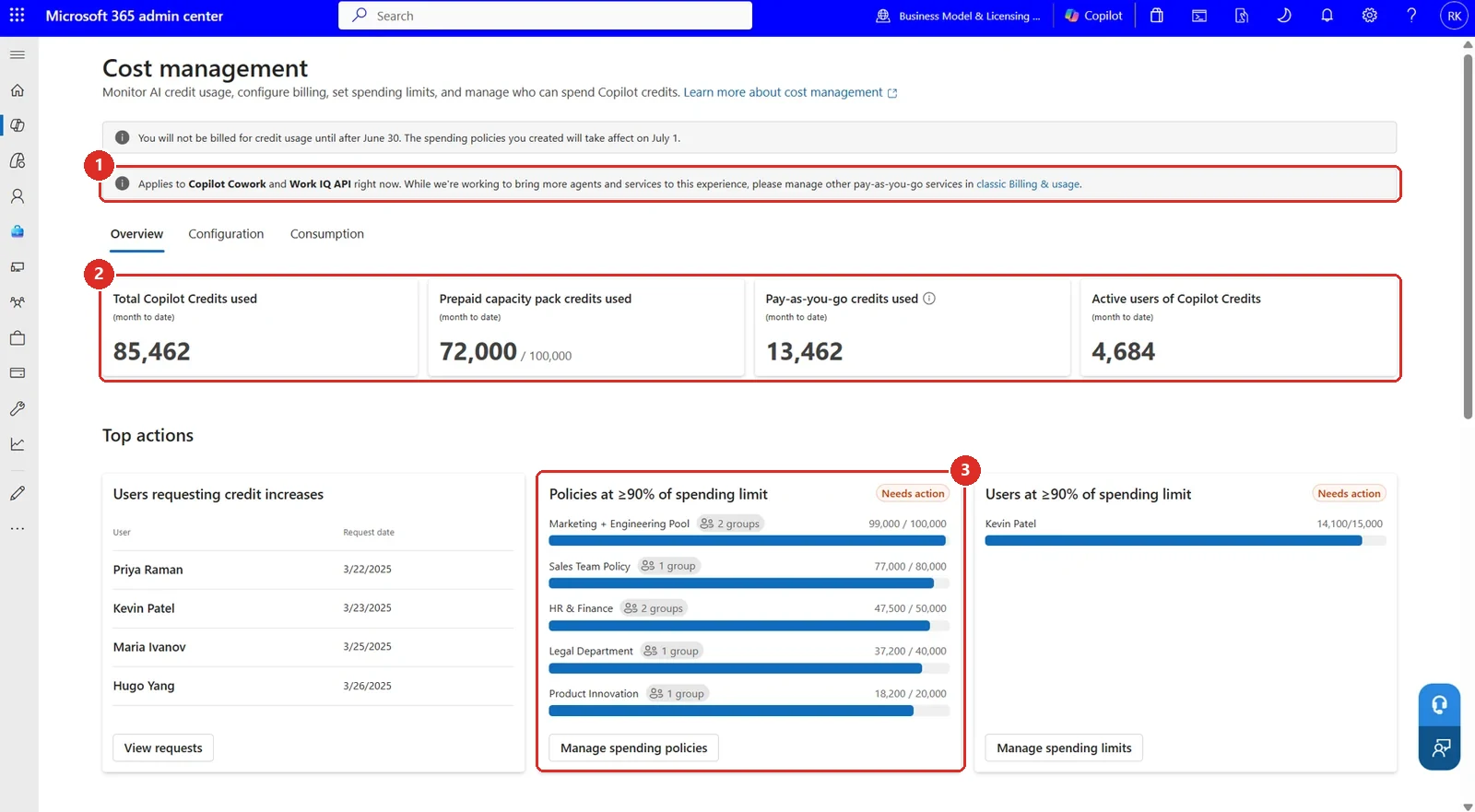
Official Microsoft image from the June roundup, red boxes mine. 1 read this first, the console covers Cowork and the Work IQ API and nothing else yet. 2 prepaid and pay-as-you-go are counted separately. 3 and it will tell you which policies are about to hit their ceiling.
📖 Microsoft’s June 2026 Copilot roundup · Usage-based billing and cost management for Copilot Credits
49. A team-level view of Copilot credit spend
For: Viva Insights · Copilot Analytics · Rolled out June 2026
Copilot Analytics in Viva Insights gained a view of AI spend — Copilot credit usage — at group and team level, rather than only tenant-wide totals. The services in scope are Cowork and the Work IQ API, and it appears both as a dashboard and in Advanced insights.
Access is narrower than “any admin”: Microsoft scopes the dashboard experience to managers with at least five direct reports, alongside Insights Analysts and Global Administrators.
Why this matters: A single tenant-wide credit number tells you almost nothing useful. It cannot tell you whether spend is concentrated in one team doing something genuinely valuable or spread thinly across people experimenting once and never returning. Breaking it down by team is what turns a bill into a decision.
This moved up from my horizon list. My June recap listed it as something you would be able to do, with roadmap 566302 already linked. That entry now reads Launched with general availability given as June 2026, so it has earned a section of its own rather than a line on a watchlist.
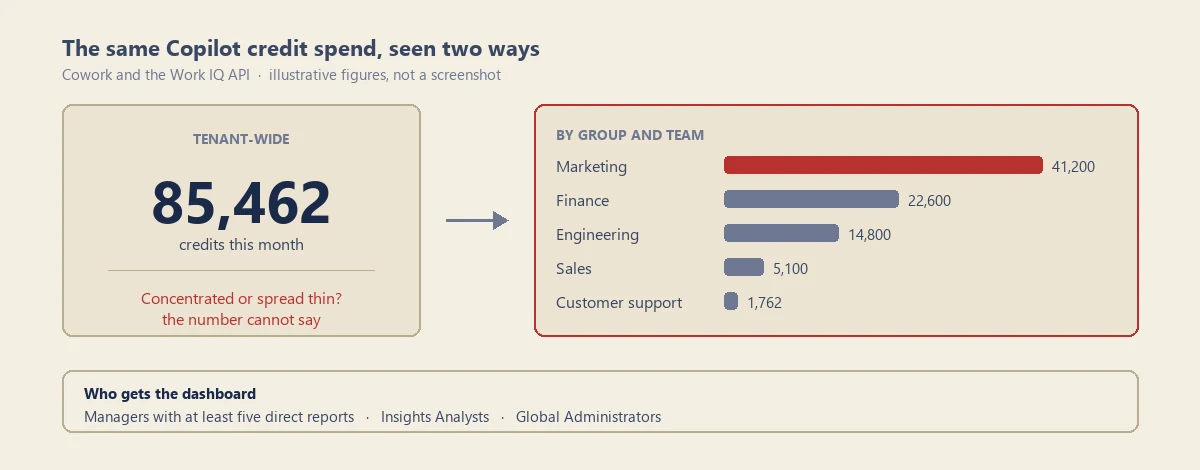
My own diagram of the same spend seen two ways — not a screenshot. The team figures are illustrative; Copilot Analytics is not surfacing team-level credit data in my tenant, and I am not a manager with five direct reports. The red bar is the whole point: a single tenant total cannot tell you it is there.
📖 M365 Roadmap 566302 · Microsoft’s June 2026 Copilot roundup
50. A heatmap showing which sites agents are accessing
For: SharePoint and OneDrive · Agent Access Insights · Rolled out July 2026 · roadmap 565027 still reads In development
Agent Access Insights now includes a heatmap of agent activity across SharePoint sites and OneDrive accounts. You can see how requests are distributed, which sites are busiest, and where activity is concentrated — Microsoft documents a site-level view with up to 20 agents listed per site, not a file-by-file read list.
Getting to it needs a SharePoint admin, plus either SharePoint Advanced Management or Microsoft 365 Copilot licensing.
One thing to plan for before you go looking: without a SharePoint Advanced Management licence you are asked to turn data collection on first. Reports can be generated 24 hours later, and they only contain data from the point collection started — there is no backfill of what your agents did last month. Data is kept for 28 days, reports cover a 1, 7, 14 or 28 day window, and if nobody runs one for three months collection pauses and has to be switched back on.
Why this matters: The honest question every organisation has about agents is "what are they actually touching?" This is the first view that answers it with data rather than assurances.
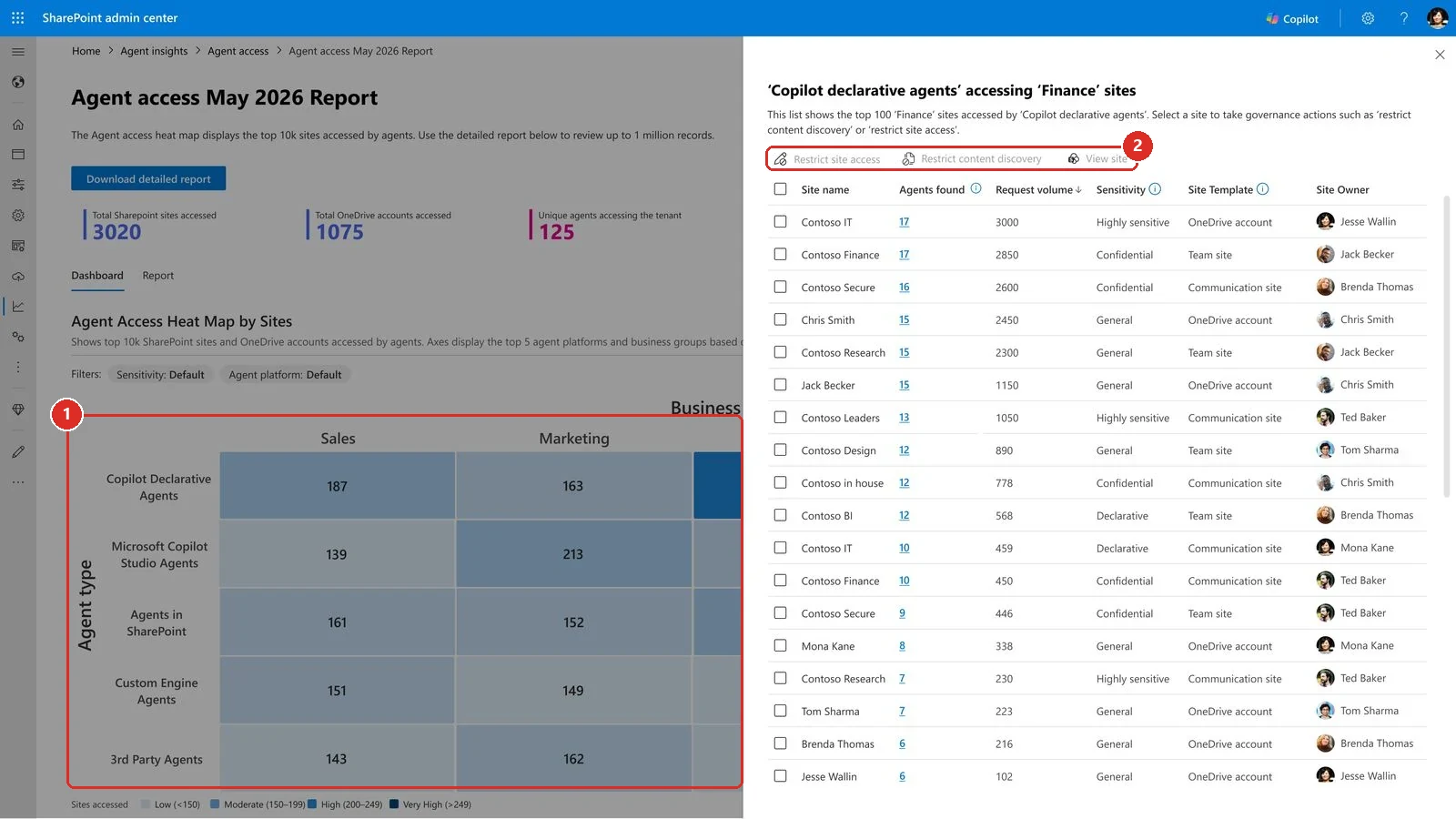
Official Microsoft image from the July roundup, red boxes mine. 1 the heat map itself, agent type down the side against business group across the top. 2 the governance actions you get once you click into a cell, including the Sensitivity column that tells you which of those sites are Highly sensitive.
📖 M365 Roadmap 565027 · Monitor agent access to SharePoint and OneDrive · Microsoft’s July 2026 Copilot roundup
51. An Agent 365 Dashboard lands in Copilot Analytics
For: Copilot Analytics in the Viva Insights web app · Announced July 2026 · roadmap 567667 still lists it in development
The Agent 365 Dashboard gives eligible leaders and analysts a consolidated view of agent activity across the tenant.
Where to find it matters here, because the name sends people the wrong way: it is in Copilot Analytics inside the Viva Insights web app, not a report in the Microsoft 365 admin center. The access bar is higher than “an admin can open it” - Microsoft documents Agent 365 licensing, at least 50 assigned Microsoft 365 Copilot licences, and actual agent activity before the view populates.
Why this matters: Agents multiply quietly. A single dashboard is how you notice that before it becomes a governance conversation you did not choose to have.
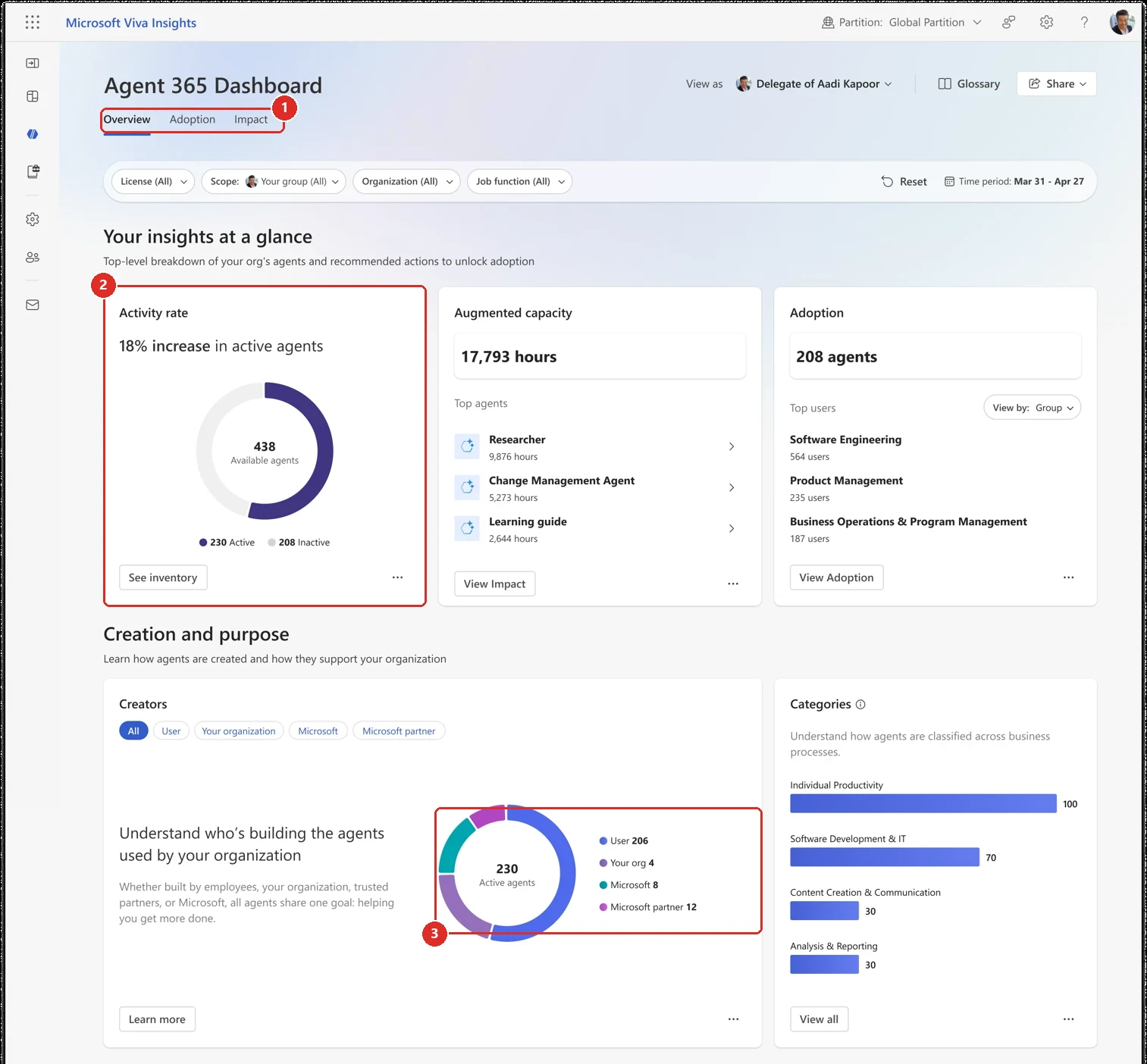
Official Microsoft image from the July roundup, red boxes mine. 1 three tabs, so this is a real reporting surface rather than a single tile. 2 the number worth staring at, 208 of 438 agents sitting inactive. 3 who built them, which is the answer to the question most admins ask first.
📖 M365 Roadmap 567667 · Microsoft’s July 2026 Copilot roundup
52. A usage report for Copilot connectors
For: Microsoft 365 admin center · Public Preview · Rolled out June 2026
A Copilot connectors usage report is available in Public Preview, showing how connectors are being used across the tenant.
Why this matters: Connectors are easy to add and easy to forget. Usage data tells you which ones earned their place and which are just extra surface area.
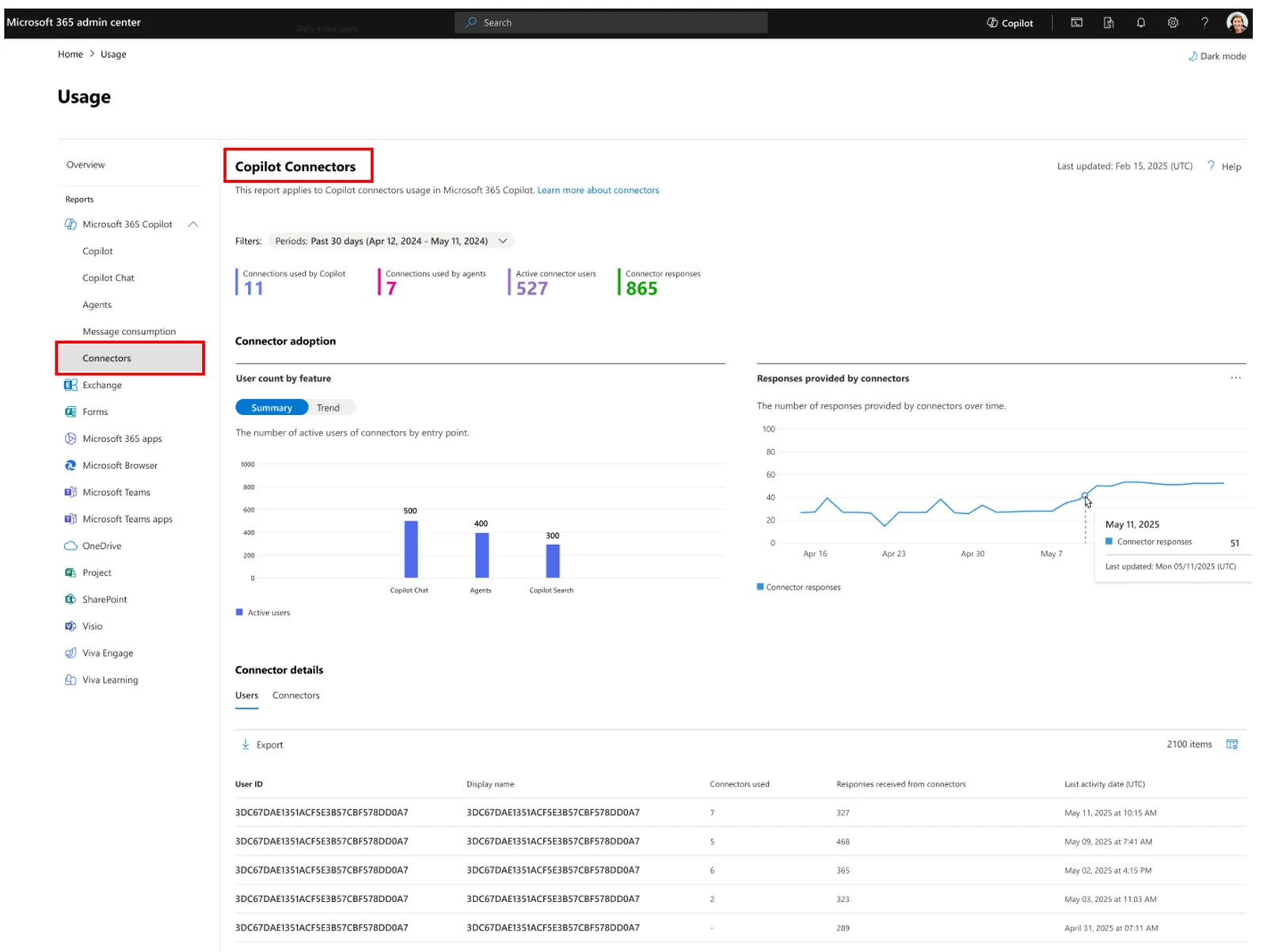
Official Microsoft image from the July roundup. The red boxes here are Microsoft's own, not mine, and they point at where the report lives: Usage, then Connectors under the Copilot reports. Note the split between connections used by Copilot and connections used by agents.
📖 M365 Roadmap 519571 · Microsoft’s July 2026 Copilot roundup
53. The Copilot Chat usage report reaches GCC, GCC High and DoD
For: Microsoft 365 admin center · GCC, GCC High, DoD · Rolled out July 2026 · roadmap 567121 still reads In development
The Microsoft 365 Copilot Chat usage report is now available in GCC, GCC High and DoD tenants, so government customers get the same adoption reporting commercial tenants have.
Why this matters: Adoption reporting is how these programmes get funded and defended. Not having it was a genuine handicap for government admins.
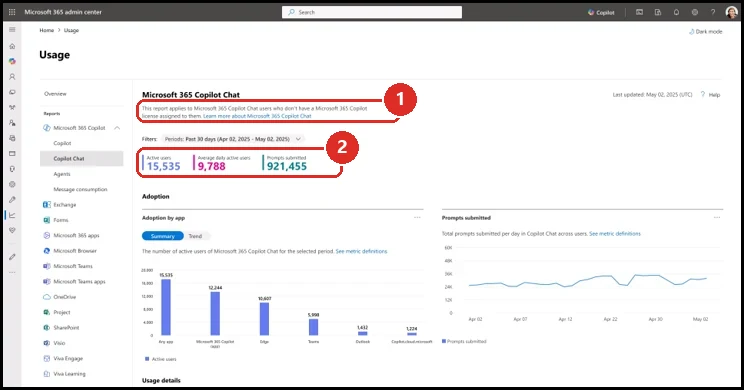
Official Microsoft image from the July roundup, red boxes mine. 1 the bit worth reading twice, this report is about the people who do not have a Copilot licence. 2 the numbers you get for them, including prompt volume.
📖 M365 Roadmap 567121 · Microsoft’s July 2026 Copilot roundup
54. Agent metrics support custom adoption reporting
For: Viva Insights Analysts · Public preview stated for July 2026 · Broader availability stated for September 2026
Microsoft said agent metrics for custom reporting would be available to Insights Analysts. They could combine granular agent usage with organisational context and build reports beyond the predefined dashboards.
The official workbench shows a custom Agent query with metrics such as agent responses generated, Copilot Credits used for agents and returning-agent-user measures over selected time periods.
Why this matters: A fixed dashboard answers the common question. Custom agent metrics let analysts test the question their organisation actually has: which agents are returning value, where adoption is sticking and what usage costs.
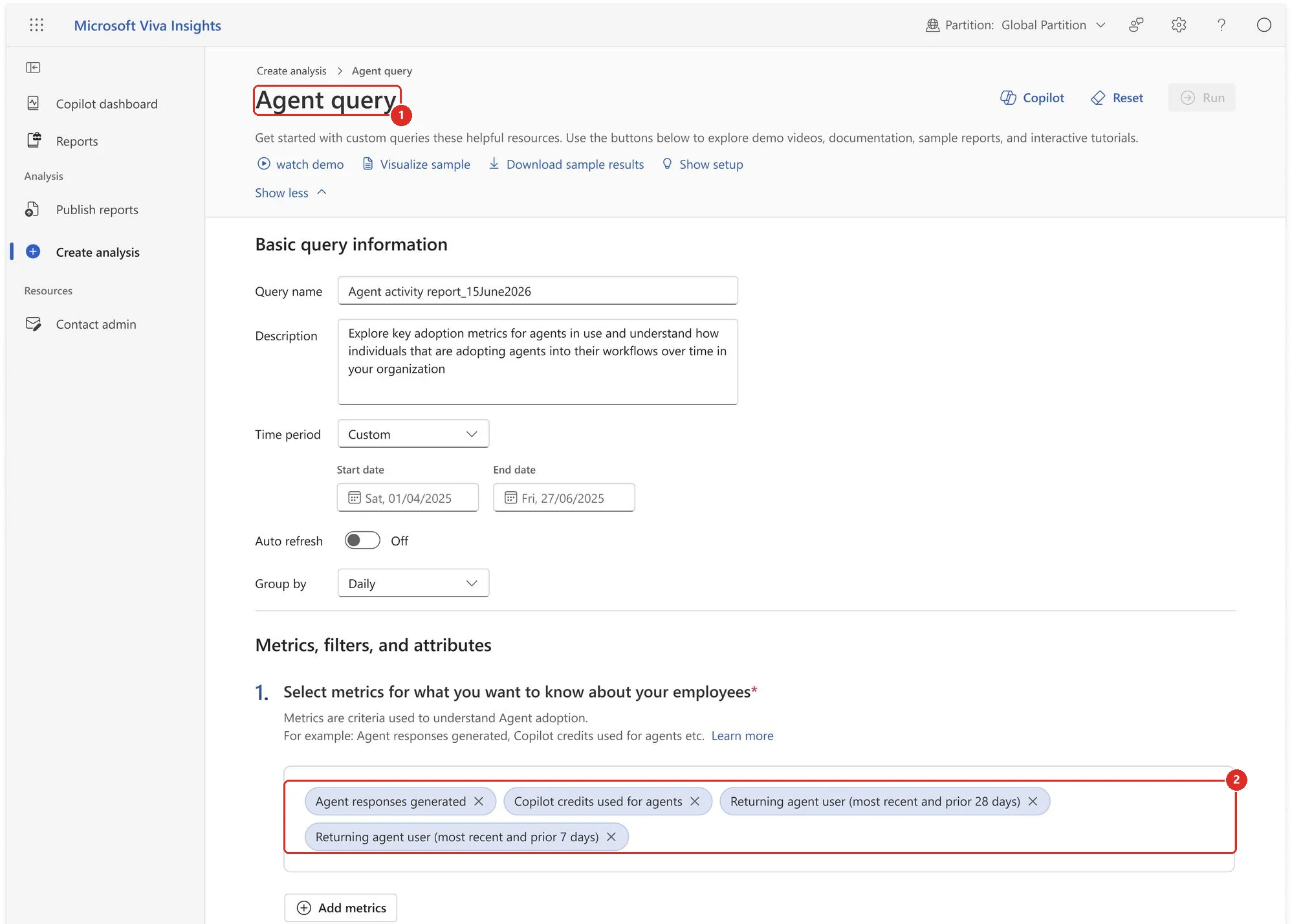
Official Microsoft image from the June roundup, red boxes mine. 1 this is a custom Agent query, not a fixed dashboard · 2 the metrics an analyst picks — agent responses generated, Copilot credits used for agents, and two returning-agent-user measures.
📖 M365 Roadmap 562412 · Microsoft’s June 2026 Copilot roundup
55. Domain exclusion for web grounding was announced, then rolled back
For: Microsoft 365 admin center · Admin control · Announced July 2026 · Withdrawn 4 August 2026
Microsoft announced that admins could exclude specific domains from web grounding, so Copilot would not use those sites when searching the web to answer a question. The announcement stated support for up to 1,000 domains.
On 4 August 2026, Microsoft rolled the feature back. Their update says the capability “has been rolled back at this time” and that they are “actively evaluating next steps”.
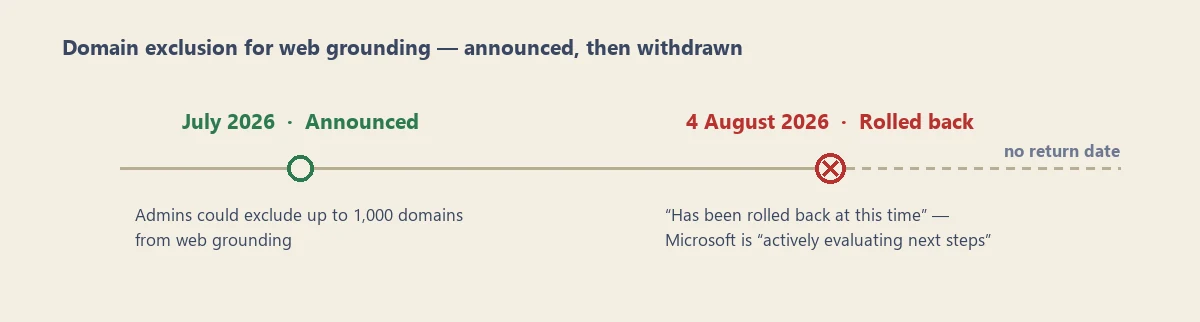
My own timeline of the two announcements — not a screenshot. There is nothing to capture: the setting never reached my tenant, and it is gone from Microsoft's own guidance. The dashed line is the bit that matters.
Do not plan around this. If you read the July roundup and added domain exclusion to a rollout plan or a governance document, take it back out. There is no replacement per-domain allow/block list, and Microsoft has not given a return date. The broad web-grounding setting is back to on or off — though Purview DLP can still block external web search conditionally, when a prompt contains configured sensitive information types, while Copilot keeps answering from permitted internal sources.
Why this matters: This is the honest shape of a fast-moving product. A feature can be announced in an official roundup and withdrawn a fortnight later. It is worth checking that an announced admin control actually exists in your tenant before you build policy on top of it.
📖 M365 Roadmap 503144 · Update: Domain Exclusion for Microsoft 365 Copilot · Microsoft’s July 2026 Copilot roundup
56. Admins can control Copilot Vision screen and camera sharing
For: Microsoft 365 Copilot admin controls · Rolled out June 2026
Admins gained control over whether users can share their screen or camera with Copilot Vision, rather than treating Vision as one all-or-nothing switch.
The panel in Microsoft’s June article shows All users and No users choices for screens and cameras, plus guidance to use policy management when the control needs to apply to a specific group.
Why this matters: Screen and camera input can expose very different kinds of context. Being able to scope Vision lets an organisation decide where it fits their data policy instead of making one blunt decision for every scenario.
Check this one against your own tenant. Microsoft's current documentation describes a single combined Screen and camera sharing setting under Copilot actions, while the June article implied two independently scoped controls. The panel below shows how both can be true at once: one setting carrying that combined name, with screens and cameras chosen separately inside it. What I still cannot confirm is the default state, so check it rather than assume it. Current Learn documentation.
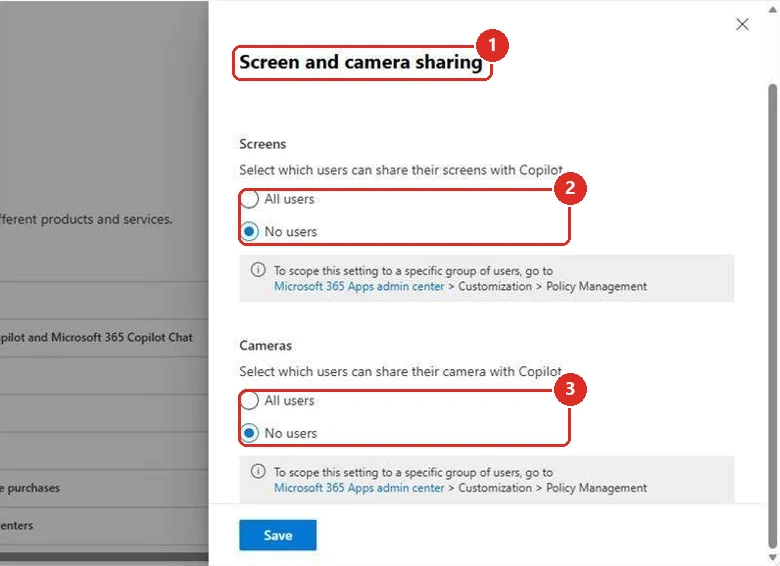
Official Microsoft image from the June roundup, red boxes mine. 1 the panel carries the single combined name that Learn uses · 2 and 3 inside it, screens and cameras are chosen separately. Both descriptions turn out to be true of the same panel.
📖 Microsoft’s June 2026 Copilot roundup
57. Microsoft Purview controls now cover Cowork
For: Microsoft Purview + Copilot Cowork · Rolled out June 2026
Microsoft Purview coverage extended to Cowork interactions. The June roundup listed sensitivity-label inheritance and display, audit logging, DSPM Activity Explorer, Insider Risk Management, eDiscovery, Data Lifecycle Management and Communication Compliance.
The official image shows Cowork interaction records inside DSPM Activity Explorer, with a selected AI Interaction and detailed user, app and response information on the right.
Why this matters: Cowork may act for longer and touch more systems than a normal chat. Extending the same Purview tools gives security and compliance teams a familiar way to see, investigate and govern those interactions.
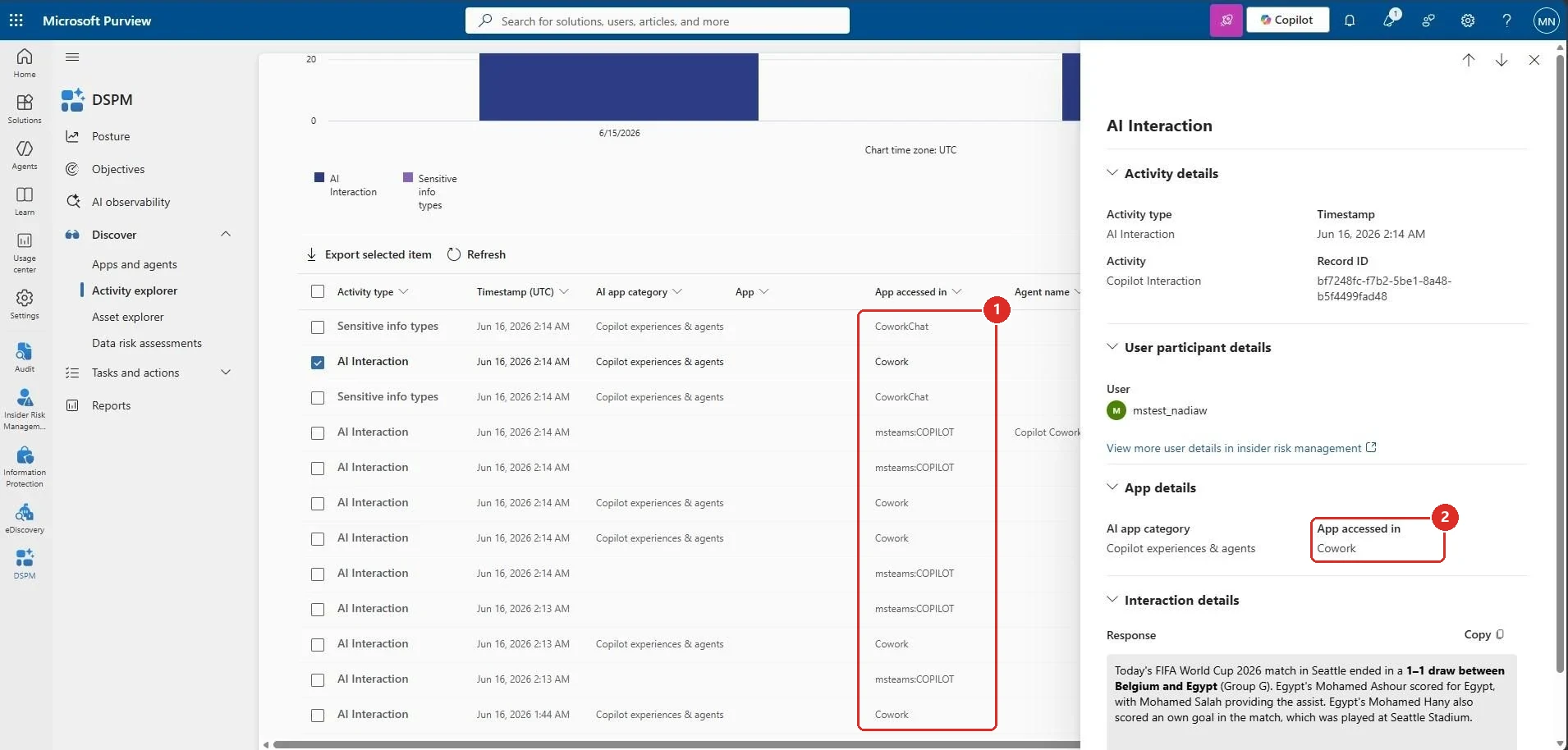
Official Microsoft image from the June roundup, red boxes mine. 1 Cowork and CoworkChat appearing in the App accessed in column · 2 the same value on the selected record, alongside the user, the timestamp and the response text itself.
📖 Microsoft’s June 2026 Copilot roundup
58. Organizational Messages reached hybrid-joined devices
For: Microsoft 365 admin center + Microsoft Entra hybrid-joined devices · Rolled out June 2026
Organizational Messages added support for devices joined to both on-premises Active Directory and Microsoft Entra ID. Admins could extend targeted in-product communications to more users in hybrid identity environments.
Microsoft Learn confirms that hybrid-joined devices are supported, but the public screenshot is a general Organizational Messages landing page rather than evidence of this exact device-support change. Rather than borrow it and let it imply more than it shows, I drew the join states myself.
Why this matters: Adoption messages only work when they reach the actual device estate. Hybrid support closes a practical gap for organisations that have not moved every Windows device to cloud-only join.
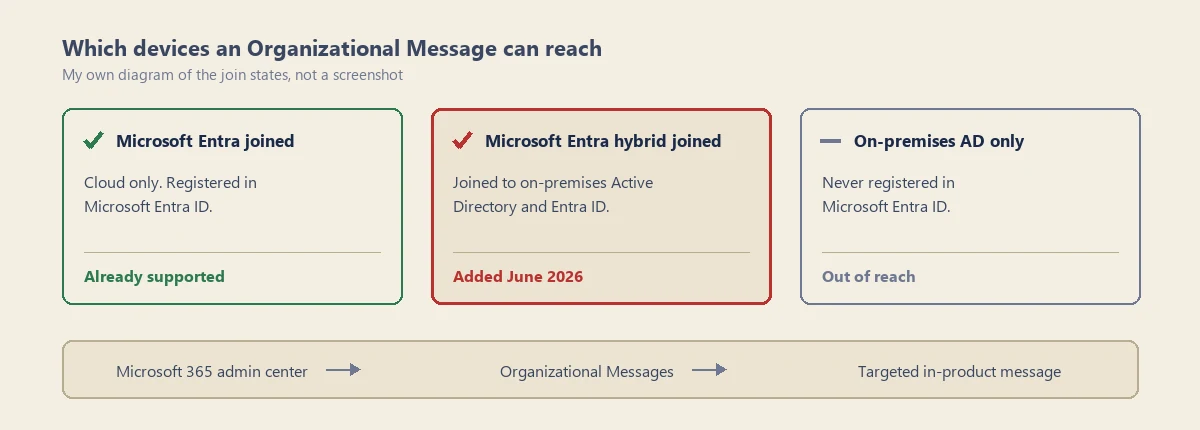
My own diagram of the join states — not a screenshot. The only public image is a general Organizational Messages landing page, which would not show you this change at all. The red card is the one June added.
📖 M365 Roadmap 503564 · Microsoft’s June 2026 Copilot roundup · Organizational Messages in Microsoft 365
59. A Purview DLP control keeps external email out of Copilot
For: Microsoft Purview + Microsoft 365 Copilot and Copilot Chat · Public Preview June 2026 · GA scheduled January 2027
Microsoft Purview gained a Data Loss Prevention control that stops Microsoft 365 Copilot and Copilot Chat using emails from external senders as grounding data. With it on, Copilot excludes those emails from grounding, summarisation and citation, and carries on using your internal Microsoft 365 content where permitted. Microsoft’s June roundup adds that agents built in Copilot Studio and published into Microsoft 365 Copilot are covered too, where they use only Microsoft 365 data. The user’s own access to the email is untouched — this changes only what Copilot is allowed to read.
It is an ordinary DLP rule rather than a switch, so nothing happens until somebody builds it. On screen the condition reads Email is received from → People outside my organization and the action is Restrict Copilot from processing content with Accessing knowledge sources set to Block. Microsoft’s documentation labels the same pair External users and Prevent Copilot from processing content — so the label in the docs is not always the label on the screen.
Two things worth knowing before you pilot it. The rule reads metadata only: it compares the sender’s domain against your tenant’s accepted domains and never inspects the body of the message. And the location is offered only in the Custom policy template, and selecting it switches every other location in that policy off — so this rule ends up living in a policy of its own.
Microsoft’s reason for building it is not the usual data-leak framing. The control, Microsoft’s documentation says, “helps organizations reduce the risk of prompt injection and untrusted data influence.”
Why this matters: most Copilot governance is aimed at stopping your data getting out. This one points the other way — at what gets in. Copilot reads an email from outside your organisation with the same willingness it reads one from your own team, and this is the control that lets you say otherwise.
Preview, and the GA date has moved. Microsoft's June roundup gave general availability as July 2026, with the standing caveat that its dates are "tentative and subject to change". Roadmap 561552 now reads In development, with general availability scheduled for January 2027 — six months later. Policy edits can also take up to four hours to appear in Copilot, so leave a gap between changing something and testing it. Worth piloting and planning around; not yet worth depending on.
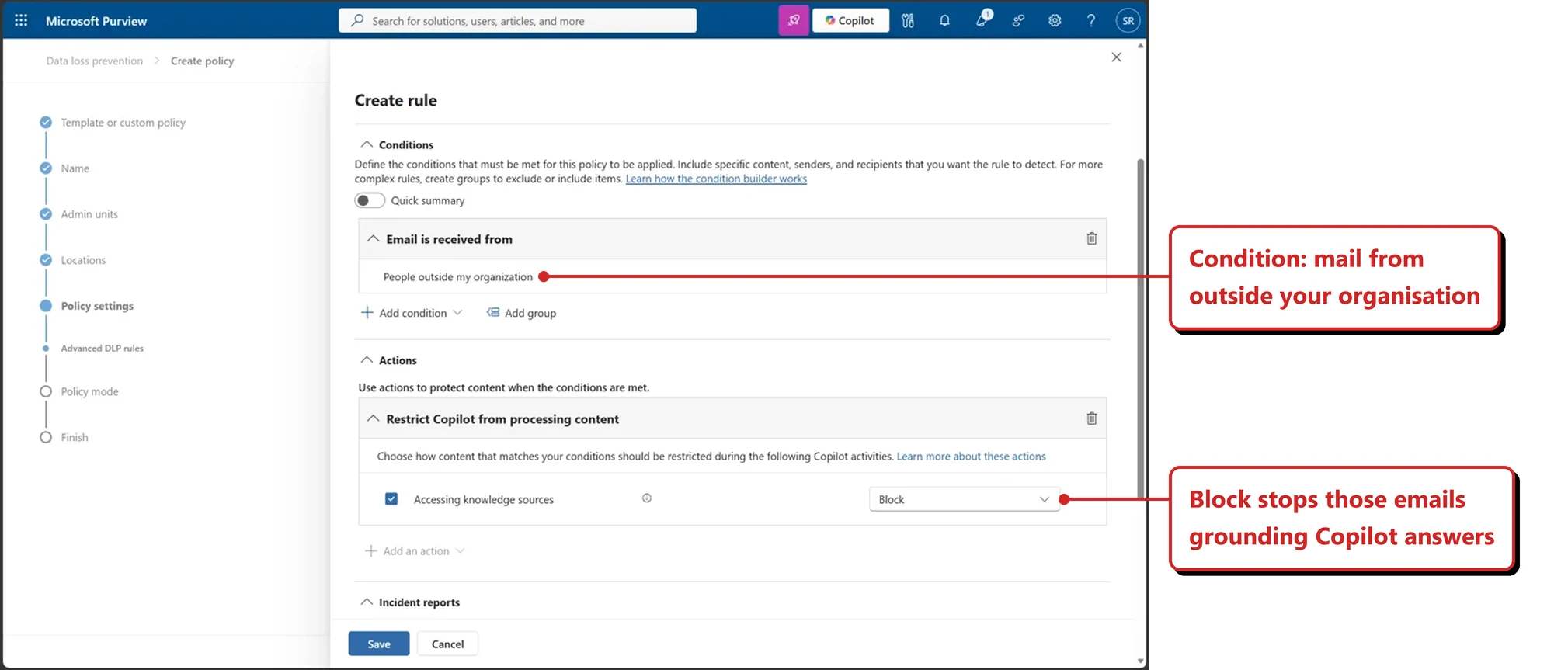
Official Microsoft image from the July roundup, callouts mine — the condition that catches external mail, and the Block action that stops it grounding Copilot answers.
📖 M365 Roadmap 561552 · Microsoft’s June 2026 Copilot roundup · Microsoft’s July 2026 Copilot roundup · Purview DLP for Microsoft 365 Copilot and Copilot Chat
On the horizon — three to watch
Three items from Microsoft’s June roundup are not numbered above. They are not there because I did not miss them — I had already mentioned each one as a future or watchlist item rather than skipping it. All three still carry an In development status on Microsoft’s roadmap, which is why they are here rather than numbered above. Here is what Microsoft’s June article said about each:
- Dataverse grounding in Copilot Chat — public preview in June, general availability in September. Roadmap 560539
- Deep citations — described as a June rollout. My July recap still had it on the horizon list, so the two do not agree. Roadmap 523223
- Suggested edits in Copilot Pages — described as a June rollout. Roadmap 562351
Two items left this list. Outlook emails as Notebook references and the team-level Copilot Credits dashboard both now read Launched on the roadmap, so they have moved up into proper numbered sections above. That is the intended path for everything on this list.
I would rather list these as things to watch than give them a status I cannot currently stand behind. As each one is confirmed, it will get a proper numbered section in a later issue.
How this issue was put together
Microsoft’s own August roundup had not published when this went out. Rather than wait for it, this issue covers everything I could verify from Microsoft’s official July roundup, published on 31 July 2026, and the sources it links to. Each section keeps the month Microsoft stated, so you can tell what is landing now from what landed earlier. Anything Microsoft’s August roundup adds will go into the September issue.
Why some sections are older than August. These go out in the middle of the month, which is usually before Microsoft publishes its own roundup for that month. Every issue therefore misses a few things. Rather than leave the gaps, I run a strict comparison against the previous roundup and fold whatever I missed into the next issue. For this one, comparing against Microsoft’s official June roundup found 29 capabilities I had not materially covered, plus one Cost Management item I had only covered partially and two items I had listed only as things to watch that have since launched — 32 items in total. They keep the rollout date Microsoft stated and are not relabelled as August news. A few have since shipped in July or August, and where that is true the section carries the later date. The three items in the horizon section above appeared only on my watch list, so they are tracked there rather than numbered here. September will work the same way, with anything I miss this month folded in there.
About the roadmap numbers. Where I could match a section to a Microsoft 365 Roadmap entry, the number is linked at the end of that section. Treat it as a pointer to Microsoft’s own record, not as proof of what is live in your tenant — roadmap status lags reality in both directions. Section 55 is the clearest example: its roadmap entry still reads Launched even though Microsoft withdrew the feature on 4 August 2026.
Official Microsoft resources
- Microsoft 365 Copilot release notes
- Microsoft 365 Roadmap
- Microsoft 365 Copilot Blog board
- What’s New in Microsoft 365 Copilot - July 2026
- What’s New in Microsoft 365 Copilot - June 2026
- Update: Domain Exclusion for Microsoft 365 Copilot
Keep reading
- Past recaps: January · February · March · April · May · June · July
- Slide packs: every monthly recap as a free PDF
- Go deeper: Microsoft Scout complete guide · Copilot Cowork complete guide · Work IQ API · Copilot vs Agents vs Copilot Studio · Agent Builder explained